The PYD Life iSmart Sublimation Oven is a versatile device designed for sublimation printing and drying various items. It allows users to print designs onto different materials by applying heat, making it suitable for personal and commercial use.
Function Description:
The iSmart Sublimation Oven is primarily used for heat transfer and sublimation printing. It features independent control over upper and lower heating tubes, allowing for precise temperature adjustments tailored to different materials and printing requirements. The oven also includes a low-temperature mode for drying transfer paper or items that require gentler heat, and a hot air circulation function to ensure uniform temperature distribution inside the oven for consistent results. The device is equipped with a fan for hot air circulation and an oven light for visibility.
Important Technical Specifications:
- Item Number: KX40LB
- Capacity: 40L
- Size: 460 x 360 x 380 mm
- Voltage: AC 110V/220V, 50/60 Hz
- Power: 1600W/2000W
- Temperature Range: 60-230°C
- Temp. Adjusting: Upper and lower heating tubes can be adjusted together or separately.
- Parts: 3 upper tubes, 3 lower tubes, 1 back tube, 1 fan, 1 oven light.
- Heating Modes and Power:
- Upper & Lower Tubes: Default temperature 180°C, range 60-230°C (Double Tube) / 60-200°C (Single Tube). Default time 30 min, range 1 min-2h. Upper Tube 800W, Lower Tube 700W, Back Tube 300W, Hot Air Fan 20W, Oven Light 15W.
- Low Temperature: Default temperature 35°C, range 28-50°C. Default time 60 min, range 10 min-12h.
- Hot Air: Default temperature 180°C, range 60-230°C. Default time 30 min, range 1 min-2h.
Usage Features:
The oven's control panel includes several intuitive features for operation:
- Temp. Knob: Adjusts printing temperature.
- Upper Tube Button: Enters upper tube heating mode.
- Lower Tube Button: Enters lower tube heating mode.
- Time Knob: Adjusts printing time.
- Start/Stop Button: Starts or stops heating.
- Low Temp./Dry Button: Enters low temperature heating mode.
- Hot Air Button: Turns on or off the hot air circulation.
- Light Button: Turns on or off the oven light.
- Indicators: Upper Tube Temp., Lower Tube Temp., Time, Function Indicator, and Preheat Indicator.
Operation Modes:
- Starting: Upon power-on, the screen flashes for 1 second and displays default time and temperature.
- Preheating: Displays "(1)" indicator with no time countdown.
- Working: Displays the set temperature, and time counts down.
- Finishing: Displays the set temperature and flashes "00:00," beeps three times. Press any button to return to standby mode, displaying set values.
Specific Operation Steps:
- Upper & Lower Heating Tube: The default mode is upper and lower tube heating.
- Press "Upper Tube" and turn the temp. knob to adjust the upper tube temperature.
- Press "Lower Tube" and turn the temp. knob to adjust the lower tube temperature.
- Press both "Upper Tube" and "Lower Tube" buttons simultaneously and turn the temp. knob to adjust both tubes.
- Press "Start/Stop" to begin heating.
- Low Temperature: For drying transfer paper or low-temperature printing.
- Press "Low Temperature" to enter low temperature heating mode.
- Turn the time and temp. knobs to adjust settings.
- Hot Air: Circulates hot air for uniform temperature.
- Press "Hot Air" after turning on the oven.
- Turn the time and temp. knobs to adjust settings.
- Press "Start/Stop" to start or stop the hot air fan.
Printing Parameters (Examples):
- Mug: Preheat 7-10 mins, Temp 195°C. Time: 12 mins (1 mug), 15 mins (4 mugs), 20 mins (6 mugs).
- Stainless Steel Bottle: Preheat 7-10 mins, Temp 195°C. Time: 5 mins (1 bottle).
- Enamel Mug: Temp 195°C. Time: 7 mins (2 mugs).
- Aluminum Bottle: Temp 160°C. Time: 7 mins (1 bottle).
- Ceramic Tile: Temp 195°C. Time: 20 mins (1 piece).
Maintenance Features & Safeguards:
- Error Alarm: The oven detects thermal sensor malfunctions within 5 seconds.
- "E1": Upper temperature sensor open or short circuit.
- "E2": Lower temperature sensor open or short circuit.
- "E3": Internal temperature exceeds 280°C.
- In case of error, the load current is cut off, the oven beeps 10 times, and returns to normal operation once the error is repaired.
- Important Safeguard Notes:
- The oven body becomes very hot during operation; wear heat-resistant gloves and use the door handle.
- Avoid electric shock; do not immerse the cord, plug, or any parts of the oven in water. Always unplug after use.
- Never leave the oven unattended.
- Do not place flammable materials (cardboard, plastic, paper, candles, etc.) in or on top of the oven.
- Ensure at least 10cm clearance on all sides and 30cm above for adequate air circulation.
General Notes:
- Working mode cannot be changed while the oven is operating.
- Press "Start/Stop" to stop working and adjust printing time.
- Printing temperature can be adjusted during working.
- Always use the "Hot Air" button for optimal printing results.

 Need help?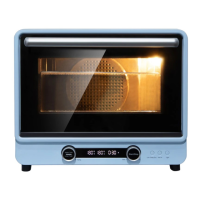

 To Next Page
 General