
 Need help?
Do you have a question about the Pyle Pro PWMKRDJ84BT and is the answer not in the manual?
Features a large magnetic circuit speaker with high sensitivity, penetrating power, and excellent frequency response.
Supports the latest decoding chips for stable MP3 playback from Micro SD cards up to 32GB.
Offers high-quality digital FM radio with automatic channel search and storage for up to 60 channels.
Provides a 3.5mm AUX audio input for connecting various sound sources.
Includes a built-in high-capacity battery for up to 2 hours of consecutive playback.
Allows microphone connection with adjustable reverberation for karaoke performance.
Features battery protection and human-oriented low battery/recharging indicators.
Offers audio outputs and the capability to record FM radio or AUX sources.
Supports microphone input recording for personal business use.
Features Bluetooth functionality for wireless audio streaming.
Connect a storage device and enter AUX mode to start recording. Ensure proper input signal strength.
Connect storage, enter FM mode, select station, and record. Optimize location for best signal.
Connect storage, press RECORD. Tune ECHO knob to minimum and position mic away from speaker.
Turn on, enter Bluetooth mode (display shows 'BLUE'), scan, and pair with 'PyleUSA' using password '0000'.
After successful pairing, play music and audio files from your connected device.
Controls for Play/Pause (►II), Previous Track (◄◄), Next Track (►►►), and playback sequencing modes.
Buttons for toggling modes (USB/SD, FM), input selection, and recording/deletion.
Knobs for adjusting Bass, Treble, and Microphone Volume for customized sound.
Includes Microphone Input, MIC PRIORITY function, and EQ for environment sound switching.
Ports for USB, Micro SD Card, AUX Input, and Headphone/MIC.
Details on Power Switch, DC 12V Recharging Port, and Recharging Indicator Light.
Instructions for using the remote control buttons like Power, Volume, Track selection, and Mode.
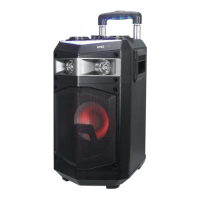
The PylePro PWMKRDJ84BT is an active PA wireless BT streaming loudspeaker, designed as a portable stereo speaker system with karaoke microphone talkover, MP3/USB/Micro SD, and FM radio functionalities.
The device features an ultra-large magnetic circuit, high-sensitivity speaker, providing powerful low-frequency shock and clear medium/high-frequency representation. It incorporates the latest decoding chips, supporting stable playback of MP3 files from Micro SD Memory Cards up to 32GB. For radio enthusiasts, it offers high-quality digital FM radio reception with automatic channel search and storage for up to 60 channels. Connectivity is versatile, with a 3.5mm AUX audio input for various sound sources.
A key feature is its ability to connect a microphone, offering adjustable reverberation, voice, and karaoke functions for enhanced performance. The device also supports recording, allowing users to capture their favorite FM radio stations or other AUX sound sources. Additionally, it facilitates microphone input recording, serving as a personal business assistant. Bluetooth functionality is integrated for wireless audio streaming.
The PWMKRDJ84BT is designed for user-friendly operation. It includes a master volume control for regulating output in MP3, FM, and AUX modes. The Micro SD Memory Card slot and USB port allow for direct playback of MP3 audio files from storage devices up to 32GB (FAT32).
Navigation through tracks and radio channels is intuitive with dedicated buttons. In FM receiving mode, users can short press to select previous or next channels after a full station search. For USB/Micro SD Memory Card playback, short press to play/pause, or press and hold for 5 seconds to select one of four playback sequencing modes: "All" (play all tracks in sequence), "ONE" (repeat one track), "RAND" (play in random), or "FOL" (repeat all tracks in a folder). In FM radio status, pressing and holding for 5 seconds executes a full search, saving all found stations even after power off. In AUX input/FM radio status, a short press toggles between mute and normal volume.
The "Mode/SHIFT" button allows toggling between USB/Micro SD Memory Card and FM receiving modes with a short press, and between recording folder and MP3 folder with a long press. The "Recording/DEL" button enables recording (requiring a USB/Micro SD Memory Card) and allows deletion of recorded files with a press and hold. Recording is available in AUX or FM mode.
For audio customization, the device includes a "BASS" control knob and an "EQ" button for environment switching, offering modes like Square, Meeting, Home, Hall, and Personal during USB/Micro SD Memory Card playback. A "MIC VOL+" knob controls microphone volume, and "-ECHO+" adjusts reverberation. A "MIC PRIORITY" key is also available.
The device features an "EAR MIC" port for headphones or microphones. It also includes a flash light switch for controlling the DJ party lights.
Remote control operation further enhances usability. The remote offers a power button for standby and resume, dedicated buttons for previous track/channel, play/pause, and next track/channel, and a "Mode" button for switching functions. Volume up/down keys are available, along with numeric keys (0-9) for direct track or channel selection. An "Environment Key" mirrors the EQ function, and a "Sequencing Key" allows selection of playback modes. A mute button is also present.
The PWMKRDJ84BT is equipped with a built-in high-capacity battery, providing up to 2 hours of consecutive playback. The battery includes built-in recharging protection to ensure a long and stable service life. The device features indications for low battery and full recharging, making it human-oriented in its use. When the charger is connected, a red light turns on, indicating charging. Once fully charged, a blue light illuminates. The DC 12V recharging port facilitates easy power replenishment.
 General
| Microphone | Yes |
|---|---|
| Impedance | 4 Ohm |
| USB Support | Yes |
| Digital Audio File Compatibility | MP3, WMA |
| Maximum SD Card Support | 32GB |
| Sensitivity | 90 dB |
| Speaker Type | 2-Way |
| Bluetooth | Yes |
| Speaker Size | 8 inch |
| Inputs | XLR, 1/4", RCA, USB, SD Card |
| Wireless Range | 30 ft |
| Power Supply | 110/220V |
| Tweeter | 1 inch |
| Woofer Size | 8 inch |

 To Next Page