Need help?
Do you have a question about the Pyle PKSCRD308 and is the answer not in the manual?
Input for dynamic microphones.
Input for condenser microphones.
Headphone input with microphone.
For mobile podcasting.
Music accompaniment input.
Audio output for earphone or speaker.
Power input/Computer data jack for live broadcasting.
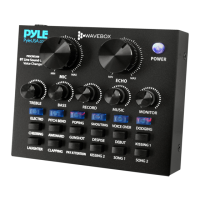
Controls the microphone volume.
Controls the bass of the microphone.
Controls the alto of the microphone.
Controls the treble of the microphone.
Controls input volume of computer or OTG.
Controls output volume for mobile live broadcasting.
Controls volume of Wireless BT or accompaniment music.
Controls the level of ECHO.
Shows the energy of the battery.
Shows the level of input accompaniment music.
Shows the level of the monitor headphone.
Press and hold to turn the unit ON/OFF.
Press and hold to turn Wireless BT function ON/OFF.
Makes a repeat sound.
Reduces microphone pick-up noise.
Reduces accompaniment music volume when speaking.
Removes human voice, keeps background music.
12 electrophonic tones. Press to change mode.
3 different voices (Female, Male, Child). Press to change.
Karaoke mode for voice enhancement.
Retains original voice without effects.
For PC live broadcasting, eliminates echo noise.
Eliminates echo noise for audience and self during singing.
Features ambient music and character sounds.
Controls monitor earphone/speaker output volume.
Secure microphone holder to tripod stand.
Attach condenser microphone to holder.
Connect XLR cable to microphone.
Connect 3.5mm to MIC 2 jack.
Place wind screen sponge on microphone.
Overview of all input/output jacks and their uses.
Use Type-C to USB cable for PC live broadcasting.
Connect various music sources like MP3, smartphones, computers.
Check VOLUME and SOLO settings if no microphone sound is heard.
Highlights external sound card features like metal housing, DSP noise reduction, and BT streaming.
Details condenser microphone benefits for studio and broadcast use.
Lists material, element, polar pattern, frequency response, and sensitivity.
Lists all items included in the box with the sound card.
Provides electrical and physical specifications of the device.
 General
| Model | PKSCRD308 |
|---|---|
| Category | Sound Card |
| Connectivity Technology | USB |
| Channels | 2 |
| Sample Rate | 48 kHz |
| Bit Depth | 16-Bit |
| Microphone Input | Yes |
| Headphone Output | Yes |
| Input Channels | 2 |
| Output Channels | 2 |
| Phantom Power | Yes |
| Driver | ASIO |
| Compatibility | Windows, Mac OS |
| Audio Interface | USB |
| Power Supply | USB Bus Power |

 To Next Page