Introduction……………………………………………………………7
Accessories list……………………………………………………7
General function…………………………………………………8-9
Charging your device………………………………………………9
Pairing to a computer and Entertainment…… …………… …10
Pairing to Mobile phone or other device……… ………………10
Warning………………………………………………………………11
Technical specification……………………………………………11
FAQ…………………………………………………………………11
Safety Rules………………………………………………………12
Service and Support………………………………………………12
Protection to Fix Card………………………………………13-14
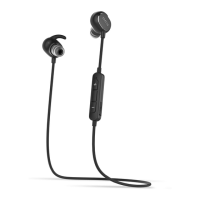
Congratulations, and thank you for choosing the Sport Bluetooth Stereo
Earphone. This manual will help you operate the Sport Bluetooth Stereo
Earphone, but you should first familiarize yourself with the Bluetooth
functionality of your mobile phone or other devices before using the Sport
Bluetooth Stereo Earphone Safety Rules.
1.Please follow the rules depicted in this manual closely to ensure your
safety. Before using this Sport Bluetooth Stereo Earphone, we would
strongly encourage you to read through this user manual.
2.Be more wary of any edges, uneven surfaces, metal parts, accessories
and its packaging so as to prevent any possible injury or damage.
3.Do not modify, repair or dismantle this Bluetooth Stereo Earphone. Doing
so may result in fires, electric shocks, complete breakdown of this Sport
Bluetooth Stereo Earphone, etc. All of which, are not covered under
warranty.
4.Do not use any diluents or volatile liquid to clean the Sport Bluetooth Stereo
Earphone.
5.Do not use the Sport Bluetooth Stereo Earphone in a hazardous location.
Power On:Press the“ ”button for 3 seconds when the device is off ,
(blue LED slowly flashes and a “power on” voice beep).
Enter the pairing mode: In power off mode, press the“ ”button to
power on the device and then sequentially hold on for 5 seconds.(blue LED
and red LED quickly flash alternately with “pairing” voice).
Pairing: Use a Bluetooth function mobile phone or other Bluetooth Master
device and to perform pairing action (detail refer to the chapter about pairing).
Play/pause:Press“ ” to play when the device is pausing and press
“ ”to pause when the device is playing.
Volume up:Press “+”is for volume up.
Volume down:Press “-”is for volume down.
Playback/Previous:Press “-” 1 second is for previous music, press
“+” 1 second is for the next music.
Power off: Press the“ ”button for 3 seconds when the device is off( a
“power off ”voice beep and all LED is off).
Low battery warning:( a “battery low” voice beep and the red LED flash)
Charging : Charging via USB charging cable connected to a computer USB
port (red LED is on) .
Answer call: Press the“ ”button once while the call is coming .
End call: Press the“ ”button once to end call .
Transfer call voice: Press the“ ” button for 2 second to transfer the
call voice between the mobile phone and device.
Reject call: Double press the“ ”button to reject call when the call is
ringing.
Connect two mobiles simultaneously: press the“ ”button for 3
seconds to power on the device, then keep on press the“ ”button for 5
seconds to come into pairing mode. Find the name of device on two mobile
phones ,then press the name for pairing and connecting.
Connecting successfully: when there is a call from the first mobile phone,
press to receive the call. At that time, there is a call from the second mobile
phone, press the“ ”button once to hold the call of the first mobile
phone, and receive the call from the second mobile phone.
Transfer calls between two mobile phones: Double press the“ ”button
can transfer the calls between two mobile phones.
Replay the phone: In stand-by mode or playing music, double press
the“ ”button
Mute: When talking, double press the“ ”button to activate the function
Default setting: Charging it and press the“ ”button for 3-5 seconds,
the purple LED flash 3 times.
Turn off the Voice Notification: Entering the pairing mode, press “-” for
3 seconds, the red LED flash 3 times.
Turn on the Voice Notification: Entering the pairing mode, press “+” for
3 seconds, the blue LED flash 3 times.
1.Connect the charger to the charging socket on the headset.
2. During charging, the indicator light will turn red.
3. When the headset is fully charged, the red indicator light changes to blue.
Unplug the charger from the headset.
Use only QCY approved chargers, Unauthorized or Non-QCY chargers
could cause damage to the headset, it could also invalidate any warranty on
the product.
Repeatedly charging and discharging of the headset, over time will cause the
battery performance to diminish, This is normal for all rechargeable batteries.
Catalogue Introduction General Functions
Charging your device
Accessories List
7 8 9
1. lf there is no Bluetooth function supported by your computer, a Bluetooth
adapter is necessary. Fix the adapter with your computer and ensure its
Bluetooth function is activated.
2. Turn on the device go to the paring mode.
3.Open the Bluetooth software (such as BlueSoleil) installed on your
computer, and select search your Bluetooth devices function. Refer to user
manual of the Bluetooth software for more information.
4.After a few seconds, the device name will be listed. Select the device name
icon and click right button of mouse to select pairing item, then select to
connect with audio device.
5. Open your media player to play music, watch TV/movie and play game,
then you can hear all the sound or music from the device.
You Must select a qualified charger .from a regular manufacturer .
You Must charge the bluetooth headphone If it has been not used for more
than 12 momths .
Warranty Period:
12 months from the date you purchase.
Free Service:
During the warranty period,if there is any breakdown which
caused by the product‘s own quality,pls contact your dealer
by this warranty card and purchasing invoice to enjoy free
maintenance.
Free maintain won’t be given under the following
circumstance:
1.No Protection to Fix Card or the product repair labels is
damage
2. The damage caused by the dismantle movement of a
non-our-company authorized maintainer.
3 .The damage due to water or drop and machinery caused
by human.
4. The breakdown and the damage caused by the Force
majeure.
Customer service information:
qy7@photron.in
1800222239
Bluetooth Specification:4.1+EDR
Bluetooth Profile: HFP1.6,HSP1.2,AVRCP1.4,A2DP1.2
RF Range:10m
Noise reduction:CVC6.0
Stand-by time: about 175 hours
Calculating Conversation Time: about 5 hours
Charging time: About 2 hours
Dimension (L×W×H):40×24×32mm
Weight : 16.4g
Q: Why can not turn the headset on?
A: Make sure your device is fully charged before using it for the first time.
Your device can not be turned on if battery level is very low.
Q: There is no sound when playback?
A: Check the connection between your device with phone or computer, if the
connection is not established, please reconnect again. And adjust the
volume level to a suitable level.
Q: Phone or computer can't find your device?
A: Check the Bluetooth is "visible" in your phone or computer, if pair timeout,
pairing mode will exit, please re-enter pairing mode. If your phone application
have some problems, please re-start the phone. If your device has problem,
re-start or reset it.
lf your device is not performing as it should, please take it to
your local service providers or dealer for service.
Pairing means unique and encrypted wireless connection between two
Bluetooth devices when they agree to communicate with each other.
In pairing mode, two devices should be placed close enough to each other.
Pairing to a phone and Entertainment:
1. Activate the Bluetooth feature on your phone and search for the Bluetooth
headset . (see your phone’s user manual)
2.Turn on your device go to the paring mode.
3.Select the headset from the list of devices found by your phone.
4.If requested enter the Bluetooth PIN 0000(4 zeros)to pair and connect the
headset to your phone.
5.Your phone will confirm the pairing, and then press Yes/Ok.
6.Select to connect with device from your phone. You can play music, watch
TV/movie and play game with your phone, then you can hear all the sound
or music from the device. Also you can control the player by operating the
device. Example, volume level and next music.
Pairing to a computer and Entertainment:
Warning:
FAQ
Service and Support
1)Never disassemble or modify your headset for any reason.
Doing this may cause the headset to malfunction or become
combustible. These damage to your device can void your
manufacturer's warranty.
2)Do not allow your device to get wet, liquids can cause
serious damage. Water damage to your device can void your
manufacturer's warranty.
3)Avoid exposing your device to very cold or very hot
temperatures(below 0℃ or above 45℃). Extreme
temperatures can cause the deformation of the device and
reduce the charging capacity and life of your device.
4)Avoid using your device's light close to the eyes of children
or animals.
5)Do not use the device during a thunderstorm.
Thunderstorms can cause the device to malfunction and
increase the risk of electric shock.
Safety Rules
Technical specification
Protection to Fix Card
Pairing to Mobile phone or other device:
10 11 12 13 14
BLUETOOTH
4.1
USER MANUAL
QY7
BLUETOOTH HEADSET
USER MANUAL
Model number:QY7 Version: Bluetooth V4.1
1X QY7 Sport Bluetooth Stereo Earphone 1X USB Charger Cable
6X ear rubber(The bluetooth earphone is with middle size ear rubbers and
ear hooks)
6X ear hook(The bluetooth earphone is with middle size ear rubbers and
ear hooks)

 Need help?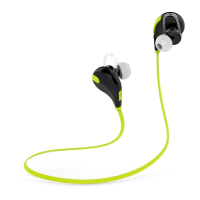

 To Next Page
 General