Page 12 of 29
Remote Transmitter Controls
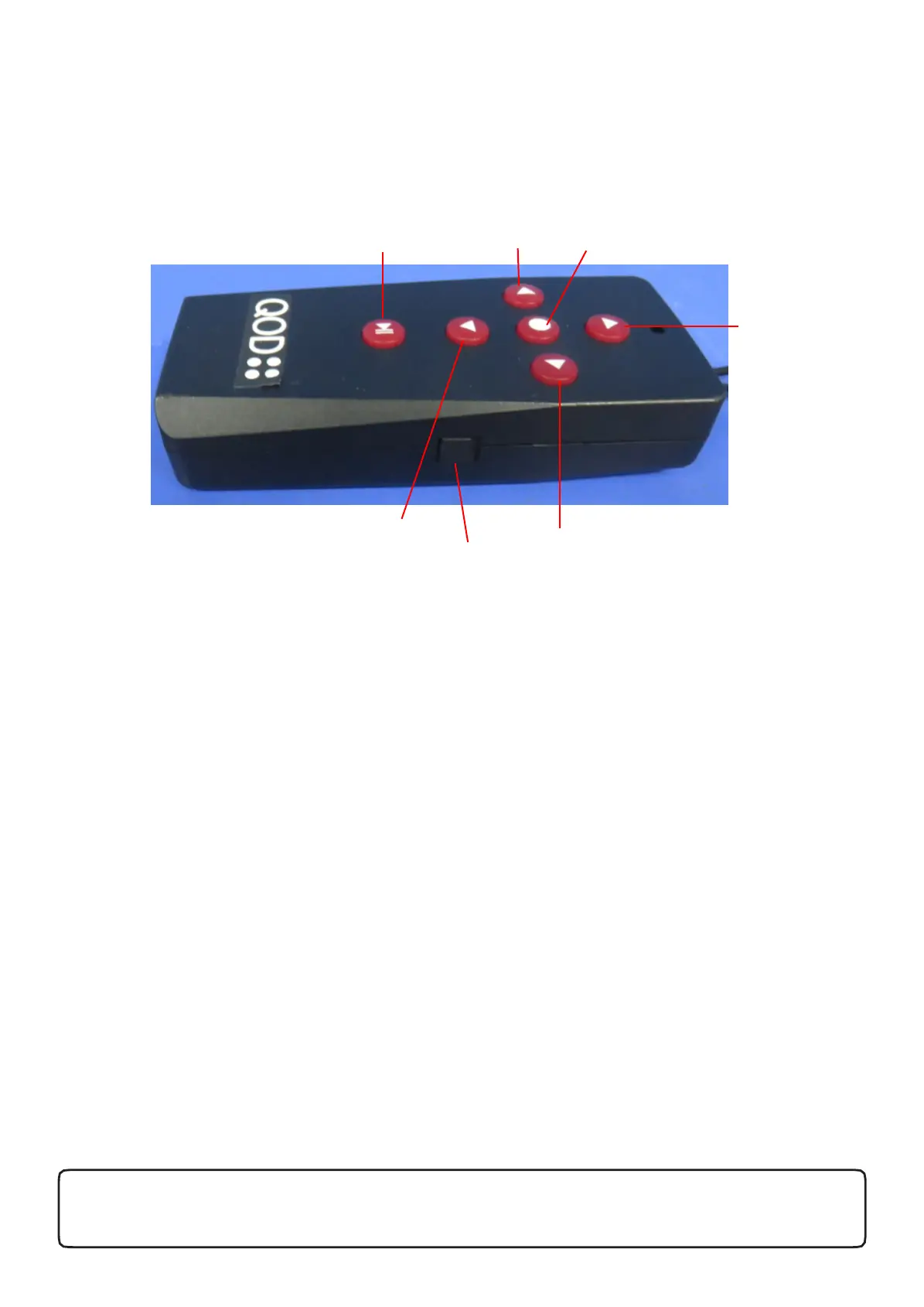
Functions
• Stop Button : The red button in the middle of the directional arrows is the stop button –
pressing this will stop the cart regardless of the direction of travel
• ON/OFF Switch: Located on the right side of the remote for turning remote on and off. (UP=
ON & DWN = Off)
• Timer: 10, 20, 30 metres, Stop (same as manual control timer function)
• Forward Arrow: Pushing the forward arrow will set the cart in forward motion. – 5 Speed
and speed can be adjusted to slower with Backward Arrow
• Left Arrow: initiates left turns. When the arrows are released the cart stops turning and
continues straight with the original speed prior to turning.
• Right Arrow: same as left arrow function
• Backward Arrow: Pressing the back arrow will set the cart in backward motion - 5 Speed
and speed can be adjusted to slower with Forward Arrow
QOD Golf International. www.qodgolf.com
Warning: Product Patent Protected, Design Protected, Copyright Protected. All rights Reserved
Forward
Backward
Left
Right
Stop
Timer
On/Off


 To Next Page