www.avsl.com 151.605UK User Manual
Placement:
• Use the included mounting bracket to fix to a stand or lighting truss
• Use secondary safety fixings if mounting overhead
• Keep away from damp or dusty environments
• Ensure adequate air-flow around the fixture housings
• Ensure adequate access to controls and connections
Cleaning:
• Use a soft cloth with a neutral detergent to clean the casing as required
• Use a vacuum cleaner to clear ventilation grilles of any dust or debris build-ups
• Do not use strong solvents for cleaning the unit
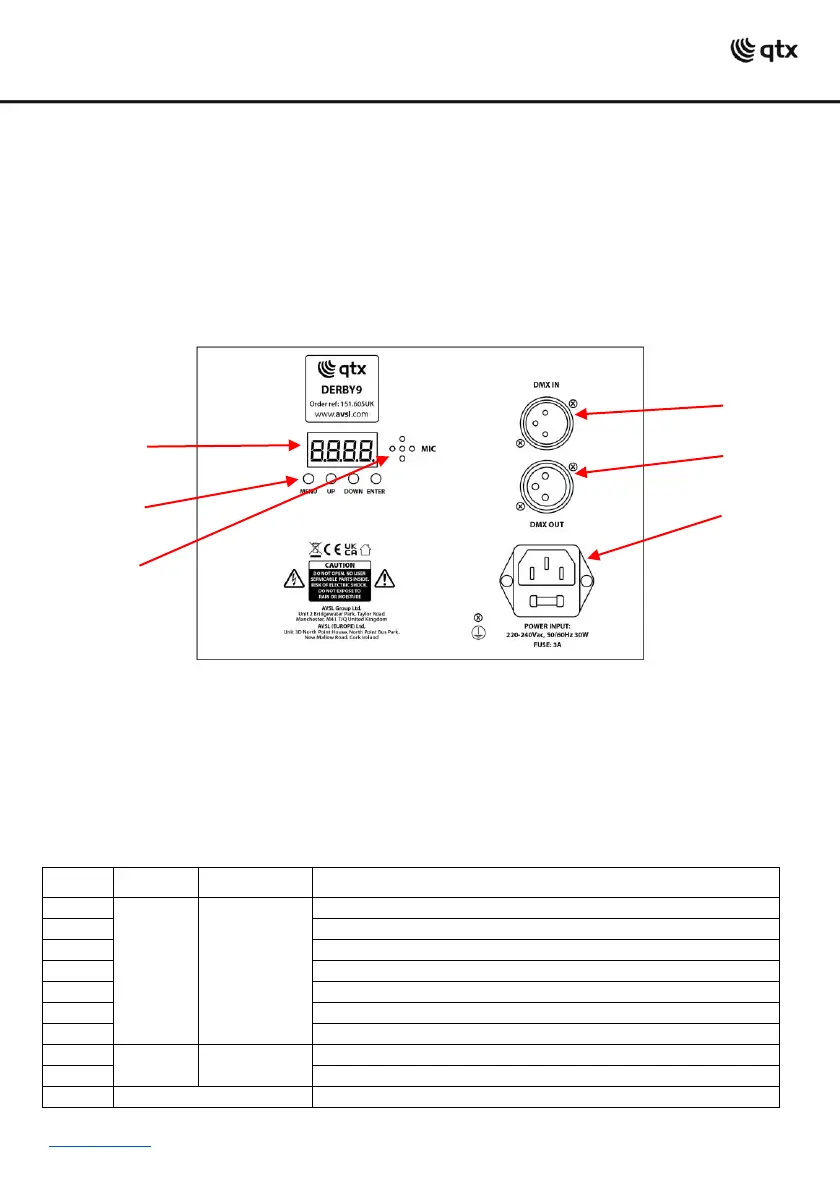
Rear panel controls:
1. LCD display
2. Manual control buttons
3. Microphone
4. DMX input
5. DMX output
6. IEC mains socket
Manual control menu:
Press the “MENU” button to enter the settings menu.
Press “UP” and “DOWN” buttons to navigate through various setting functions.
Press “ENTER” button to save the desired setting.


 To Next Page
 Loading...