Need help?
Do you have a question about the Qtx KAD-2BT and is the answer not in the manual?
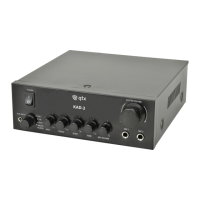
The QTX KAD-2BT is a compact Class D digital stereo amplifier designed for both domestic and commercial use. It offers a powerful 55W maximum output per channel and features a versatile set of inputs and controls, making it a multipurpose audio solution.
The primary function of the KAD-2BT is to amplify audio signals from various sources and deliver them to speakers. It integrates a built-in media player that supports MP3 playback from SD cards and USB memory sticks, an FM radio tuner, and Bluetooth connectivity for wireless audio streaming. Additionally, it includes two microphone inputs with independent level control, tone adjustment, and an echo effect, making it suitable for public address, karaoke, or vocal performances.
The amplifier is powered by a 230Vac, 50Hz (IEC) mains input. A power switch on the front panel controls the unit's power. Input selection is managed via a rotary selector, allowing users to switch between various audio sources. Available inputs include a 3.5mm jack auxiliary input, RCA stereo line inputs (CD, LINE, AUX), and the integrated media player. An input display indicates the currently selected source.
The KAD-2BT provides comprehensive audio control. A large master volume control adjusts the overall output level. Separate rotary controls are available for adjusting the bass and treble levels of the input audio, allowing users to tailor the sound to their preference.
Two 6.3mm jack microphone inputs are located on the front panel. Each microphone input has its own level control (MIC VOLUME), enabling independent adjustment of microphone loudness. An ECHO effect control allows users to add reverberation to the microphone audio, while a TONE control provides further adjustment of the microphone's sound characteristics.
The integrated media player is a key feature, offering three modes: MP3 player, FM radio, and Bluetooth receiver.
Speakers are connected via spring clip terminals on the rear panel. It is crucial to ensure correct polarity (positive to positive, negative to negative) for optimal stereo output. The amplifier is capable of driving speakers with an impedance range of 4-16Ω. For multiple speakers per channel, they can be wired in parallel or series, and the total impedance should remain within the specified range.
Before installation, it is essential to ensure the power is switched off and the mains plug is disconnected to prevent damage. Speakers should be wired correctly, and audio input signals (left and right) should be connected to the appropriate RCA connectors. After all connections are made, the IEC plug can be inserted, and the unit connected to the mains. Always ensure the master volume is set to its lowest point before switching on to avoid power surge damage to the unit or speakers. The volume can then be adjusted to a suitable listening level.
The manual provides a comprehensive troubleshooting guide to address common issues:
The device should be handled with care. It is classified as Electrical or Electronic equipment and should be disposed of according to local council guidelines, not with household or commercial waste. This emphasizes responsible end-of-life management. The manual also notes that errors and omissions are excepted, indicating that users should refer to the latest information or contact support if needed.
 General
| Power Supply | 230V AC, 50Hz |
|---|---|
| Inputs | 2 x RCA, 1 x 3.5mm jack |
| Frequency Response | 20Hz - 20kHz |
| Input Impedance | 47k ohms |
| Outputs | 2 x Speaker Terminals |
| Output Power | 2 x 50W @ 4 Ohms |

 To Next Page