This document provides assembly instructions and operational guidelines for the Typhoon Ultimate Gaming Electric Sit Stand Desk (QUTYULTE15). It is designed for workstations in dry work environments and features an electromotive, height-adjustable frame, allowing for infinite adjustment to an ergonomically suitable working level.
Function Description:
The Typhoon Ultimate Gaming Electric Sit Stand Desk is an electric height-adjustable desk primarily intended for gaming and general workstation use. Its core function is to allow users to easily switch between sitting and standing positions, promoting better posture and reducing sedentary time. The desk features an integrated control panel for height adjustment and memory functions, as well as lighting controls for aesthetic customization. It includes dedicated features like a headphone hook and cup holder, enhancing its utility for gamers. The desk's design incorporates cable management to maintain a tidy workspace.
Important Technical Specifications:
- Model: QUTYULTE15
- Estimated Assembly Time: 50 minutes
- Operation Time: Maximum 2 minutes on / 18 minutes off (to prevent overheating)
- Max Speed: 25 mm/s
- Desktop Size: Length 1500mm, Width 700mm, Thickness 18mm
- Lowest Position: 720mm
- Highest Position: 1200mm
- Stroke: 480mm
- Input Voltage: 100-240V
- Maximum Raising Weight Capacity: 40 KG
- Maximum Static Weight Capacity: 100 KG
- Power Supply: AC100V-240V, 50/60Hz
- Service Environment: 0-40°C
Usage Features:
- Height Adjustment Function: The desk's height can be adjusted by long-pressing the "up" or "down" buttons on the control panel. The current height is displayed on an LED screen.
- Height Memory Function: Users can save up to four preferred height settings (labeled 1, 2, 3, 4). To save a height, press the "M" button, wait for the LED display to show "-", then press the desired memory button (1-4). The light will flicker to confirm the data is saved. To recall a saved height, simply press the corresponding memory button.
- Reset Function: This function is used if the LED display shows a default code or if the height is inconsistent. To reset, press and hold the "down" button until the desk reaches its lowest point. Then, long-press the "down" button for more than 5 seconds until "RST" is displayed. Continue long-pressing the "down" button until the desk bounces up and the LED display shows the current height, indicating a successful reset.
- Anti-Collision Sensitivity Adjustment: The desk features an anti-collision function to prevent damage when encountering obstacles during movement. The sensitivity can be adjusted to four levels (A-0, A-1, A-2, A-3) by pressing and holding the "up" and "down" buttons simultaneously for 5 seconds. "A-0" means the function is closed, "A-3" is high sensitivity, "A-2" is medium sensitivity, and "A-1" is low sensitivity.
- Lighting Control: After the USB is powered on, the light strip turns on for 3 seconds. Users can then switch the light via a dedicated light switch. Available options include green, blue, red, cyan, yellow, purple, white, seven-color gradient light, and flashing light. The lighting also supports touch control.
- Integrated Accessories: The desk comes with a headphone hook and a cup holder, which can be installed on either side of the desk.
- Cable Management: A cable management tray is installed underneath the desktop to help organize and conceal cables, contributing to a neat workspace.
- USB Port: An integrated USB port is available for powering accessories, including the desk's lighting system.
Maintenance Features:
- Regular Checks: It is recommended to check that all bolts and screws are securely tightened at least every 4 months.
- Cleaning: Unplug the power plug before cleaning. Wipe the dust on the surface with a slightly wet dishcloth, being careful not to let drops enter internal parts or loosen connectors. Corrosive or abrasive materials are forbidden for cleaning.
- Troubleshooting (Common Fault Treatment): The manual provides a table for common error codes (E01, E02, E03/E04, E05/E06/E10, E07/E08/E20/E21/E22/E23, E09) and their corresponding solutions, such as retrying after a cool-down period or performing a reset. For issues not listed, customers are advised to contact customer service.
- Safety Warnings:
- Do not use tools other than those required for assembly.
- Do not tighten screws before all screws are in the right place.
- Do not use the product unless all bolts and screws are firmly secured.
- Stop using the product immediately if parts are missing, broken, damaged, or worn, and use only manufacturer-authorized parts for repairs.
- Children must be supervised when near the desk and are forbidden to play on it.
- Do not crawl, lie, or move around under the table frame, and do not sit or stand on it.
- Do not place any objects above 58.3 cm underneath the table.
- Ensure the supply cord and supply unit are undamaged. If damaged, they must be replaced by the manufacturer or a qualified person.
- Do not exceed the maximum weight capacities (40 KG raising, 100 KG static) to avoid instability and injury.
- Dispose of the electric box and its components (electronic parts, metals, plastics, wires) according to environmental legislation, not as general household waste.
- Retain the original packaging for future transportation if needed.
Warranty:
The product comes with an 8-year warranty for Australian customers, covering defects and intended functionality from the date of purchase. Officeworks Ltd will repair or replace the product at its discretion. The warranty does not cover cosmetic damage, damage from consumables, misuse, fair wear and tear, unreasonable use, intentional/negligent damage, or customer-attempted repairs. To make a claim, return the product with proof of purchase to an Officeworks store or contact customer service. This warranty is in addition to rights under the Australian Consumer Law.

 Need help?
 General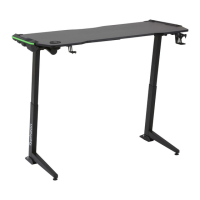

 To Next Page