Need help?
Do you have a question about the QUINN 58706 and is the answer not in the manual?
Lists available drive sizes: 3/4", 1/2", 3/8" for the adapter.
Specifies the accuracy tolerance for all drive sizes: +/- 2% CW and CCW.
Details the torque measurement range for each drive size, e.g., 5.9-59 ft-lb for 3/8".
Indicates the time delay before the adapter automatically shuts down: 85 seconds.
States the capacity of the adapter's memory for storing torque readings: up to 50 readings.
Lists the battery types required for each drive size, e.g., AA for 3/4".
Explains the general safety alert symbol used to indicate potential personal injury hazards.
Defines a DANGER situation as one that will result in death or serious injury if not avoided.
Defines a WARNING situation as one that could result in death or serious injury if not avoided.
Defines a CAUTION situation as one that could result in minor or moderate injury if not avoided.
Defines NOTICE as addressing practices not related to personal injury.
Defines general CAUTION without an alert symbol for practices not related to personal injury.
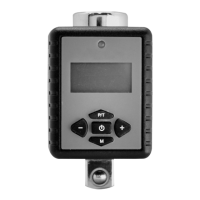
Describes the key functions and components of the digital torque adapter, like display, buttons, and anvil.
Details the step-by-step process for using the torque adapter, including setting units and storing readings.
Provides instructions on how to replace the batteries in the torque adapter when power is low.
Outlines procedures for cleaning and maintaining the tool to ensure safe operation.
The Quinn Digital Torque Adapter is a versatile tool designed to convert a standard ratchet into a digital torque wrench, providing precise torque measurement and control for various applications. It is available in three drive sizes: 3/4", 1/2", and 3/8", each with specific torque ranges and battery requirements.
The primary function of the Quinn Digital Torque Adapter is to measure and display torque applied during fastening tasks. It operates in both clockwise (CW) and counter-clockwise (CCW) directions with an accuracy of ±2%. The adapter features an LED indicator and an audible buzzer to alert the user when approaching and reaching the targeted torque value. It supports multiple unit selections, including Kg-m, ft-lb, N-m, Kg-cm, and in-lb, depending on the model. The device can operate in "Peak" mode, which stores the maximum torque applied, or "Trace" mode, which displays real-time torque readings. It also has a memory function capable of storing up to 50 torque readings, allowing users to review past measurements. An auto-shutdown feature conserves battery life by turning off the adapter after 85 seconds of inactivity.
To use the adapter, it must first be securely fastened to a ratchet. An additional adapter can be attached to the anvil if desired. The device is activated by pressing the Power button, which will display "trACE" and "PtoP" on the LCD. After two seconds, the display will show "0.0". The user can then swing the adapter to measure torque, which will be displayed on the screen.
Setting the desired torque unit is done by simultaneously pressing the Memory ("M") button and the "P/T" button. To increase or decrease the current torque value, the user presses and holds the "+" or "-" buttons, respectively, until the desired value is reached. If no selection is made after ten seconds, the display will revert to "0.0".
The adapter provides visual and audible feedback during operation. When the applied torque is within 20% of the targeted value, the LED will flash RED, and the buzzer will beep. Upon reaching the targeted torque, the LED will turn solid RED, and a long buzz will sound.
The adapter supports two operational modes:
Stored readings can be accessed by pressing the Memory button. The display panel will show the stored reading as "P01" for the most recent reading, and subsequent presses will show "P02" through "P50" for older readings. The adapter automatically shuts off after 85 seconds of inactivity to save battery life, or it can be manually turned off by pressing the Power button.
Regular maintenance ensures the longevity and safe operation of the Quinn Digital Torque Adapter.
Users are advised to wear ANSI-approved safety goggles during use. It is crucial not to exceed the adapter's maximum torque value. Batteries should not be mixed (old and new, or different types like alkaline, standard, or rechargeable), and proper polarity must be maintained. Swollen or leaking batteries should not be used. The adapter should only be used as intended and not as a pry bar or hammer. It should not be submerged, disassembled, or exposed to extreme temperatures, humidity, or direct sunlight. Excessive shaking should also be avoided. The product is not a toy and should be kept out of reach of children. The manual emphasizes that common sense and caution are essential for safe operation, as not all possible conditions and situations can be covered in the instructions.


 To Next Page
 General