GENERAL OPERATION MAC OS
GENERAL OPERATION WINDOWS
7
8
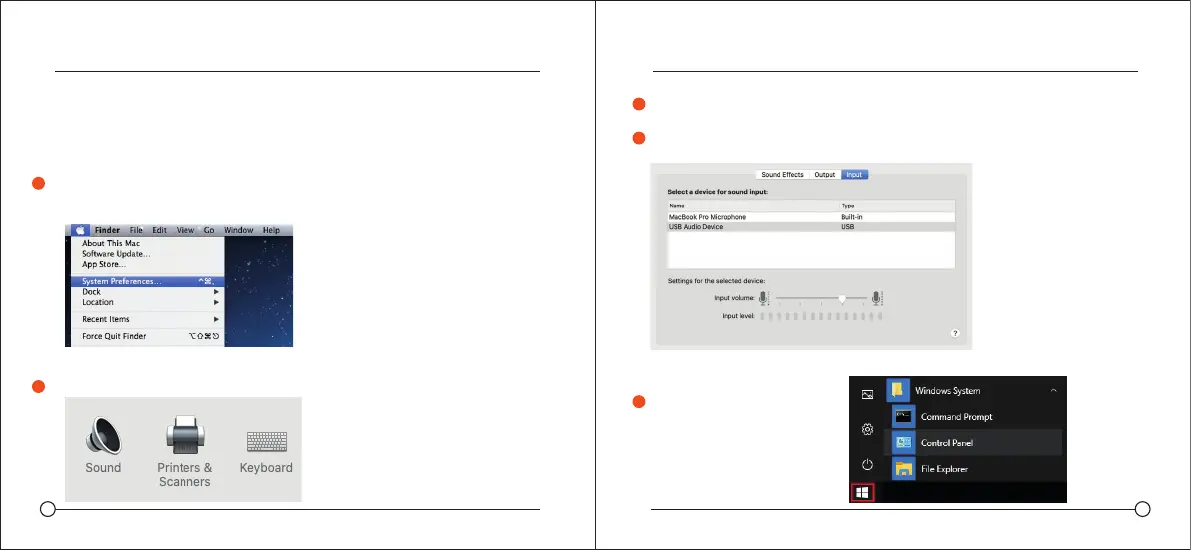
Open the 'Input tab'.
From here, select the 'USB Audio Device' from the list devices,
and adjust the input level using the slider.
Adjusting the input level on a
Windows computer:
Open the Start menu and
click on 'Control panel'
To manually adjust your input level via your computer's system preferences,
use the following instructions relevant to your device platform/operating system.
Adjusting the input level on a Mac OS computer:
Click on the Apple symbol at the top left of your screen, and select System
Preferences.
Click on 'Sound' to open the sound options
3
1
2
4
1
MODESTO 710MODESTO 710



 To Next Page