27
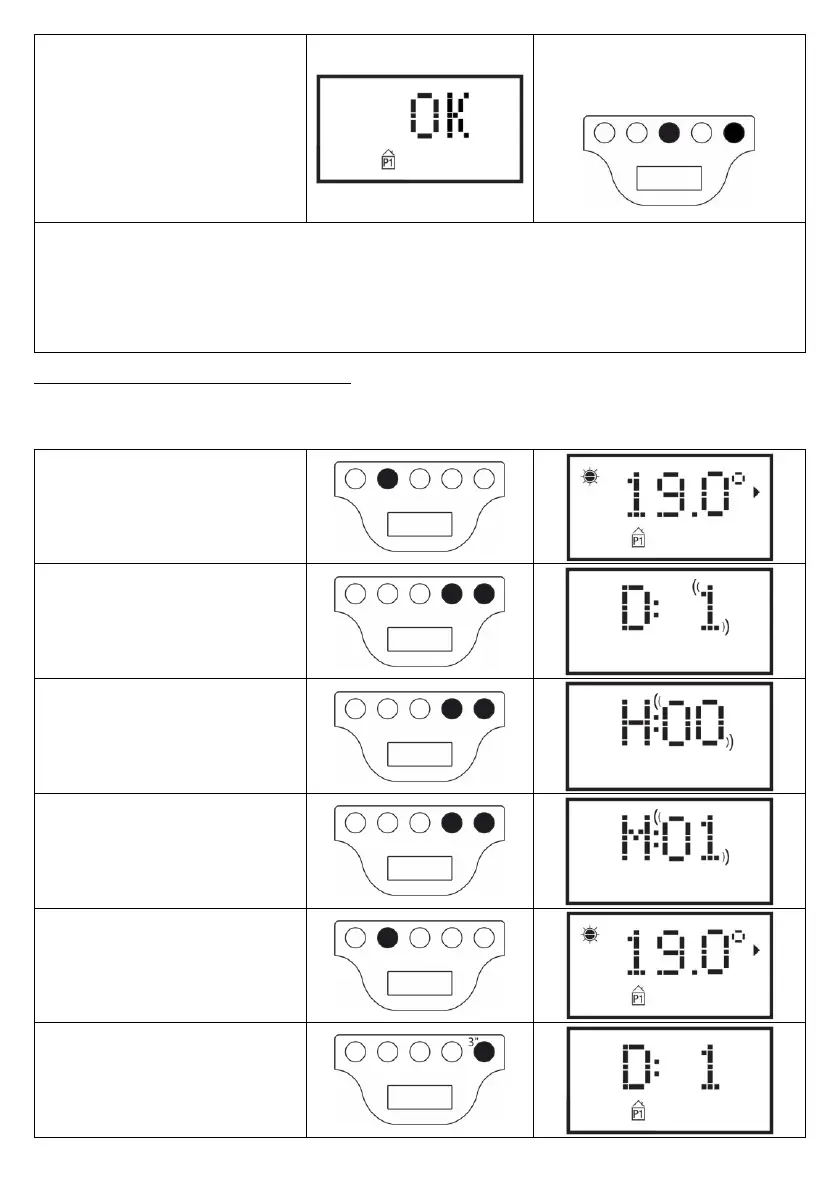
“OK will appear on the display for 5
second, confirming that the Program
sequence has been carried out
successfully.
System is now set to adjust the
temperature according to the new
adjustment of program P1.
Note: it is possible to exit any time from
the program sequence, without
displaying every hour until Day 7.
To do so, just hold “F” button and press “-
“ button.
N.B.:
- You can abort the display/modification sequence anytime, deleting any settings that have not been saved, just by
pressing “Stand-By” button;
- Restoring the default settings will delete every P1 Program previously created (see paragraph 6.3);
- If no button is pressed within 90 sec. during the Program setting process, the result will be the cancellation of the
display/modification procedure and will restore back the factory default settings;
- During the programmation process, the heating elements will automatically switch to Stand-by mode, and the
radiator does not heat.
EXAMPLE: HOW TO SET A CUSTOM PROGRAM
Let’s see how to program a brand-new radiator, and anticipate the change from ECO to COMFORT temperature one hour
earlier (06:00 a.m. is the default factory settings), for each day from Monday to Friday.
Press “M” to select Program P1
Set the current day of the week (first use
of the radiator) using “+” or “-“ button.
Press “M” and set the current Hour (first
use of the radiator) using “+” or “-“ button.
Press “M” and set the current Minutes
(first use of the radiator) using “+” or “-“
button.
Press “M” to end the time setting
procedure. System now gets back to
Program P1.
Hold “-“ for 3 sec. To enter the
display/modification of Day 1.


 To Next Page