NEE D HELP WI TH THE
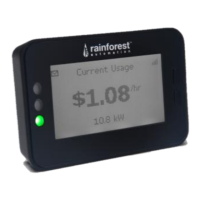
EMU-2
™ ?
For a full user manual, FAQs, and to contact support:
www.rainforestautomation.com/support/bch
C A N ’ T S E E YOUR ELECTRICITY USE INFORMATION?
Contact: hem.support@bchydro.com
Phone: 604.224.9376 or 1.800.224.9376
www.rainforestautomation.com
A new way to see your energy
Blank screen - unit
does not respond
to button press
Remove all power connections/batteries from EMU-2™
Wait 10 seconds
Re-connect power
Unit has power but
does not display
data
Check display for signal strength. If a weak signal is indicated, try
moving the EMU-2™ to a location in your home that is closer to the
electricity meter for a stronger signal.
Move EMU-2™ away from electronic devices that may interfere with the
signal (eg. wireless routers, cordless phones).
Refer to the Online User Guide:
www.rainforestautomation.com/support/bch
Moving? Call BC Hydro at 1-800-224-9376
YOUR
EMU-2
™ INFORMATION LABEL
Located on the back of your EMU-2™ is information that identifies your specific unit.
MAC Address:
Install Code:


 To Next Page