Documentation Center
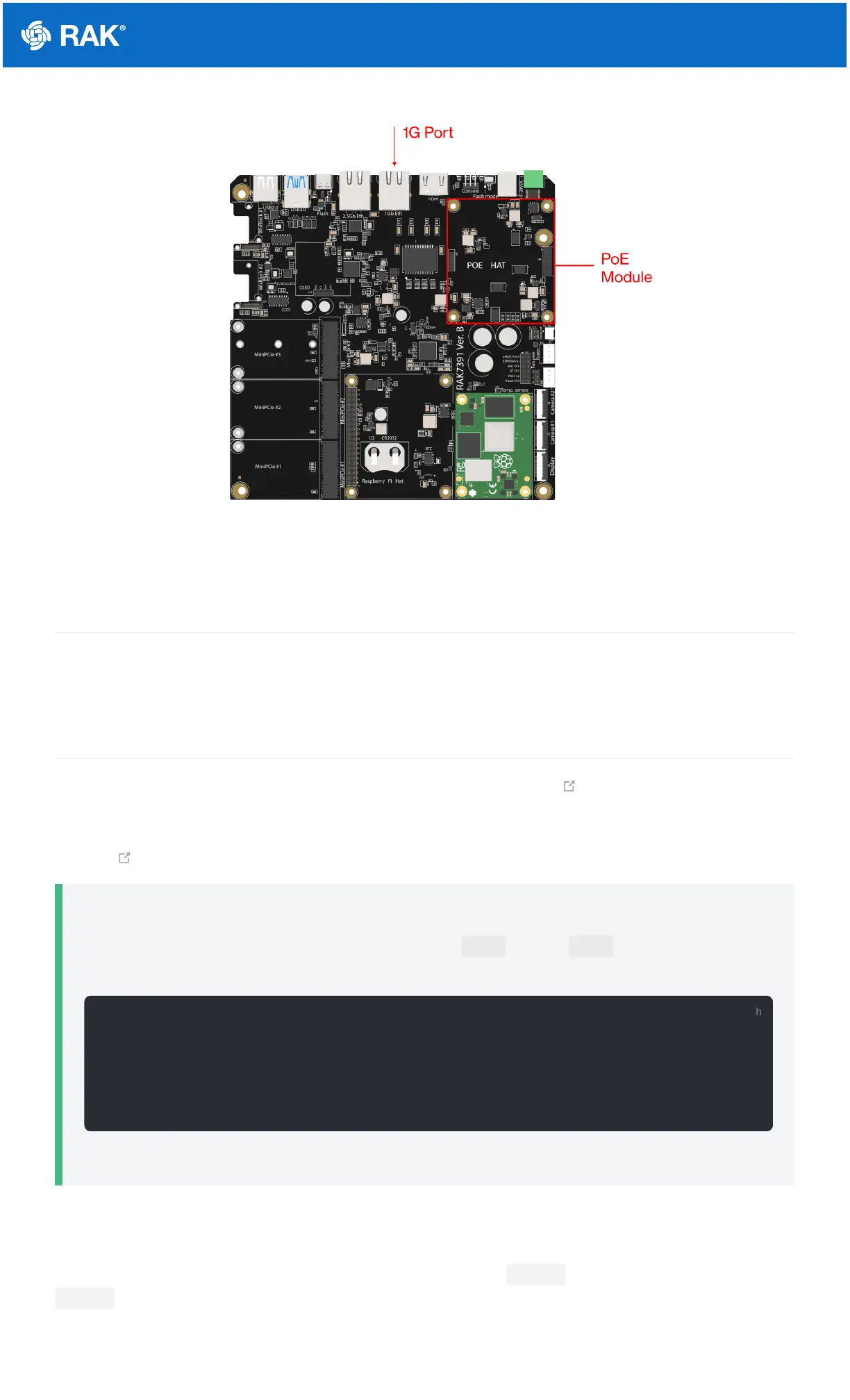
Figure 3: PoE provisioning via the 1-GB port (PoE HAT installed)
Flashing the OS
RAK7391 recommended OS is RAKPiOS. Refer to the RAKPiOS documentation for instructions on flashing and
booting the OS.
Network Connectivity
For the RAK7391, connectivity management is done via the NetworkManager tool suite. NetworkManager
allows for flexibility when configuring the Ethernet, Wi-Fi, and Cellular interfaces. It is used to create, display, edit,
delete, activate, and deactivate network connections via configuration files. One can also use the command-line
tool nmcli for controlling NetworkManager.
📝
NOTE
The NetworkManager configuration file must be owned by root and only root should be able to read
it, so you need to set permissions by using the commands below:
The OS needs to be rebooted / Gateway power cycled for the configuration to take effect
Ethernet
There are two Ethernet ports on the gateway: one 1 Gb Ethernet Port (eth0) and one 2.5 Gb Ethernet port
(eth1) . Once you connect to one of them, the Ethernet DHCP should work without requiring any specific
configuration for Network Manager (you can grab the assigned address either via your router interface or from the
OLED screen if you have it installed).


 To Next Page
 Loading...