Causions
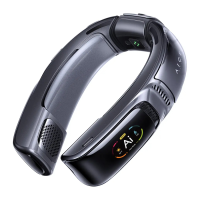
1. Charge to activate the A/C function before the 1st use;
2. Please download the Metaura App, connect to AICE 3 and upgrade the
firmware to experience better performance;
3. Please drain the battery to sl 0%, and then charge it to 100% to fully activate
the battery (only need to be done once)*;
* You can perform the discharge and charge cycle at anytime. But it's
recommended to be done as soon as possible, for example right after the
firmware upgrade.
4. Once connected to your phone, AICE 3 will be taken as headphones, and
all sounds from your phone will be played on AICE 3 instead of your phone. *
* If you don't want AICE 3 to act as headphones, you can go to "Settings" -+
"Bluetooth" Tap on AICE 3--4 Select the device type —+Choose "Others".
All sounds will play on your phone instead of AICE 3.
5. To protect its battery system from overcharging, AICE 3 will enter standby
mode when charging. You can press the power button to charge and play.
6. Tap the power button on the App to enter / exit standby mode. Under standby
mode, both the power button and the function button will be dimmed, but the
screen is operable and Bluetooth is still connected.
7. To protect your hearing, the sound volume of AICE 3 might be limited by the
phone. To unlock it, you may go to "Settings" —+"Sounds & Haptics" —+
"Headphone Safety" -+ Turn off "Reduce Loud Sounds".
8. If the device language is not in your preference, you may:
a. Download the Metaura App and pair it with your device. The device language
will follow your App language automatically;
b. Slide left (e) on the homepage -+ Tap on the "Settings" -+ Tap on the
"Language" -+ Choose the language you prefer.
12


 To Previous Page
 Loading...