39
A DPX3 sensor package features the following:
Its connection interface is RJ-45.
You can cascade a maximum of 12 DPX3 sensor packages.
DPX3 series works with Raritan's DPX3 sensor hub 'DPX3-ENVHUB4',
but
not
with the DPX sensor hub 'DPX-ENVHUB4'.
With a standard network patch cable (CAT5e or higher), you can:
Connect a DPX3 sensor to a Raritan or Legrand product with the
"RJ-45" SENSOR port, such as Raritan's PX3 PDU or Legrand PDU.
Exception: For a Raritan PDU or EMX with an "RJ-12" SENSOR port,
an RJ-12 to RJ-45 adapter cable (part number: RJ12M-RJ45M) is
needed, which you can request from Raritan.
Daisy chain DPX3 sensor packages.
Warning: Do NOT use a crossover cable for connection.
In This Chapter
Available DPX3 Sensor Packages .............................................................39
DPX3 Temperature and Humidity Sensors ...............................................40
Cascading DPX3 Sensor Packages
...........................................................41
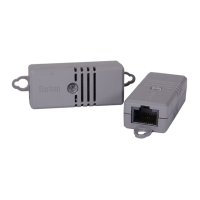
Available DPX3 Sensor Packages
Sensor packages Description
DPX3-T1H1
1 temperature sensor
1 humidity sensor
See
DPX3 Temperature and Humidity Sensors
(on page 40).
For detailed information on sensor names, see
Sensor Naming
Conventions
(on page 80).
Chapter 4 DPX3 Series


 To Next Page
 Loading...