Chapter 5: DPX2 Series
46
Connection and Disconnection
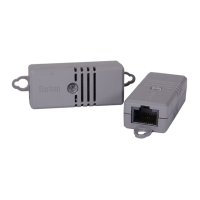
Before connecting a DPX2 sensor to a Raritan or Legrand product, you
must connect it to a DPX2 sensor cable first.
If any connected sensor is broken, you can replace it with a new one
without disconnecting the DPX2 sensor cable from the Raritan or
Legrand product.
To connect the DPX2 sensor package to the end of a DX sensor chain, see
Connecting a DPX2 Sensor Package to DX2, DX or DPX3
(on page 49).
Connecting a DPX2 Sensor Cable
Raritan has three types of DPX2 sensor cables. The difference is the
number of available head connectors on the cable: one to three head
connectors.
DPX2 sensor cables cannot be daisy chained.
The following diagram illustrates a DPX2 sensor cable with three head
connectors.
Number Component Function
RJ-12 connector Connect to a Raritan PDU or EMX.
Head connectors Connect DPX2 sensors.


 To Next Page
 Loading...