EasyManua.ls Logo

RAS 74.40 - Page 211

Default Icon
263 pages
Print Icon
To Next Page IconTo Next Page
To Previous Page IconTo Previous Page
Loading...
tlF :*
I
L
i a r t I a.t E
M.
tt i ,. i i;" l,/
rvtLli\,i'!
lndustrie Elektronik
GmbH
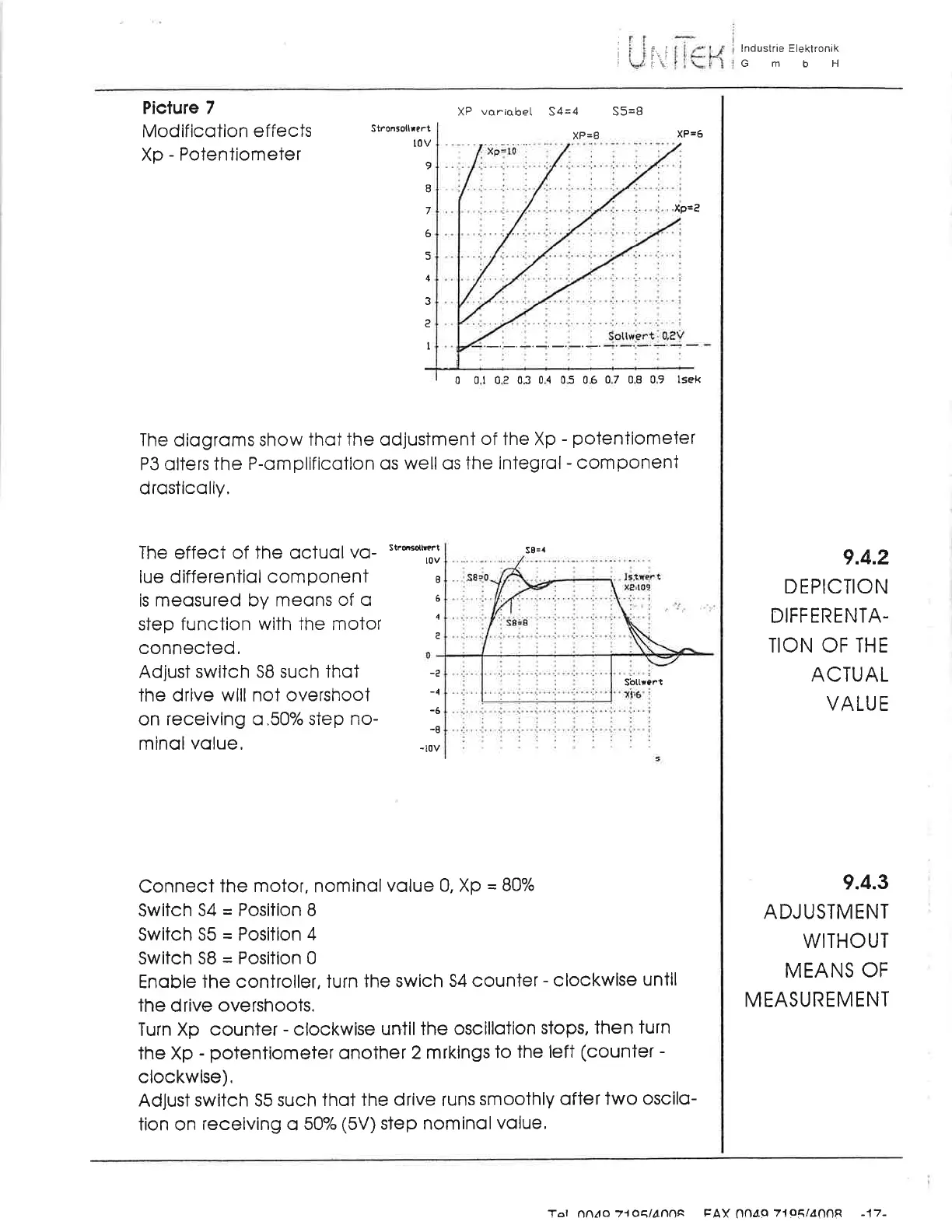
Picture 7
Modificotion
effects
Xp
-
Potentiometer
XP
variobel
S4=4
XP=8
S5=8
StronSotlrert
XP=6
l0v
9
o
7
6
5
4
3
c
I
'xP=e
0
0.1 0.2 0.3
0.4 0.5 0.6 0.7
0.8 0.9 lsek
The
diogroms
show
thot the odjusiment
of
the Xp
-
potentiometer
P3 olters the
P-omplificqtion
os well os
the integrol
-
component
drosticolly,
The
effect
of the ocluol
vo-
'**T;
lue differentiol
componeni I
is meosured
by meons
of
q
6
step
function
with
the motor
:
connected,
Adjust swiich SB such
ihot
ihe drive
will
not
overshoot
on
receiving
o.50"/o
step no-
minol volue,
S8=,.
-e
-4
-6
-8
-l0v
Sbttrart
Connect
the
motor,
nomincl
volue 0, Xp
--
83o/o
Switch
54
=
Position B
Switch S5
=
Position
4
Switch S8
=
Position 0
Enqble
the
controller,
turn
the swich
54 counter
-
clockwise
until
the
drive overshoots.
Turn
Xp
counter
-
clockwise
until the
oscillotion
stops, then
turn
the Xp
- potentiomeier
onother
2 mrkings
to
the left
(counter
-
clockwise).
Adjust
switch 55 such
thot the
drive
runs
smoothly
ofter two
oscilo-
tion on receiving o
5Oo/o
(5V)
step nominol
volue,
9.4.2
D
E PICIION
DIFFERENTA-
TION OF IHE
ACTUAL
VALUE
9.4.3
ADJUSTMENT
WITHOUT
MEANS
OF
M EASU
REM ENT
Tat oou!o 7'toE,lA,nnA
trAX
Ondq
71o5/4OOR
-17-

Related product manuals