Need help?
Do you have a question about the Ravelli AVT and is the answer not in the manual?
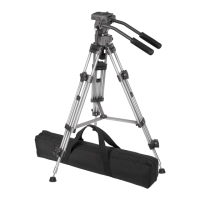
Steps for setting up the tripod by extending and locking the legs into position.
Procedure for securely attaching the fluid drag head to the tripod's mounting plate and securing it.
Instructions for attaching the left and right pan/tilt handles to the tripod head and adjusting their angle.
Steps to detach the quick release plate from the head, attach it to a camera, and reattach it securely.
How to adjust the tripod's height using leg extension adjusters and the center column for desired elevation.
Guide on adjusting the tripod head's tilt angle using the tilt adjuster handle and plate adjuster.
Instructions for retracting or removing rubber feet to expose turf spikes for stability on soft surfaces.
 General
| Purpose | Hand-held camcorder |
|---|---|
| Material | Aluminum |
| Mounting | 1/4\ |
| Product color | Aluminium, Black |
| Number of legs | 3 leg(s) |
| Tilt angle range | -90 - 90 ° |
| Number of leg sections | 3 |
| Maximum weight capacity | 7.711 kg |
| Footprint diameter (max) | 30 mm |
| Carrying case | Yes |
 Weight and Dimensions
| Weight | 4445 g |
|---|---|
| Height (max) | 1702 mm |
| Height (min) | 508 mm |
| Folded length | 774.7 mm |

 To Next Page