
 Need help?
Do you have a question about the Raw Thrills Winter X Games SnoCross and is the answer not in the manual?
Read this manual before operating the game for proper installation and safe use.
Handle the heavy and top-heavy cabinet with care due to fragile components and glass.
Handle sensitive components carefully, especially the computer, and use ESD procedures.
Always turn off and unplug the unit before servicing to prevent component damage.
Ensure the unit is properly grounded to avoid electrical shock. Use a three-wire outlet.
Be aware of lethal voltages even when power is disconnected. Use extreme caution and verify ground.
The monitor contains no user-serviceable parts. Do not attempt to service it.
Ensure the voltage selector switch is set correctly for your site's voltage before installation.
Replace a damaged power cord with an identical one from the manufacturer.
Recommended to plug game into a surge suppressor to protect sensitive electronic components.
Ensure all connectors mate properly during servicing. Do not force them; they are often keyed.
Handle PC components sensitively. Call distributor before servicing internal components.
Be alert for seizure symptoms when playing video games. Consult a physician if symptoms occur.
Keep this manual available. Contact distributor if game fails. Warranty lasts 60 days.
Product specifications may change without notice. Content is protected by intellectual property laws.
Details specifications for AC current, operating current, and voltage for US, International, and Japan.
Specifies the operating temperature range for the game, from 50°F to 104°F (10°C to 40°C).
The game must not exceed 95% relative humidity for proper operation.
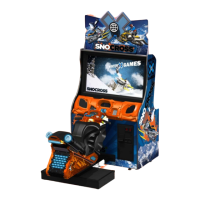
Provides the physical dimensions of the game cabinet: Height, Width, and Depth.
Indicates the weight of the game in its carton, 405 lbs (184 kg).
Instructions for unpacking the game, including checking for shipping damage.
Verify voltage, ground connection, and voltage selector switch settings before powering on.
Steps for powering up the game, checking for heat/odors, and calibrating controls.
Explains how to navigate the menu system using the service buttons like TEST, Start, View, etc.
Step-by-step guide to calibrate game controls, including wheel and gas pedal.
Details other tests available in the diagnostic section for inspecting game controls and interface.
Lists options within the main menu for Diagnostics, Audits, Pricing, System, Game Adjustments, and Utilities.
Provides descriptions for Diagnostics, Game Audits, Pricing, System, Game Adjustments, and Utilities.
Tests switch functions for troubleshooting.
Troubleshoots game sound by checking music, effects, and speaker response.
Tests wheel force feedback activation in left and right directions.
Diagnoses display issues like color or linearity using test patterns.
Diagnoses game lighting features by toggling various lights.
Activates coin meter for troubleshooting.
Tests watchdog/reset system for automatic recovery from crashes.
Views and resets link status for connected games on a network.
Tests blower function at different speeds to determine intensity.
Tests seat shaker function at different levels for player experience.
Displays general game statistics like games played, errors, and uptime.
Displays game stats like time, coin drops, and bonus credits.
Shows statistics for course wins, placings, vehicles, music, and stunts.
Displays win statistics per track, including count and percentage.
Shows player placing statistics and win/lose streaks.
Displays statistics on the usage of different snowmobile vehicles.
Shows statistics for various game upgrades like decals and engine.
Displays tune and time statistics for the game's music tracks.
Shows statistics for tricks, nitros used, and autopilot usage.
Allows adjustment of game pricing settings like coin value, freeplay, and credits.
Enables adjustment of system settings like motion seat, language, and QR codes.
Allows adjustment of game settings like start time bonus, game difficulty, and name entry.
Provides access to utility functions like CRC Check, clearing data, and restoring defaults.
Enters the calibration mode for game controls.
Adjusts game volume during play mode, with auto-sync for linked units.
Adjusts attract or standby mode volume independently.
Details symptoms and steps for restoring the game's hard drive.
Guides on adjusting BIOS settings for automatic power-up after AC power loss.
Bill of Materials (BOM) and diagram for the SnoMotion LCD Cabinet Assembly.
Diagram showing numbered components of the SnoMotion LCD Cabinet Assembly.
Diagram showing the main system connections for the SNOMOTION game.
Diagram showing connections for the SNOMOTION seat and associated lights/controls.
 General
| Brand | Raw Thrills |
|---|---|
| Model | Winter X Games SnoCross |
| Category | Game |
| Language | English |

 To Next Page