Connectinghandsetsandcables
Followthestepsbelowtoconnecthandsetsande
xtensioncablestogether.
1.Iffitted,unscrewandremovethedustcapfromtherelevantconnector.
2.Ensurethecableconnectorsarecorrectlyorientated,beforeinsertion.
3.Ensureconnectorsarefullyinserted,beforelocking..
4.TightenlockingcollarsbyRotatingclockwise.
8.7SeaTalkng®/NMEA2000connection
YourproductcantransmitandreceivedatatoandfromdevicesconnectedonSeaTalkng®orNMEA
2000CANbusnetworks.ConnectionisestablishedusingtheSeaTalkng®connectorlocatedonthe
rearoftheunit.
1.UsethesuppliedSea Talkng®spurcabletoconnectyourproducttoyourSeaTalkng®network.
2.YoucanalsouseaDeviceNettoSeaTalkng®adaptorcable(notsupplied)toconnectyour
producttoanavailablespuronaNMEA2000network.
Note:
1.Theproductmustbeconnectedtoacorrectlyterminatedbackbone .
2.YoucannotconnectyourproductdirectlytoaMFD.
3.RefertotheinstructionssuppliedwithyourSeaTalkng®/NMEA2000devicefordetailson
creatingabackbone.
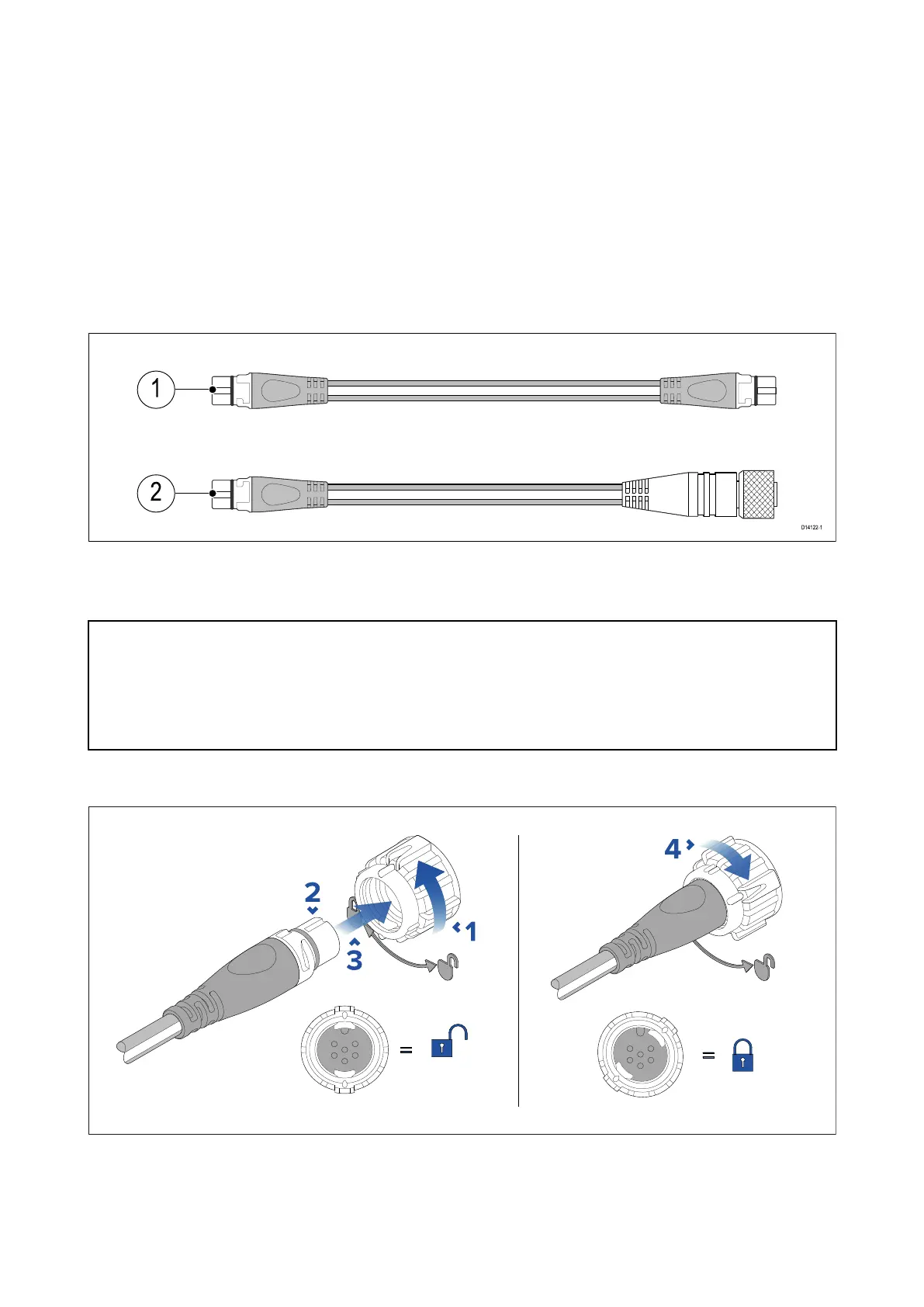
ConnectingSea Talkng®cables
1.R otateyourproduct’sSeaTalkng®connectorlockingcollarcounterclockwise,sothatthe
connectorisintheunlockedposition.
2.Ensurethecable’sconnectoriscorrectlyoriented(groovepointingup).
3.Fullyinsertthecableconnector..
4.Rotatethelockingcollarclockwise(2clicks)untilitisinthelockedposition.
84



 To Next Page
 Loading...




