5.
1RealVision™3DAHRScalibration
RealVision™3Dtransducersincludeabuilt-inAHRS(AttitudeandHeadingReferenceSensor),which
measuresthemotionofyourvesseltoassistintherenderingofsonarimages.Afterinstallationall
RealVision™3Dtransducersrequirecalibration.
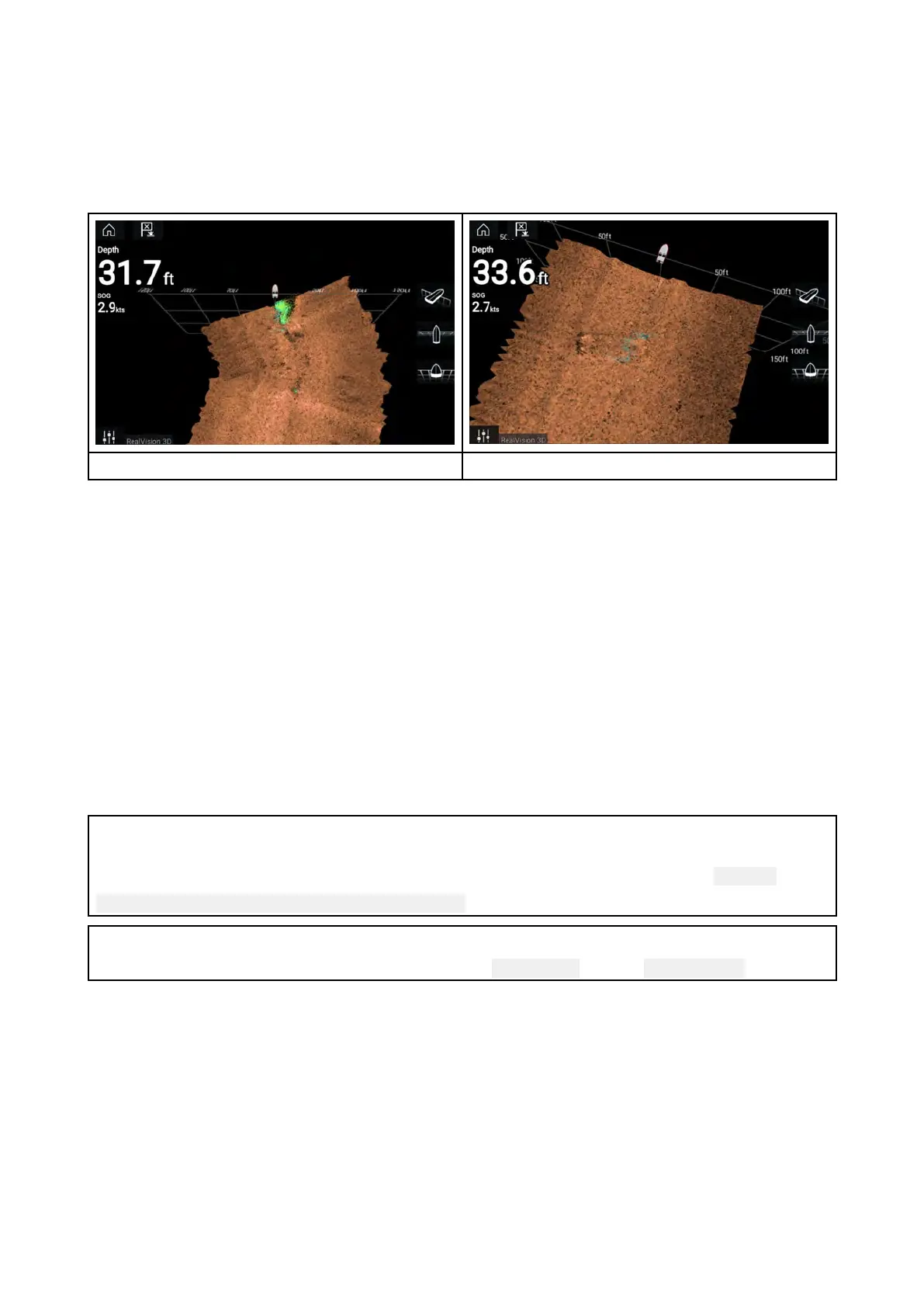
Anuncalibratedtransducercanproduceanoffsettothefrontedgeoftherenderofthebottomin
thesonarimage,asillustratedbelow.
Uncalibrated
Calibrated
Calibrationisanautomaticprocessandstartsafteryourvesselhasturnedappro ximately100°ata
speedofbetween3–15knots.Calibrationrequiresnouserinput,howeveratleasta270°turnis
requiredbeforethecalibrationprocesscandeterminethelocaldeviationandapplyarelevantoffset.
Thetimeittakestocompletethecalibrationprocesswillvaryaccordingtothecharacteristicsof
thevessel,theinstallationenvironmentofthetransducer,andthelevelsofmagneticinterference
atthetimeofconductingtheprocess.Sourcesofsignificantmagneticinterferencemayincrease
thetimerequiredtocompletethecalibrationprocess.Certainareaswithsubstantialmagnetic
deviationmayrequireextracirclesor“figureof8”manoeuvrestobeperformed.Examplesofsuch
sourcesofmagneticinterferenceinclude:
•Vesselengines
•Vesselalternators
•Marinepontoons
•Metal-hulledvessels
•Underwatercables
Note:
Insomecircumstances,itisbeneficialtodisableR ealvisionAHRSiflocalsourcesofmagnetic
interferencearedistortingthesonarimage.RealvisionAHRScanbedisabledfrom Settings.
Menu>Settings>Sounder>AHRSstabilization
Note:
TheCalibrationprocesswillrequirerepeatingaftera SonarresetorMFD Factoryreset.
5.2T roubleshooting
Thetroubleshootinginformationprovidespossiblecausesandcorrectiveactionrequiredforcommon
problemsassociatedwithinstallationandoperationofyourproduct.
Beforepackingandshipping,allRaymarineproductsaresubjectedtocomprehensivetestingand
qualityassuranceprograms.Ifyoudoexperienceproblemswithyourproductthissectionwillhelp
youtodiagnoseandcorrectproblemsinordertorestorenormaloperation.
Ifafterreferringtothissectionyouarestillhavingproblemswithyourproduct,pleaserefertothe
TechnicalsupportsectionofthismanualforusefullinksandRaymarineProductSupportcontact
details.
38



 To Next Page
 Loading...