5. GETTING STARTED
CHARGING YOUR RAZER BLACKWIDOW MINI HYPERSPEED
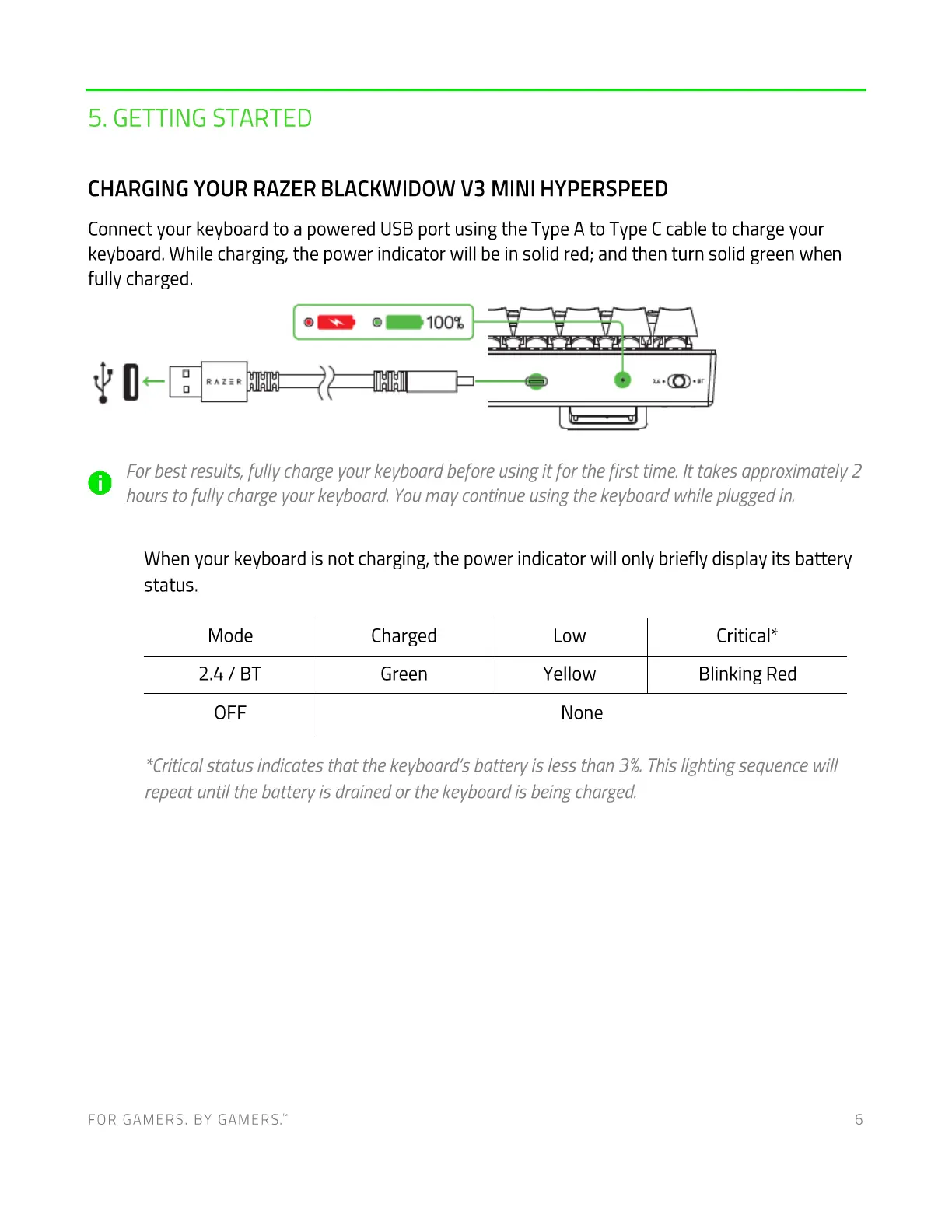
Connect your keyboard to a powered USB port using the Type A to Type C cable to charge your
keyboard. While charging, the power indicator will be in solid red; and then turn solid green when
fully charged.
100%
(0)
For best results, fu//v charge your keyboard before using it for the first time. It takes approximately 2
O
hours to fully charge your keyboard. Youmay continue using the keyboard while plugged in.
When your keyboard is not charging, the power indicator will only briefly display its battery
status.
Mode
2.4 / BT
OFF
Charged
Green
Low
Yellow
None
Critical*
Blinking Red
*Criticalstatus indicates that the keyboard's battery is less than 3%.Thislighting sequence will
repeat until the battery is drained or the keyboard is being charged
FOR GAMERS. BY GAMERS:
6



 To Next Page