2.
3.
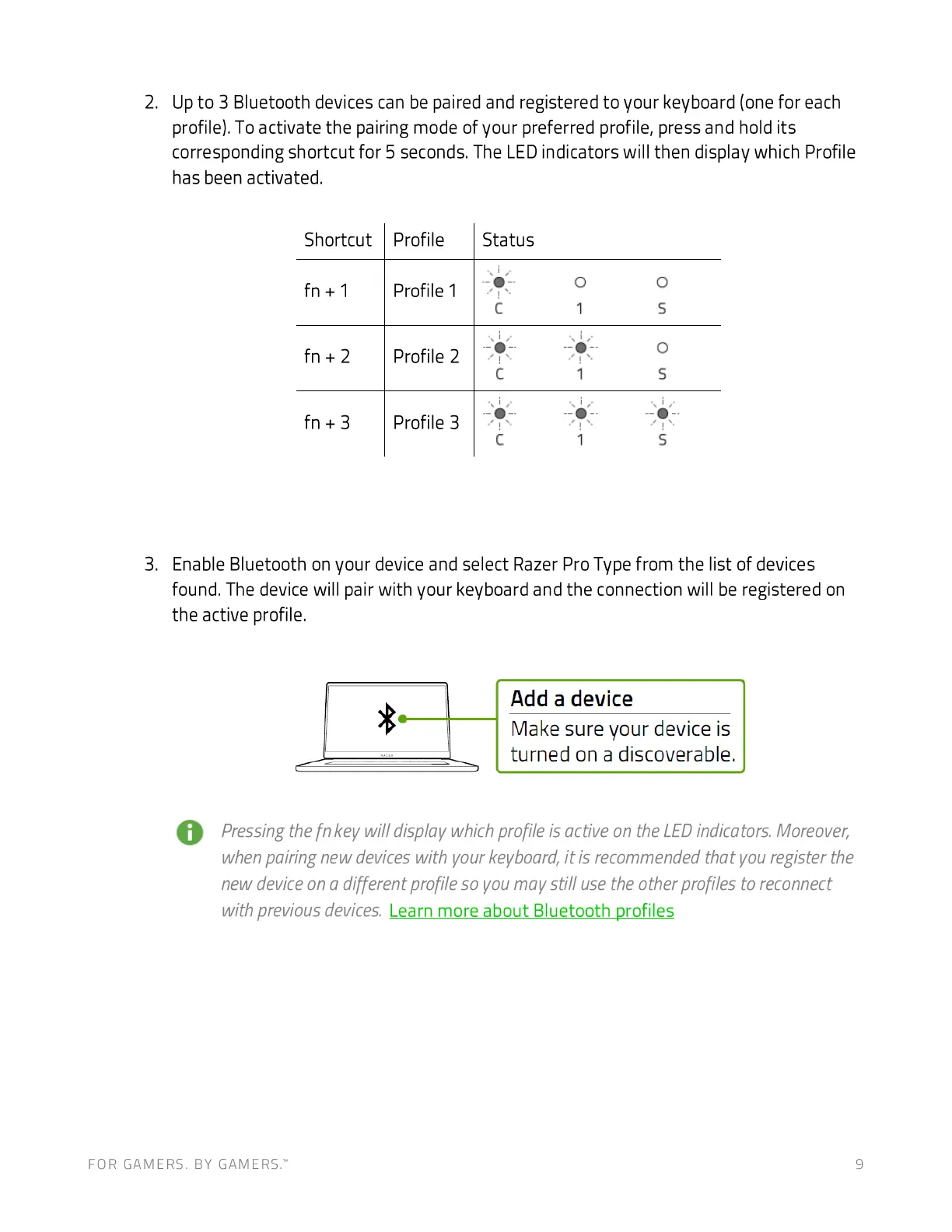
Up to 3 Bluetooth devices can be paired and registered to your keyboard (one for each
profile). To activate the pairing mode of your preferred profile, press and hold its
corresponding shortcut for 5 seconds. The LED indicators will then display which Profile
has been activated.
Shortcut
fn +1
fn +3
Profile
Profile 1
Profile 2
Profile 3
Status
c
-o
c
c
o
-o
1
o
s
o
s
Enable Bluetooth on your device and select Razer Pro Type from the list of devices
found. The device will pair with your keyboard and the connection will be registered on
the active profile.
Add a device
Make sure your device is
turned on a discoverable.
Pressing the fn key will display which profile is active on the LEDindicators Moreover,
when pairing new devices with your keyboard, it is recommended that you register the
new deviceon a different profile so you may still use the other profiles to reconnect
with previous devices. Learn more about Bluetooth profiles
FOR GAMERS. BY GAMERS: 9







 To Next Page