5. SETTING UP YOUR KEYBOARD
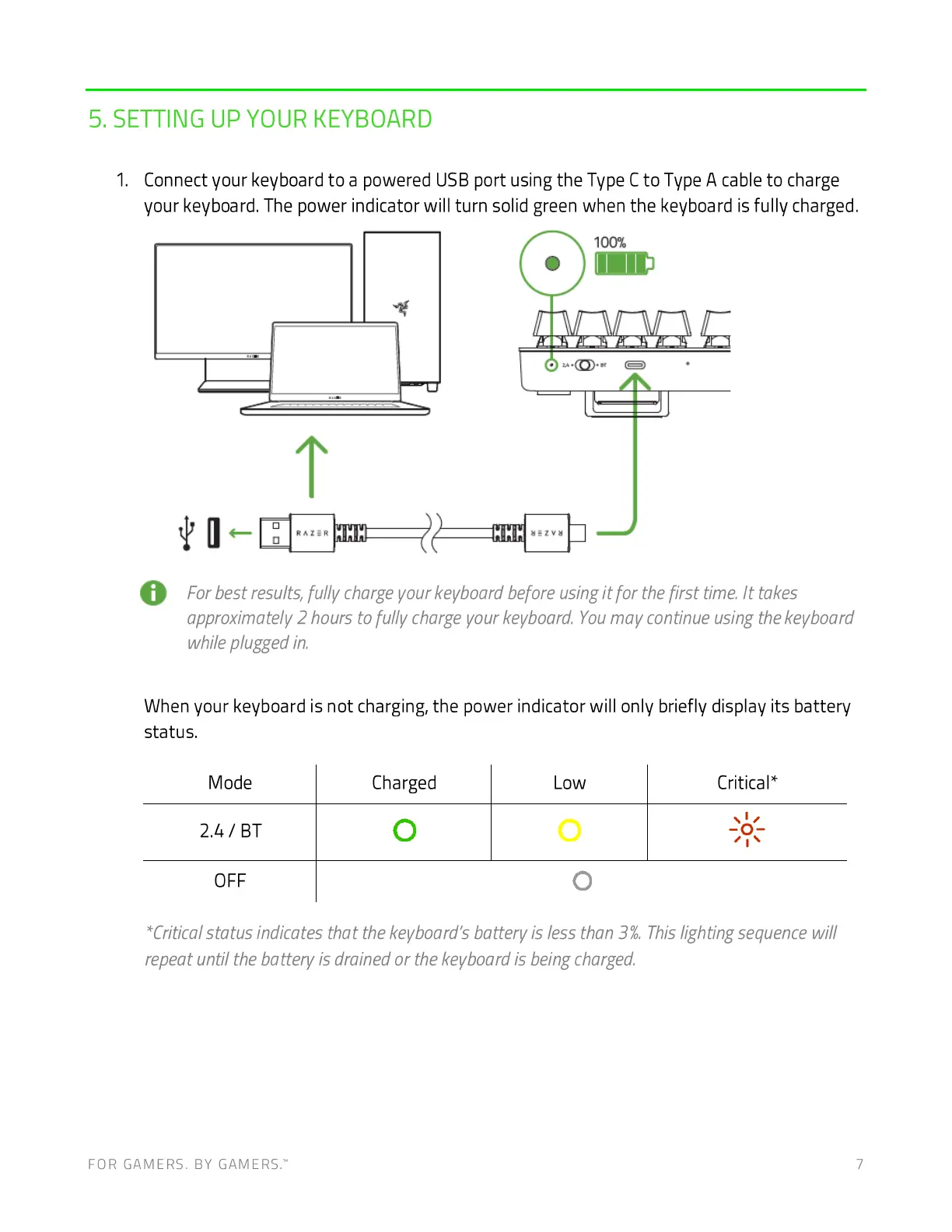
1. Connect your keyboard to a powered USB port using the Type Cto Type A cable to charge
your keyboard. The power indicator will turn solid green when the keyboard is fully charged.
100%
O Forbestresults,fullychargeyourkeyboardbeforeusingitforthefirsttime.Ittakes
approximately 2 hours to fully charge your keyboard. Youmay continue using the keyboard
while plugged in,
When your keyboard is not charging, the power indicator will only briefly display its battery
status.
Mode
OFF
Charged
Low
O
Critical*
*Critical status indicates that the keyboard's battery is less than 3%. Thislighting sequence will
repeat until the battery is drained or the keyboard is being charged.
FOR GAMERS. BY GAMERS: 7







 To Next Page