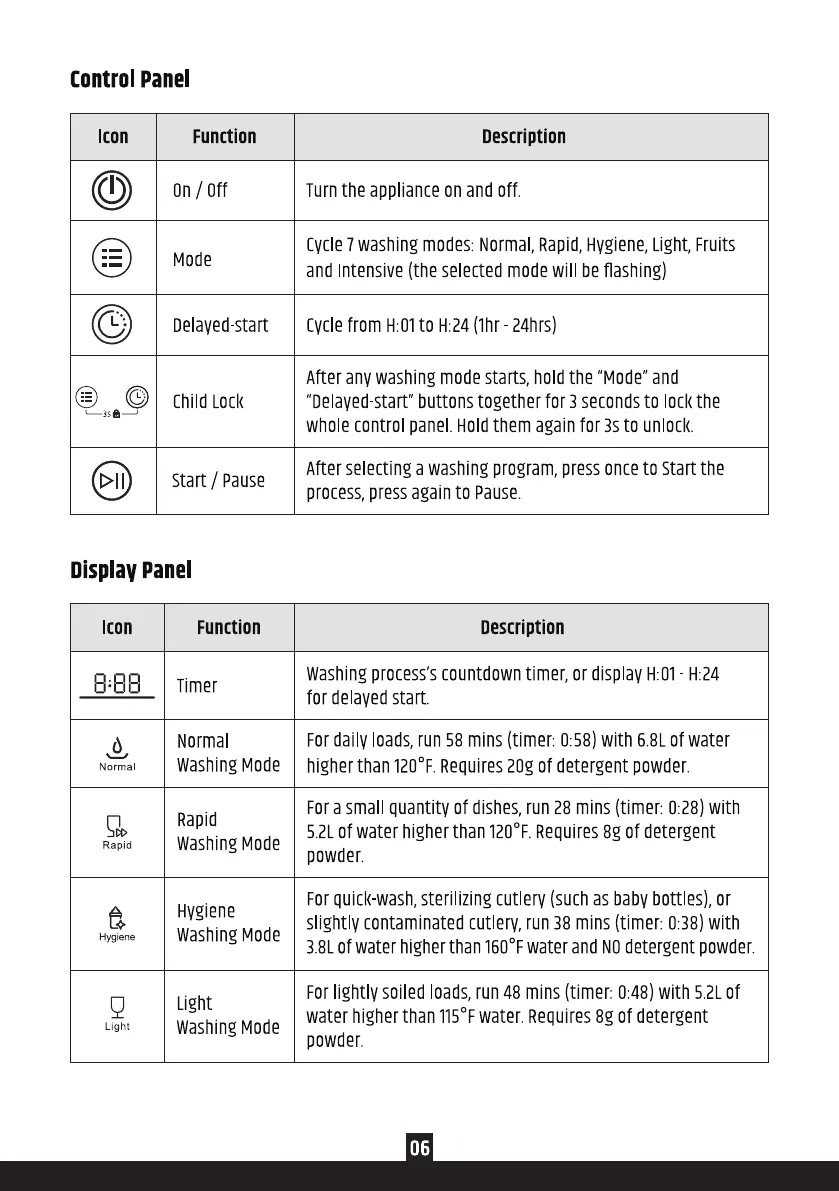
Control Panel
Icon
(O
Function
On/ Off
Mode
Delayed start
Child LOCI(
start / Pause
Display Panel
Icon
Normal
Rapid
a
Hygiene
Light
Function
Timer
Normal
Washing Mode
Rapid
Washing Mode
Hygiene
Washing Mode
Light
Washing Mode
Description
Turnthe applianceonand off.
cycle 7washing modes: Normal, Rapid,Hygiene, Light, Fruits
and Intensive(the selectedmodewill beflashing)
Cyclefrom H:OIto H:24(Ihr 24hrs)
After anv washing mode starts, hold the "Mode" and
"Delayed-start" buttons together for 3 seconds to lock the
whole control panel. Holdthem again for 3s to unlock.
After selecting a washing program, press once to start the
process,press again to Pause.
Description
washing process's countdown timer, or display H:01 H:24
for delayed start.
Fordaily loads,run 58 mins (timer: 0:58)with 6.8Lof water
higherthan 1200F.Requires20gof detergent powder.
Fora small quantity of dishes,run28 mins (timer: 0:28)with
5.2Lof water higherthan 1200F.Requires8g of detergent
powder.
Forquickwash,sterilizingcutlery (suchasbabybottles),or
slightly contaminatedcutlery,run38 mins (timer: 0•38)with
3.8Lofwater higherthan1600Fwater andNOdetergentpowder.
Forlightly soiled loads,run48 mins (timer: 0.48)with 5.2Lof
water higherthan 1150Fwater.Requires8g of detergent
powder.
06


 To Next Page
 Loading...