HDMI
EN - 10
Wi-Fi
Connect to a Wi-Fi Network
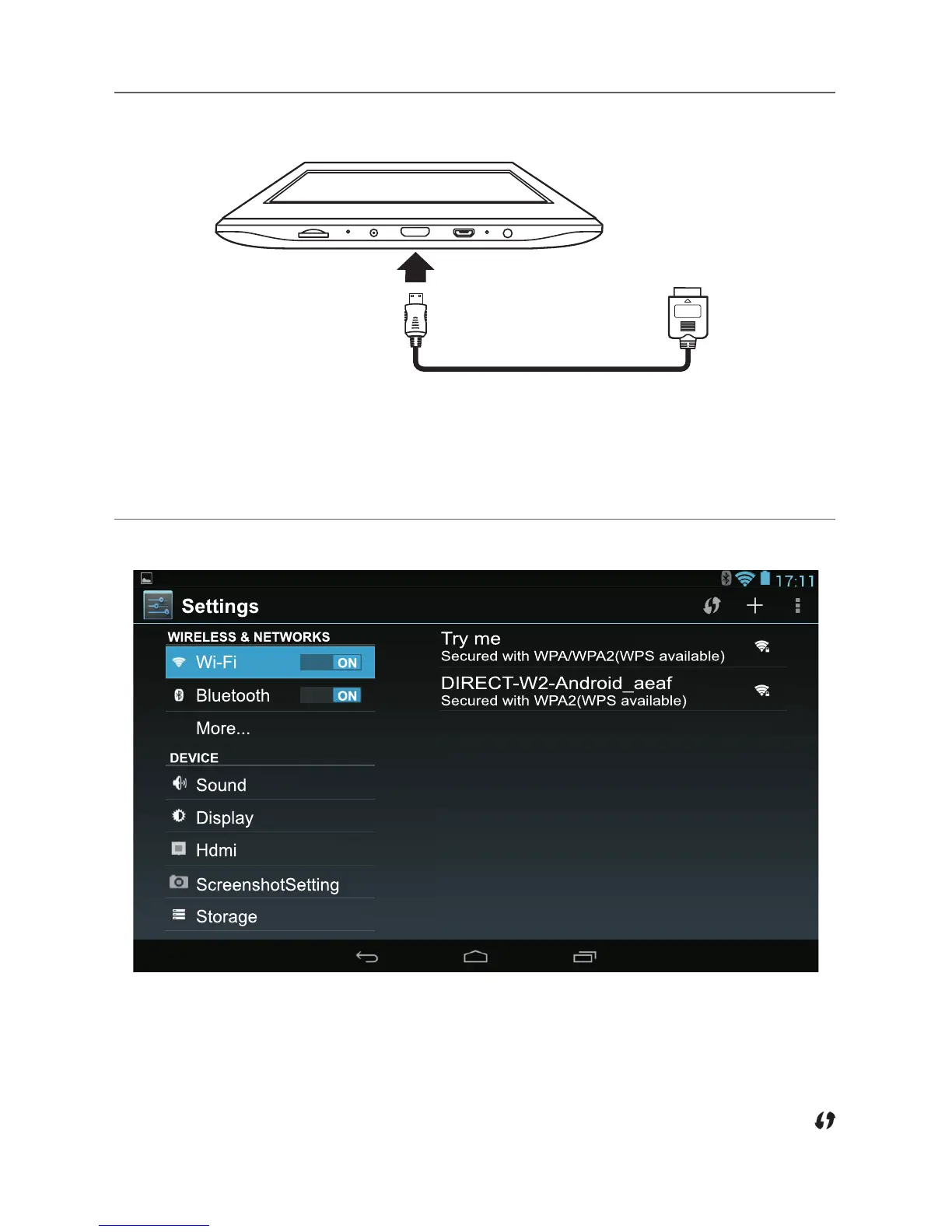
1. Go to Settings -> WIRELESS & NETWORKS -> Wi-Fi, and slide Wi-Fi to ON.
2. ThedevicewillscanWi-Finetworksautomaticallyanddisplaytheavailablenames.
• If the device finds a network that you connected to previously, it will connect to it
automatically.
3. Tapanetworknametoconnecttoit,andenterapasswordifnecessary.
4. Alternatively, if your Wi-Fi router supports Wi-Fi Protected Setup, tap the WPS icon
at the top of the screen, and then press the WPS button on your router.
You can connect the unit to aTV or other display device using an HDMI cable through
theHDMIjack.
1. Go to Settings -> DEVICE -> Hdmi,turnontheHDMI.
2. ThesysteminterfaceontheunitisautomaticallysynchronizedwithyourTVscreen.
ToHDMIjack
HDMIcable
(not included)
TV



 To Next Page
 Loading...