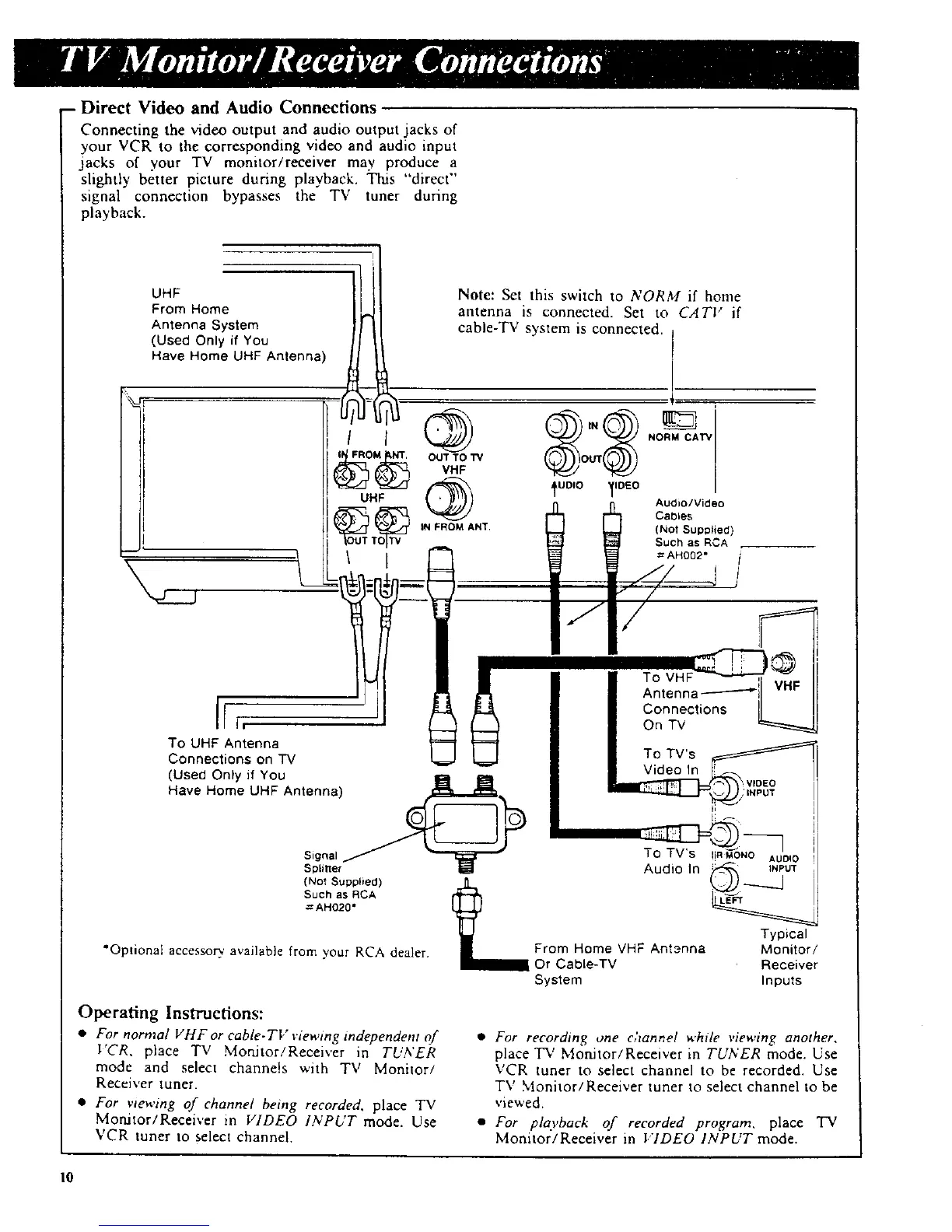
-- Direct Video and Audio Connections
Connecting the video output and audio output jacks of
your VCR to the corresponding video and audio input
jacks of your TV monitor/receiver may produce a
slightly better picture during playback. This "direct"
signal connection bypasses the TV tuner during
playback.
UHF
From Home
Antenna System
(Used Only if You
Have Home UHF Antenna)
I
Note: Set this switch to NORM if home
antenna is connected. Set to CATV if
cable-TV system is connected.
tN
I NORM CATV
OUT TO "iV UT
VHF
UHF Audio/Video
Cabtes
IN FROM ANT. (Not Supplied)
Such as RCA
I =AHOO2"i
I
S
II l,
To UHF Antenna
Connections on "IV
(Used Only if You I_ I_
Have Home UHF Antenna)
Signal /
Splitter
{No! Supplied)
Such as RCA
=AH020"
"Optional accessory available from your RCA dealer.
To TV's
Video In
J_
TO TV's I!R gONe AU'OlO
AudJoln _._ Ux
%
Typical
From Home VHF Antenna Monitor/
Or Cabte-TV Receiver
System Inputs
Operating Instructions:
• For norrnal VHFor cable-TV viewing independent of
I'CR. place TV Mortitor/Receiver in TUNER
mode and select channels with TV Monitor/
Receiver tuner.
• For wewing of channel being recorded, place TV
Morutor/Recei','er in VIDEO INPUT mode. Use
VCR tuner to select channel.
• For recording one channel while viewing another,
place "l_' Monitor/Receiver in TUNER mode. Use
VCR tuner to select channel to be recorded. Use
TV Monitor/Receiver tuner to select channel to be
viewed
• For plc_vback of recorded program, place TV
Monitor/Receiver in I'IDEO 1NPUT mode.
10



 To Next Page