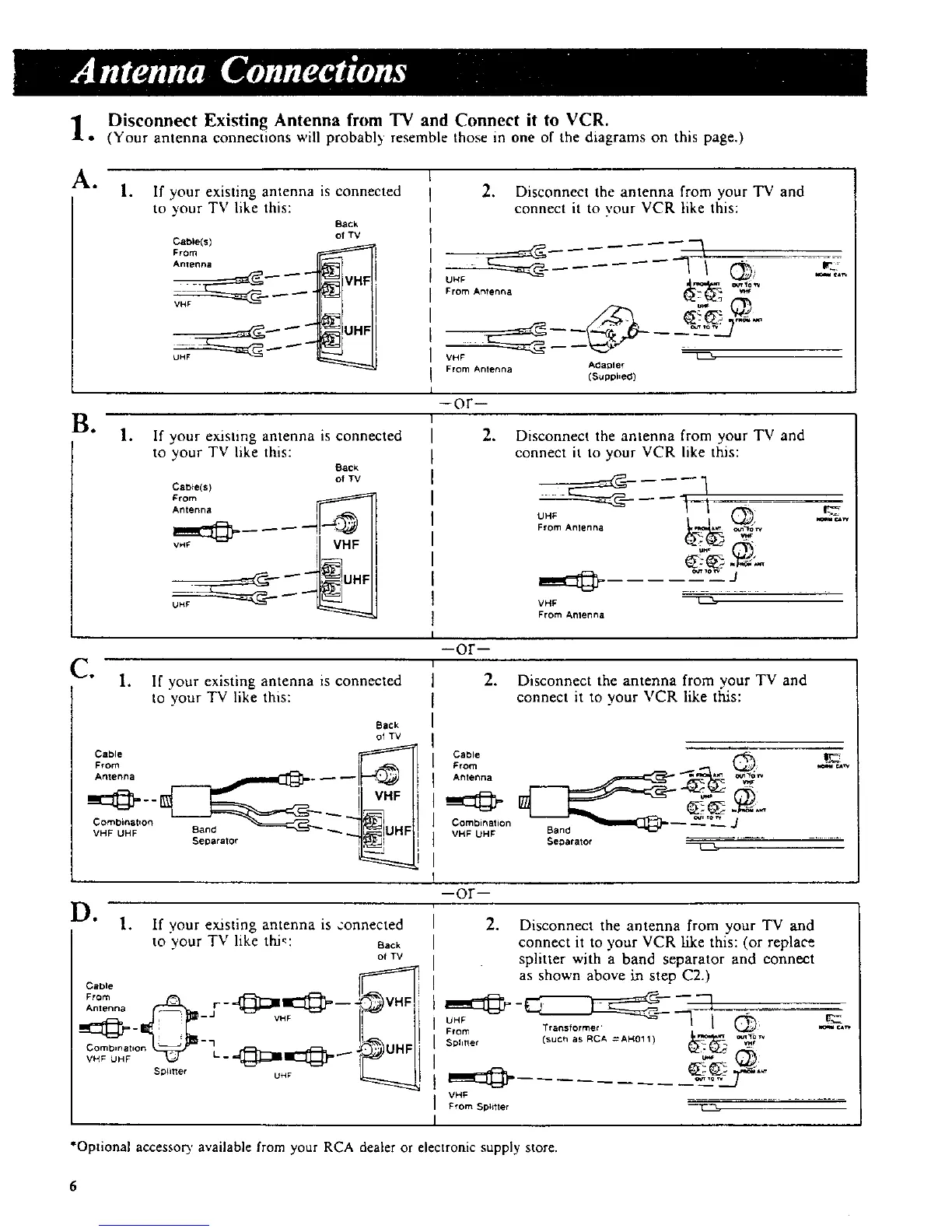
o Disconnect Existing Antenna from TV and Connect it to VCR.
(Your antenna connections will probably resemble those in one of the diagrams on this page.)
k. 1.
If your existing antenna is connected
to your TV like this:
BaCk
of TV
Cable(s)
From
"°'°7_ ---__- q
UHF _
2. Disconnect the antenna from your TV and
connect it to your VCR like this:
VHF
From Anlenna A_aDler
(Suppi,e(_)
¢.*w
Bo
Ct
--Or--
°
If your existing antenna is connected
to your TV like this:
Back
of TV
Cab_e(s)
From ._
Antenna s
vH_ ! VHF
1. If your existing antenna is connected
to your TV like this:
,
Disconnect the antenna from your TV and
connect it to your VCR like this:
Back
of TV
Antenna j ,_j r-_ _
il
VHF UHF Band _ _J_IUHF
separator FI_z_ I
From Anlenna
VHF
From Amenna
--or-
2. Disconnect the antenna from your TV and
connect it to your VCR like tl;fis:
Cab,e _
Antenna
Combination
VHF UHF Ban(_ _
Separator
D" " 1 rl enn 1 "
I. If your existng a t a s ,:onnecteo
to your TV like thi_: oBT__
Cable
I
sp,.e, u._
--Or--
°
as shown above in step C2.)
From r ansforme ' _'
Sphtler
VHF
From Spli_ter
Disconnect the antenna from your TV and
connect it to your VCR like this: (or replace
splitter with a band separator and connect
*Optional accessor 3, available from your RCA dealer or electronic supply store.



 To Next Page