EN-13
Charging the Battery
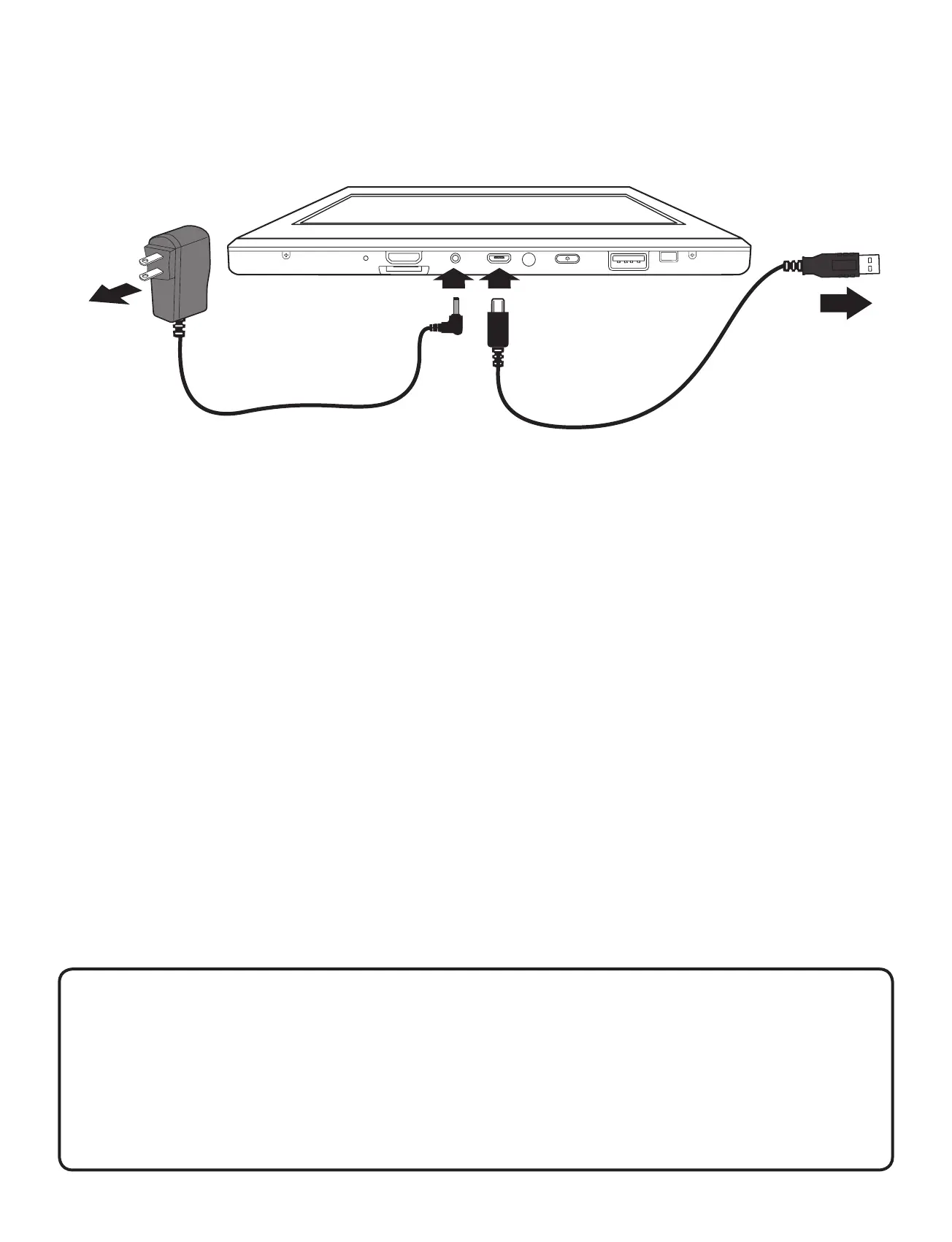
Use the AC Adapter or the Micro-USB* port to charge the
battery.
AC Adapter
(included)
To DC jack
To Wall
Outlet
To USB
accessories
USB cable
(not included)
To
Micro
USB port
Note: Micro USB port for charging at either OFF mode or
Standby mode.
Note: In order to keep the battery working in best condition,
please pay attention to the following:
• The included AC adapter is for use with this unit only.
Do not use it with other equipment.
• Please do not charge the battery in high temperatures.
• Do not wait for the battery to be fully depleted before
charging again. Keep the battery charged as needed.
• If tablet has not been used for a long period of time, the
battery might be in over discharge protection mode and
may take longer to charge.
IMPORTANT!
If your tablet’s battery contains less than 5% charge,
it will not power on. Charge your tablet with the
provided AC adapter for several minutes before
attempting to power on again.


 To Next Page