- 3 -
1. Moisture level indicator
2. Flashlight indicator
3. Analog proportion display
4.8.13 Moisture level icon "dry" "medium" "wet"
5. Softwood measurement mode (loose, low-density
wood)
6. Measurement mode selection button
7. ON/OFF button
9. Battery indicator
10. Reading display
11. Reading Hold Indicator
12. Wall measurement mode (generally refers to hard
walls such as cement walls, cement floor , tile walls,
etc.)
14. Masonry measurement mode (generally refers to
bricks, loose stones, etc.)
15.Hardwood measurement mode (hard, dense wood)
16. Flashlight on/off button
17. Lock the screen on/off button, press and hold the
machine for 3 seconds to enter the reference value
calibration. (Note: Please don't let the touch
anything during the calibration process, hold the

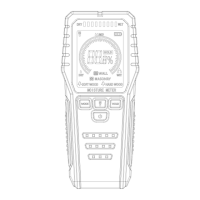

 To Next Page