
 Need help?
Do you have a question about the Re WaveMaster and is the answer not in the manual?
Controls waveform morphing, pitch modulation, octave, tuning, detuning, unison, and voice modes.
Filters can be HP, BP, LP. Modulated by EG1, EG2, LFO1, LFO2. Resonance and Keyboard tracking.
Used for modulation of waveform, pitch, and filter cutoff. LFOs can be SYNC/RETRIG.
Adds white noise and applies signal distortion before/after VCF2.
Controls overall volume, VCA modulation source, and stereo panning.
Input/output jacks for Sequencer, OSC, VCF, LFO, Echo, CV, and Audio modules.
Controls modulation wheel behavior and fine-tuning of synth parameters.
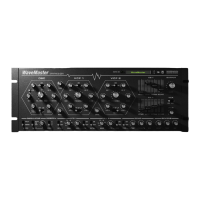
The WaveMaster Synthesizer is a Rack Extension designed for experimental electronic sound creation within the Reason environment. It offers a comprehensive set of features for sound design, including a versatile oscillator, two voltage-controlled filters, envelope generators, low-frequency oscillators, and built-in effects.
The WaveMaster's oscillator section is the primary sound source, offering a continuous waveform morphing capability. Users can seamlessly transition the waveform from a square shape, through a triangle, and into a sawtooth. This morphing can be modulated by various sources, including EG2 and LFO2, allowing for dynamic and evolving timbres. The amount of modulation applied to the waveshape is determined by the settings of each modulation source.
Beyond waveshape modulation, the oscillator's pitch can also be modulated. LFO1 is dedicated to pitch modulation, while EG1 can be configured to modulate either the waveshape (its default behavior) or the pitch by activating the button connected to the OCT knob. The OCT knob sets the fundamental pitch of the oscillator, providing a broad range for tonal exploration. For precise tuning, the TUNE knob allows for fine adjustments to the oscillator's pitch.
The WaveMaster also incorporates an inversion feature for envelope generator modulation. The modulation from one of the envelope generators can always be inverted, with the INV switch allowing users to select which envelope generator's modulation will be inverted. This provides greater control over the direction and impact of envelope modulation on the oscillator's parameters.
A unique feature of the oscillator is the DETUNE control, which introduces and spreads saw waveforms. The total amount of detuned saw waveforms can be adjusted using the UNISON switch located below the oscillator section. As the WAVE knob approaches the saw position, or when modulation pushes the waveform towards the saw shape, the detuned saw waves are gradually faded in, creating a richer and thicker sound.
For extended bass frequencies, the SUB switch activates a square wave one octave lower than the main oscillator, adding depth and weight to the sound.
The WaveMaster's OSCILLATOR section offers both monophonic and polyphonic operation. It can be set to POLY, allowing for up to 16 voices, or MONO for single-voice playback. When glide is activated in MONO mode, the pitch will smoothly slide between notes, with the glide time depending on the distance between the notes.
The WaveMaster features two independent Voltage Controlled Filters (VCFs), VCF 1 and VCF 2, each offering flexible filtering options. Both filters can be configured to operate in three distinct modes: HP (High Pass, 12dB/oct), BP (Band Pass, 6dB/oct), or LP (Low Pass, 18dB/oct). The desired filter mode is selected using the MODE switch for each VCF.
The cutoff FREQUENCY of each filter can be modulated by various sources, including EG1, EG2, LFO1, and LFO2. The corresponding knobs allow users to adjust the amount of modulation from each source. This enables dynamic filtering effects, from subtle sweeps to dramatic changes in timbre.
The RESO (Resonance) knob adds emphasis to the cutoff frequency, creating a more pronounced and sometimes self-oscillating filter sound. Higher resonance settings can lead to sharper, more focused tones.
The KBD (Keyboard Tracking) knob modulates the cutoff frequency based on the note being played. This allows the filter to track the pitch of the incoming notes, maintaining a consistent tonal character across the keyboard range.
Similar to the oscillator section, the VCFs also incorporate an inversion feature for envelope generator modulation. The modulation from one of the envelope generators can always be inverted, with the INV switch allowing users to select which envelope generator's modulation will be inverted, providing precise control over filter sweeps.
The WaveMaster utilizes Envelope Generators (EGs) and Low Frequency Oscillators (LFOs) as primary modulation sources, crucial for shaping the dynamic and rhythmic aspects of the sound. These modulators are used to control various parameters, including the waveform, pitch, and filter cutoff frequency.
The LFOs offer flexible synchronization and retriggering options. Both LFOs can be set to RETRIG, causing them to retrigger with each new note played. This ensures consistent LFO cycles for every note. Additionally, the LFOs can be synchronized to the song tempo using their respective SYNC switches, allowing for rhythmic modulation that aligns with the project's beat.
LFO1 is characterized by a sharp, random wave shape, making it suitable for creating unpredictable and evolving modulation effects. In contrast, LFO2 features a softer, drifting random wave shape, ideal for more subtle and organic modulation.
The EGs provide standard Attack, Decay, Sustain, and Release controls, allowing for detailed shaping of amplitude and modulation envelopes.
The WaveMaster includes dedicated sections for adding noise and drive to the signal, enhancing its character and aggression.
White NOISE can be introduced into the oscillator signal before it enters the filters. This allows for the noise to be shaped and colored by the VCFs, creating a wide range of percussive, atmospheric, or gritty textures.
The DRIVE section offers two stages of signal distortion. The signal can be driven both before VCF2 (using a diode shaper) and after VCF2 (using a tahn shaper). This dual-stage drive allows for complex and varied distortion effects, from subtle saturation to heavy fuzz, providing significant sound-shaping capabilities.
The OUTPUT section controls the overall volume and stereo positioning of the WaveMaster's sound.
The LEVEL knob adjusts the master output volume of the synthesizer. Below the VCA (Voltage Controlled Amplifier) section, users can select which envelope generator (EG1 or EG2) will control the output level, allowing for dynamic amplitude shaping.
The PAN control shifts the signal from left to right, enabling stereo placement of the sound within the mix.
The WaveMaster integrates built-in Echo and Reverb effects, adding spatial depth and ambience to the sound.
The ECHO section offers tempo synchronization and feedback control. The ECHO TIME can be set to SYNC with the song tempo, ensuring rhythmic delays. FEEDBACK controls the number of repetitions, allowing for short, discrete echoes or long, decaying trails. The MIX knob adjusts the balance between the dry signal and the echo effect.
The REVERB section provides controls for decay, tone, and mix. Reverb DECAY determines the length of the reverberation, with longer decay times suitable for simulating large spaces. The TONE control allows users to brighten or dull the reverb signal, shaping its spectral character. The MIX knob adjusts the balance between the dry signal and the reverb effect.
The back panel of the WaveMaster provides extensive connectivity and fine-tuning options through Control Voltage (CV) inputs and outputs, as well as various trimmers.
The CV section offers numerous jacks for modulating labeled parameters using external control voltages. Small trim knobs located next to each jack allow for precise adjustment of the modulation level, providing granular control over the impact of incoming CV signals. Each EG CV output provides a slightly smoothed signal, ensuring musical and artifact-free modulation.
The "Wheels" section allows users to configure the behavior of the modulation and pitch bend wheels. Buttons are provided to set the destination for the Mod wheel and the range of the pitch bend wheel. If the Mod wheel is assigned to "LFO Depth," it will scale the amount set by the LFO knobs on the front panel, offering real-time control over LFO intensity.
The back panel includes several trimmers for fine-tuning various aspects of the WaveMaster's behavior:
These trimmers allow users to dial in preferred levels and behaviors for corresponding functions, offering a deeper level of customization for the synthesizer's sound and response.
The WaveMaster is designed for ease of use and maintenance within the Reason Rack Extension framework. As a software instrument, it does not require physical maintenance in the traditional sense. However, users are encouraged to refer to the Reason platform's documentation for general software maintenance and troubleshooting. The user guide provides a clear overview of all front and back panel controls, facilitating understanding of the device's functionality. The "WARNING!" label on the back panel, indicating "DISCONNECT POWER BEFORE OPENING!" and "110-220V 50~60Hz," is a standard safety notice for physical hardware and serves as a reminder of best practices, even for a software emulation.
 General
| Arpeggiator | Yes |
|---|---|
| MIDI | In/Out/Thru |
| LFO | Yes |
| Effects | Reverb, Chorus, Delay |
| Inputs | Audio Input |
| Outputs | Stereo Output, Headphone Output |
| Sequencer | 16-step sequencer |

 To Next Page