Need help?
Do you have a question about the Real-El FC-140 and is the answer not in the manual?
Protect the web camera from humidity, dust, high temperatures, and use appropriate cleaning methods.
Avoid disassembling, repairing, or exposing the device to shocks/falls to prevent damage.
Lists the web camera, user's manual, and warranty card included in the package.
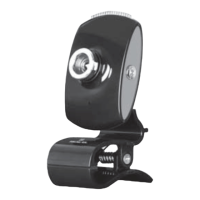
Highlights 3-lens optics, built-in microphone, manual focus, and flexible mounting.
Features Plug&Play technology for easy setup and a hinge for camera rotation.
Specifies operating systems, processor, RAM, graphics adapter, and USB port for optimal performance.
Connect the web camera to an available USB port for automatic device installation.
Identifies key parts of the web camera, including focus, lenses, hinge, microphone, and mounting clip.
Provides sensor type, resolution, frame rate, focus distance, and cable length for the FC-140 web camera.
 General
| Interface | USB 2.0 |
|---|---|
| Built-in microphone | Yes |
| Resolution | 1920x1080 |
| Frame Rate | 30 fps |
| Lens Type | Fixed focus |
| Microphone | Built-in |
| Compatibility | Windows, macOS |
| Sensor Resolution, MP | 2 MP |
| Maximum frame rate, fps | 30 fps |

 To Next Page