Step 11
Page 14 www.sauder.com/service 425810
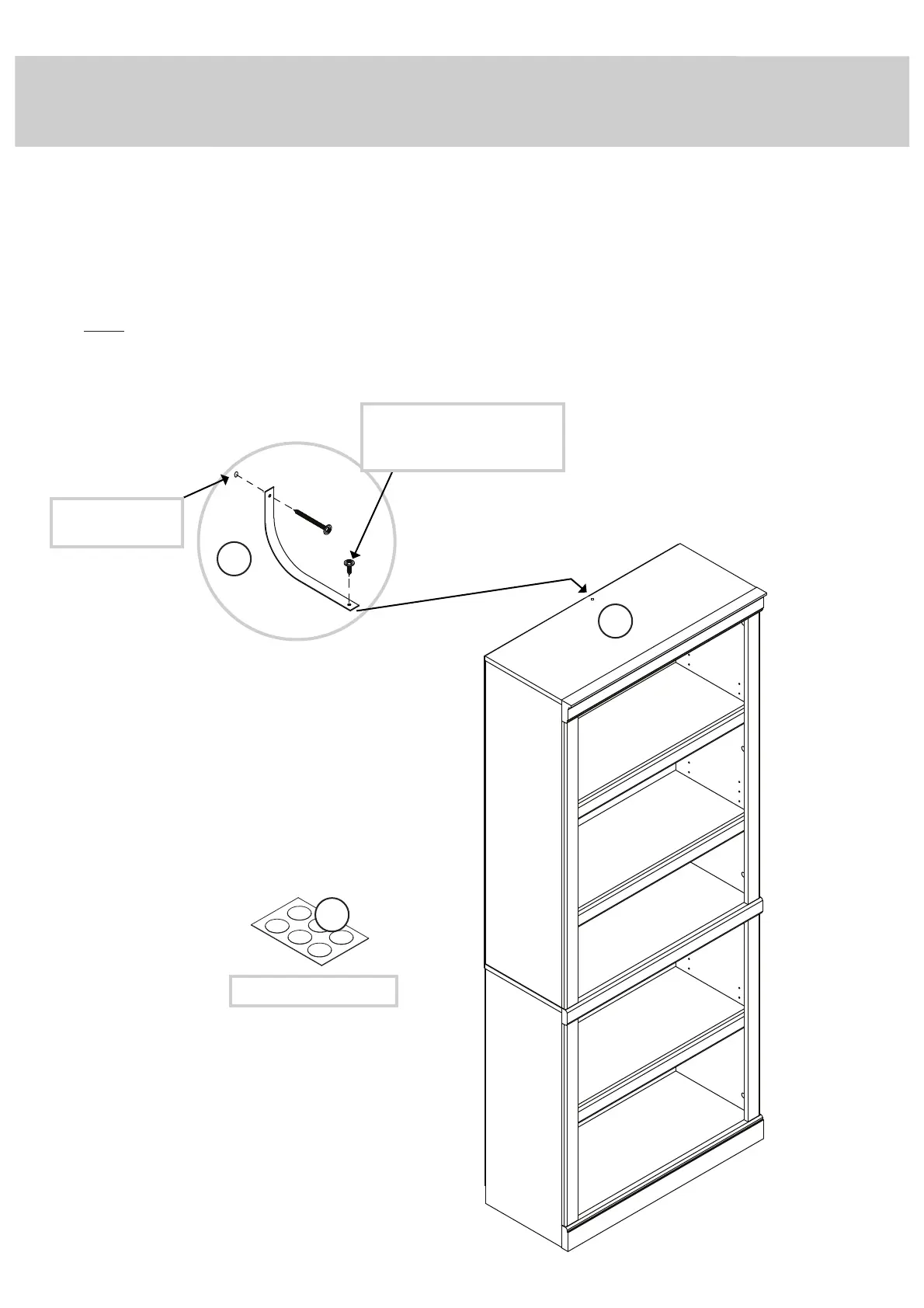
Drill this hole into
a stud in your wall.
Use the short screw through
the hole in the strap and into
the top surface of the TOP (E).
98
å
Use the FURNITURE TIPPING RESTRAINT KIT (98) for added stability. Fasten the strap to the top surface of the
TOP (E) using the short screw as shown.
å
Place your unit in its fi nal location against a wall. Locate the center of a stud in your wall near your unit and mark it
with a pencil. Next, drill a 1/8" hole on the mark and into the stud in your wall.
å
Fasten the unit to the wall. Use the long screw through the other end of the strap and into the 1/8" hole.
å
Peel APPLIQUES from the APPLIQUE CARDS (6) and stick them onto each visible HIDDEN CAM.
å
NOTE: Please read the back pages of the instruction booklet for important safety information.
å
This completes assembly. Clean with a damp cloth. Wipe dry.
E
No load
25 lbs.
25 lbs.
25 lbs.
35 lbs.
35 lbs.
6
To cover HIDDEN CAMS



 To Next Page