The Rebel Cactus GO Smartwatch is designed to help children discover their world playfully while staying connected. This quick start guide and more provides step-by-step instructions for setting up and using the smartwatch, along with information on its features and capabilities.
Function Description:
The Rebel Cactus GO Smartwatch is a child-friendly device that combines the functionalities of a smartwatch with communication and entertainment features. It allows children to stay connected with their parents and friends, track their activities, and enjoy various apps and games. Parents can manage the smartwatch through a dedicated app, ensuring a safe and controlled environment for their child.
Important Technical Specifications:
- SIM Card: Requires a nano-sized SIM card. The SIM card's PIN code should be turned off for ease of use by a child.
- Connectivity: Supports mobile networks (data roaming), Wi-Fi, and Bluetooth low energy.
- Charging: Charges via a pins charging cable. The smartwatch should be turned off before charging.
- Storage: Allows for storing MP3 music files, movies, photos, or audiobooks when connected to a computer.
- Password: The IMEI password defaults to 123456 and can be changed via a text message. New passwords must be 6 digits.
- App Compatibility: Works with the Rebel Cactus Tracker app, available on App Store and Google Play.
Usage Features:
Getting Started:
- Charging: Ensure the smartwatch battery is fully charged using the pins charging cable.
- SIM Card Insertion:
- Unlock the nano SIM card using a smartphone and the provided PIN code (default '0000' for KPN and Lebara).
- Turn off the SIM card's PIN code in the smartphone's security settings.
- Open the SIM card holder on the left side of the watch using a pin.
- Place the nano SIM card with the copper side up, slanted corner into the holder, and gently slide it into the watch until it clicks.
- Caution: Insert the SIM card exactly as shown to avoid errors or damage to the SIM card reader.
- Power On: Press the on button on the right side to turn on the smartwatch. To turn off, go to 'settings' > 'shutdown' or use the Rebel Cactus Tracker app.
- Network Setup:
- Go to 'settings' > 'mobile networks' > 'data roaming' and check 'data roaming'.
- Turn on Wi-Fi and connect to a Wi-Fi network (e.g., at home) by entering the correct password.
- Tip: If the child doesn't have data, connect to a parent's phone hotspot on the go.
- Reboot: Go to 'settings' and press 'reboot'. This is crucial for the SIM card to be recognized.
App Setup (Parent's Smartphone):
- Download App: Download the Rebel Cactus Tracker app from the App Store/Google Play or scan the QR code provided in the manual.
- Registration: Open the app and register by creating an account. Click 'Register'.
- Account Details: Enter your email address, code, and password. Agree to the user agreement and confirm registration.
- Note: Password must be 8-16 letters & numbers; no special characters allowed.
- Add Device: After registration, go to 'add Device' or 'add new smartwatch'.
- Scan Registration Code: Scan the registration code (QR code) on the smartwatch (found under 'app code'). Choose 'registration code' or 'regcode', not 'app code'.
- Parent Information: Enter the parent's name, choose your relationship to the child, and click 'OK'.
- Child's Phone Number: Enter the child's phone number under 'call' (including country number, e.g., +44 6...). Add a picture of yourself to the contact so your child can identify who is calling.
- Smartwatch Connection: Ensure the smartwatch is connected to Wi-Fi while connecting to the app.
Smartwatch Features:
- Contacts: Enter your phone number and other contacts (grandparents, siblings, etc.) under 'contacts'.
- Functions (Parent App): Set important functions like 'SOS numbers', additional contacts (grandparents, friends, aunts, uncles) who can call the watch.
- SIM Card Security: It is recommended to remove SIM card security (screen lock or face recognition) for easier use by children.
- AppStore: Access the AppStore on the smartwatch to download various apps like WhatsApp, Spotify, games (Ninja Run, Plunk, Stack, Banana Kong), math games, fitness apps, calendar, calculator, Google Translate, YT (if old enough), Instagram (with parent approval), microphone for sound files, and video player.
- App Management: Move app icons on the smartwatch screen by pressing and holding them. Swipe right from the main screen, press '+', and select frequently used apps for quick access.
- Notifications: For WhatsApp notifications, open WhatsApp, go to settings, notifications, and select 'always show popup'.
- Quick Settings/Messages:
- Swipe up from the main menu to quickly turn on/off Wi-Fi, adjust sound, backlight, and flashlight.
- Swipe down to see smartwatch statuses (Wi-Fi, Bluetooth, battery, cell phone). Swipe right to view received messages/actions (missed calls, WhatsApp, text messages, downloaded files).
- Bluetooth Low Energy: Connect to headsets or disco speakers for music sharing.
- Ringtones: Choose from pre-installed ringtones or save custom MP3 ringtones via Bluetooth or charging cable.
- Displays/Screensavers/Backgrounds: Personalize the watch with various backgrounds, screensavers, and dials.
- Friends: Connect with other Rebel Cactus GO smartwatches via the ParentApp (set up business card) and Wi-Fi. Both children go to Chat and press '+' to connect (up to 4 friends).
- Flashlight: Turn on the flashlight for convenience.
- Pre-installed Apps/Features:
- WhatsApp
- Jeudjournaal (Dutchies news/weather)
- Spotify (music, fairy tales, books)
- Deezer (radio stations)
- MP3 music player
- Pedometer
- StepsApp (5,000 steps challenge)
- Schedule appointments/calendar
- POU (grooming, feeding)
- Camera (photos, videos, special effects, filters)
- SayHi (translator)
Maintenance Features:
- Software Updates: Software is periodically updated with new games and/or apps.
- Password Reset: If the smartwatch needs to be reset, the IMEI password will be required. Remember the new password well after changing it.
- Parental Responsibility: Parents remain responsible for their children's use of the apps.
For more information, check out the FAQs on www.rebelcactus.com or contact customersupport@rebelcactus.com. Follow Rebel Cactus on social media: @rebelcactus (Facebook), @rebel_cactus_uk (Instagram), @rebel_cactus (TikTok).

 Need help?
 General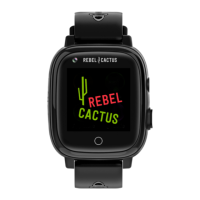

 To Next Page