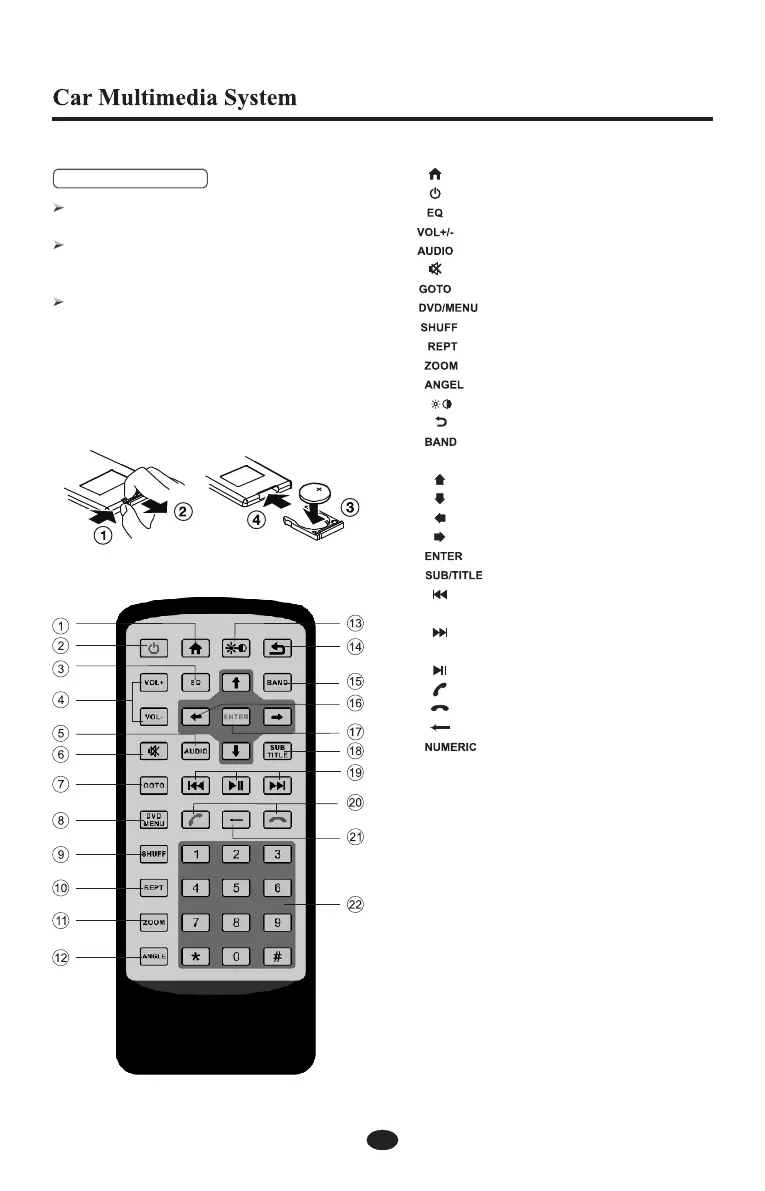
If the remote control is used first time, please take
off the insulated sheet.
When the range of the operation of the card remote
control becomes short or no functions while
operating,replace the battery with a new lithium one.
Make sure the battery polarity replacement is
correct.
1.Slide remote control unit rear cover in the
direction shown.
2.Insert battery into insertion guides with printed
side (+)up.
3.Replace and slide cover until it clicks into place
Remote Control
Replacing the battery
1. [ ] key - Main source menu
2. [ ] key - Press to power on/off
3. [ ] key - EQ adjustment
4. [ ] key - Volume up/down
5. [ ] key - Field switch
6. [ ] key - Mute
7. [ ] key - Go to search
8. [ ] key - DVD/MENU
9. [ ] key - Random playback
10. [ ] key - Repeat playback
11. [ ] key - Zoom
12. [ ] key - View angles switch
13. [ ] key - Contrast
14. [ ] key - Back
15. [ ] key - Radio bands switch
16. Cursor:
[ ] key - Fast forwards/Move cursor up
[ ] key - Fast backwards/Move cursor down
[ ] key - The previous track/Move cursor left
[ ] key - The next track/Move cursor right
17. [ ] key - Confirm
18. [ ] key - DVD subtitle languages switch
19. [ ] key - Short press to the previous track/Long
press to fast backwards
[ ] key - Short press to the next track/Long
press to fast forwards
[ ] key - Play/Pause
20. [ ] key - Dial/Receive a call
[ ] key - Terminate a call
21. [ ] key - Cancel
22. [ ] key - Input numbers to select a track or
station directly.
Note:
Don't expose the batteries to extreme heat.
Put the plug in place to have easy access to it always.
11



 To Next Page