
 Need help?
Do you have a question about the Reecom R-1630 and is the answer not in the manual?
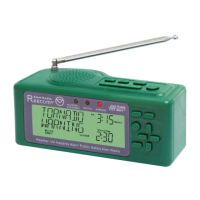
The Reecom Model R-1630 Weather Radio is a specialized device designed to provide timely weather and hazard information for your immediate area, utilizing the Specific Area Message Encoding (S.A.M.E.) system. This radio is an essential tool for staying informed about local weather conditions and potential emergencies, offering both AC power operation and battery backup for continuous functionality during power outages.
The primary function of the Reecom R-1630 is to receive and broadcast NOAA Weather Radio alerts and information. It is equipped with S.A.M.E. technology, which allows it to filter alerts specifically for your programmed county or counties, reducing false alarms from distant areas. The radio can operate in an "Alert Mode" where it remains silent until an alert is broadcast, at which point it will activate and play the warning message. It supports both voice and tone alerts, ensuring that you are notified effectively.
*   To install batteries, slide the battery door located on the bottom of the radio downward and remove it.
*   Insert four fresh 1.5 volt AA ALKALINE batteries, ensuring correct polarity as indicated by the + and - symbols inside the compartment.
*   Replace the battery compartment door.
*   For best reception, place the radio **IN OR NEAR A WINDOW**.
*   Extend the telescoping antenna fully.
*   Avoid placing the radio on or near other electronic equipment such as computers or monitors, as this can interfere with reception.
*   Ensure the radio is off (no static or voice heard). If it's on, press the **STOP** button. The display will remain on even when the radio is off.
*   Press and hold the **ENTER** button until you hear a beep and "SET CLOCK" appears on the display.
*   Press **ENTER**. The hour will flash. Use the **+** and **-** buttons to set the hour.
*   Press the **Channel Select (down arrow)** button. The minutes will flash. Use the **+** and **-** buttons to set the minutes.
*   Press **ENTER**. "SET DATE" will appear.
*   Press **ENTER**. The month will flash. Use the **+** and **-** buttons to select the current month.
*   Press the **Channel Select (down arrow)** button. The day will flash. Use the **+** button to select the day.
*   Press the **Channel Select (down arrow)** button. The year will flash. Use the **+** button to select the year.
*   Press **ENTER**. "SET DATE" will show. Press the **PROG** button to exit.
*   Ensure the radio is off (no static or voice heard). If it's on, press the **STOP** button.
*   Press and hold the **PROG** button until you hear a beep and "ALERT MODE" appears on the display.
*   Press **ENTER**. "ALERT ENABLE" will flash at the bottom of the display.
*   Press **ENTER**. "VOICE" will flash. Press **ENTER** again. The display will show "ALERT MODE".
*   Press the **Channel Select (down arrow)** button until "CHANNEL SELECT" appears.
*   Press **ENTER**. Use the **Channel Select (down arrow)** button until "CH2" appears on the display. At this point, you should hear the NOAA Weather Radio broadcast.
*   Press **ENTER**. Then press the **Channel Select (down arrow)** button. "ENTER COUNTY" will show on the display.
*   Press **ENTER**. "SINGLE COUNTY" will flash. Press **ENTER**.
*   Two numbers will flash. Use the **+** and **-** keys to select "04" (this is the first part of a S.A.M.E. code).
*   Press the **Channel Select (down arrow)** button. The next two numbers will flash. Use the **+** and **-** keys to select "50".
*   Press the **Channel Select (down arrow)** button. The next two numbers will flash. Use the **+** and **-** keys to select "91".
*   Press **ENTER**. Then press **PROGRAM**.
*   Your weather radio is now programmed and ready.
*   Press the **RADIO** button. You should hear the weather information broadcast from the speaker.
*   To turn the weather broadcast off, press the **STOP** button.
The Reecom Model R-1630 is designed for straightforward operation and reliable performance, providing crucial weather and hazard alerts to help ensure safety and preparedness.
 General
| Brand | Reecom |
|---|---|
| Model | R-1630 |
| Category | Weather Radio |
| Language | English |

 To Next Page