reflecta gmbh • Merkurstrasse 8 • D-72184 Eutingen i.G
Phone: +49 (0)7457 9465-60 • Fax: +49(0)7457 9465-72 • www.reflecta.de • mail@reflecta.de
Hardware system requirements
Wíndows XP, VISTA´, WIN7, WIN8, WIN10 Pentium 1G, Celeron, AMD 1G & above,
128MB Memory, 150MB Hard Disc memory space, 16-bit & above
VGA, CD-ROM, USB2.0 or USB1.1.
How to install the Driver
The Digital Microscope is a free Driver Product,it can be worked immediately after connected to the
computer with operation system above win2000 version.
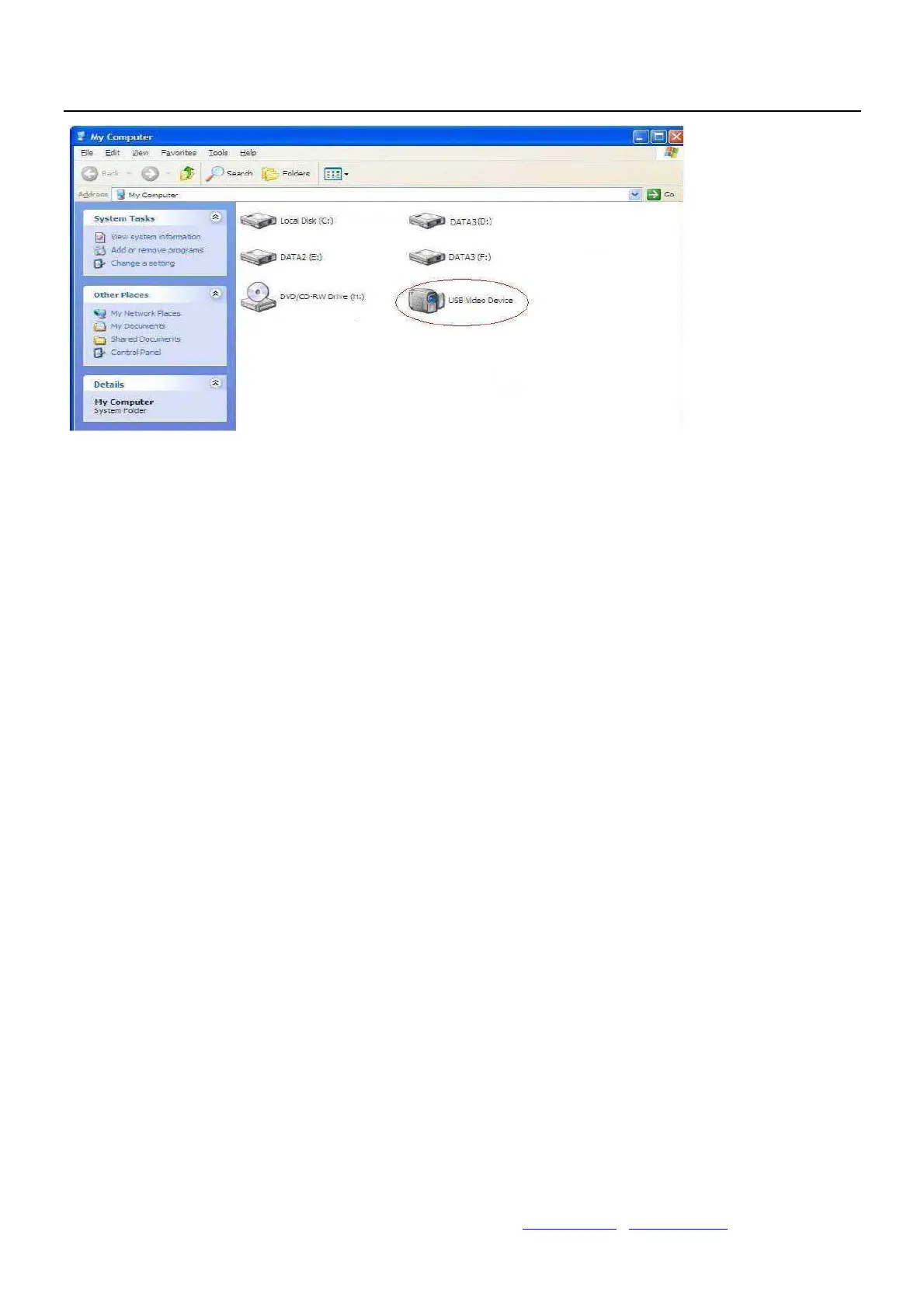
1. Connect the Portable digital microscope by USB2.0 cable to your computer, double click “my
computer” icon on your computer desktop, below interface will be shown up.
2. Double click the Video device icon as above red marked in your computer. Now it is ready to use.
If you can’t find the Video device, or if your computer can’t recognize it,
Please follow below steps to install the driver.
Insert the attached CD, open “My Computer”, and double click the “DVD/CD Driver” to open the CD.


 To Next Page
 Loading...