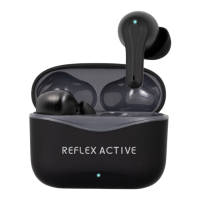
CHARGING CASE
CHARGING PORT
MICROPHONE
TOUCH POINT
CHARGING INDICATOR
SPECIFICATIONS
SETTING UP
Remove headphones from case once fully charged.
Open Bluetooth connections within device settings, search ‘REFLEX-PRO’ & select.
Your device will now be paired with your headphones.
3.
2.
1.
APP SETUP USING THE APP
CHARGING THE CASE
Insert charging cable into the charging port at base of case & connect to power supply.
The charging indicator light will flash red to show case is charging.
Allow to charge for around 60 minutes, the charging indicator light will be lluminated continuously
once fully charged.
3.
Always take care not to overcharge.
4.
2.
1.
CONNECTING & SET UP
Once downloaded open the app and tap OK to allow Bluetooth connection to connect to the earbuds.
Review and accept privacy policy.
Click to connect your earbuds these will show as ‘Reflex-Pro’.
3.
Review and accept location settings.
4.
2.
1.
DISCONNECTING FROM APP
Hold down on the device in the app homescreen to remove.
Open your phones bluetooth settings.
Tap disconnect or remove device.
3.
2.
1.
• BLUETOOTH VERSION / V5.0
• FREQUENCY / 20 Hz - 20kHz
• CHARGING CASE BATTERY CAPACITY / 300mAh Li-Poly
• HEADPHONE BATTERY CAPACITY / 40mAh Li-Poly
• PLAY TIME / 5 HOURS
• CASE CHARGING TIME / 60 MINS
• STAND BY TIME / 250 HOURS
• WIRELESS RANGE / 10 - 15 METERS
When you have your phone & speaker connected you can take the following actions.
ANSWER CALLS Press touch point twice.
REJECT A CALL Press and hold touch point for 2 seconds.
Note: These options can be changed within the Original Sound app.
END A CALL Press touch point twice.
POWER ON Take the headphones out of the case, or press touch point for 5 seconds.
POWER OFF Put your headphones out of the case, or press touch point for 5 seconds.
PLAY / PAUSE Press touch point twice.
PLAY NEXT TRACK Press touch point on right headphone 3 times.
PLAY PREVIOUS TRACK Press touch point on left headphone 3 times.
ACTIVATE VOICE ASSISTANT Press and hold left touch point for 2 seconds.
HANDS-FREE FUNCTIONS
Press & hold the right touch point for 5 seconds to switch between modes best suited to your
situation.
ACTIVE NOISE CANCELLATION Closes peripheral sound for uninterrupted, immersive audio performance.
TRANSPARENCY Opens sound spheres to allow ambient noise, ideal for situations when you need to be
aware of your surroundings.
NORMAL A balanced sound sphere creating a studio sounding audio.
AUDIO MODES
PRO
REFLEX.ACTIVE REFLEX.ACTIVE
COME JOIN US OVER ON SOCIAL!
THANK YOU FOR CHOOSING REFLEX ACTIVE!
We know you want to get straight to the music, but please take a minute to read these instructions, they’ll help you get the most from your Reflex Active product.
Search for ORIGINAL SOUND to download onto your smartphone. Alternatively, you can scan the appropriate
QR code below, use your smartphone camera or QR code reader App.
The ORIGINAL SOUND app will work on the following
smartphones:
• Android (version 7.0 and above)
• Apple IOS (version 12.0 and above)
Edit the sound settings and toggle between noise reduction, transparency and normal mode settings.
Toggle game mode on and off.
Once connected your earbuds will show on the homescreen in the app. Tap to go into the earbud settings.


 To Next Page
 Need help?
 General