Performance
Verification
Lexicon
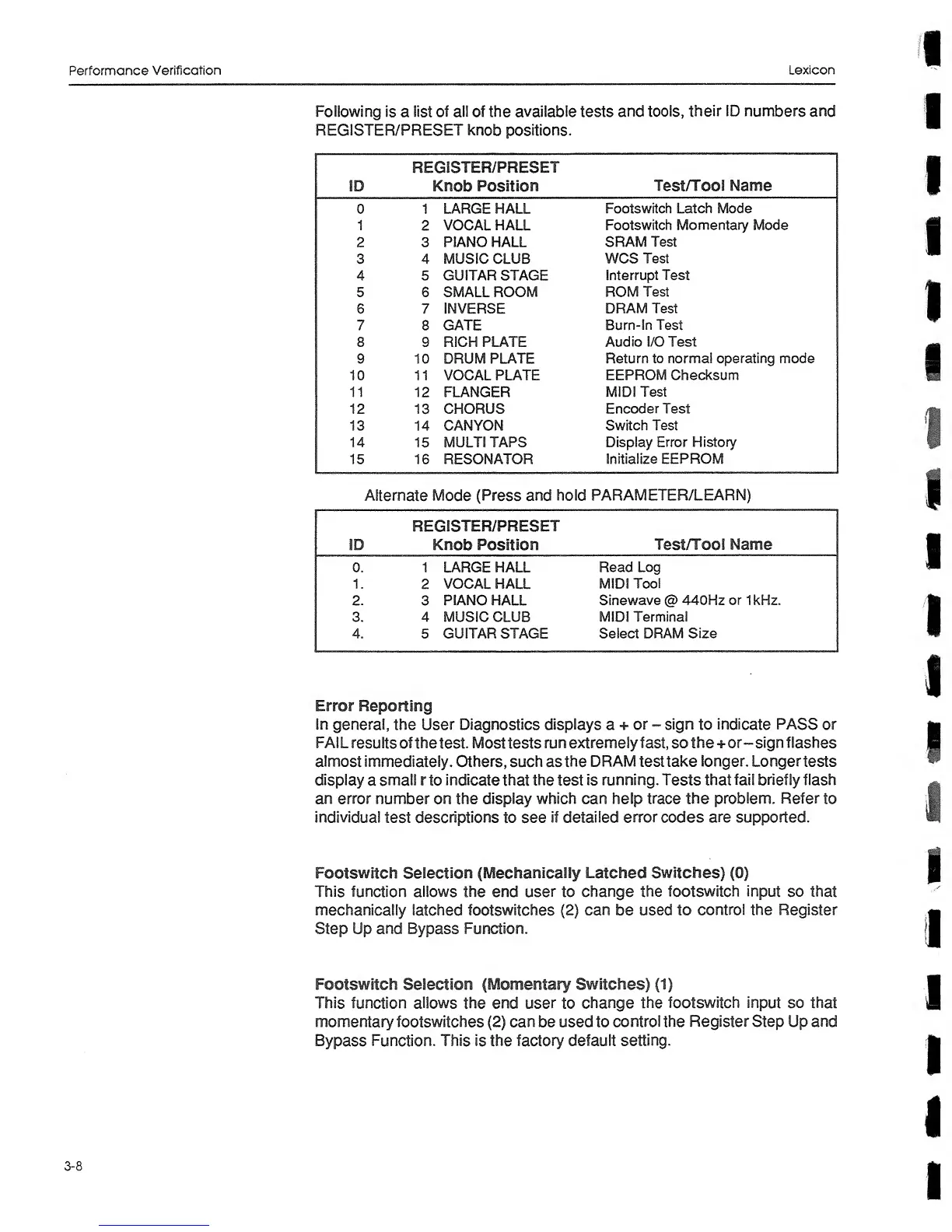
Following
is
a
list of
ail
of the
available tests
and tools,
their
ID
numbers and
REGISTER/PRESET knob
positions.
ID
REGISTER/PRESET
Knob Position
Test/Tool Name
0 1
LARGE HALL
Footswitch Latch Mode
1
2
VOCAL HALL
Footswitch Momentary Mode
2 3 PIANO HALL
SRAM Test
3 4
MUSIC
CLUB
WCS
Test
4 5
GUITAR STAGE
Interrupt Test
5 6
SMALL ROOM
ROM
Test
6 7
INVERSE
DRAM Test
7 8
GATE
Burn-In Test
8
9 RICH PLATE
Audio
I/O Test
9 10 DRUM
PLATE
Return
to normal operating mode
10 11
VOCAL
PLATE
EEPROM Checksum
11
12 FLANGER
MIDI
Test
12
13
CHORUS
Encoder
Test
13 14 CANYON
Switch Test
14 15 MULTI TAPS
Display Error
History
15
16 RESONATOR
Initialize EEPROM
Alternate Mode (Press and hold
PARAMETER/LEARN)
ID
REGISTER/PRESET
Knob
Position
Test/Tool Name
0.
1 LARGE HALL
Read
Log
1.
2
VOCAL HALL
MIDI
Tool
2-
3
PIANO
HALL
Sinewave
@
440Hz
or
1 kHz.
3. 4 MUSIC
CLUB
MIDI
Terminal
4.
5
GUITAR
STAGE
Select DRAM
Size
Error
Reporting
In
general,
the User
Diagnostics displays
a +
or
-
sign
to
indicate PASS
or
FAIL
results
of the
test.
Mosttestsrunextremelyfast, so
the
+or-sign
flashes
almost
immediately. Others,
such
as
the
DRAM
test
take
longer.
Longertests
display
a
small rto indicate
that the test
is
running.
Tests
that
fail
briefly
flash
an
error
number on the display
which
can
help
trace
the
problem.
Refer
to
individual
test
descriptions
to see
if detailed
error
codes
are supported.
Footswitch Selection
(Mechanicaiiy
Latched
Switches)
(0)
This
function allows the end user to
change the footswitch input
so
that
mechanically
latched
footswitches
(2)
can
be
used to
control the Register
Step
Up
and
Bypass
Function.
Footswitch Selection (Momentary
Switches)
(1)
This
function allows the end user
to
change
the footswitch input
so
that
momentary footswitches
(2)
can
be used to
control the
Register
Step Up
and
Bypass Function.
This
is
the factory
default setting.
3-8


 To Next Page
 Loading...