Performance
Verification
Lexicon
Encoder
Test
(12)
This
is
a
utility that displays the
position
of
the
two front
panel
knobs
and
indicates
whether
or
not they are
in
the
same
position.
When run,
the
test
displays the current position of the
REGISTER/PRESET
knob
and
a +
or-
sign.
The
+
sign
is displayed
if
both
the
REGISTER/PRESET
knob and
the
VALUE
knob
are in
the
same
position.
The
-
sign indicates that they are
in
different
positions. To
view
the position
of
VALUE
as
the
Z80
(U12)
sees
it,
press and hold
STORE/CLEAR. Note
that the
value
displayed
does
not
directly represent the
binary value
being read
by
the
Z80. The Z80
reads
the
value then converts the
grey
scale
values output
by
the
encoders
to
contigu-
ous
values. The
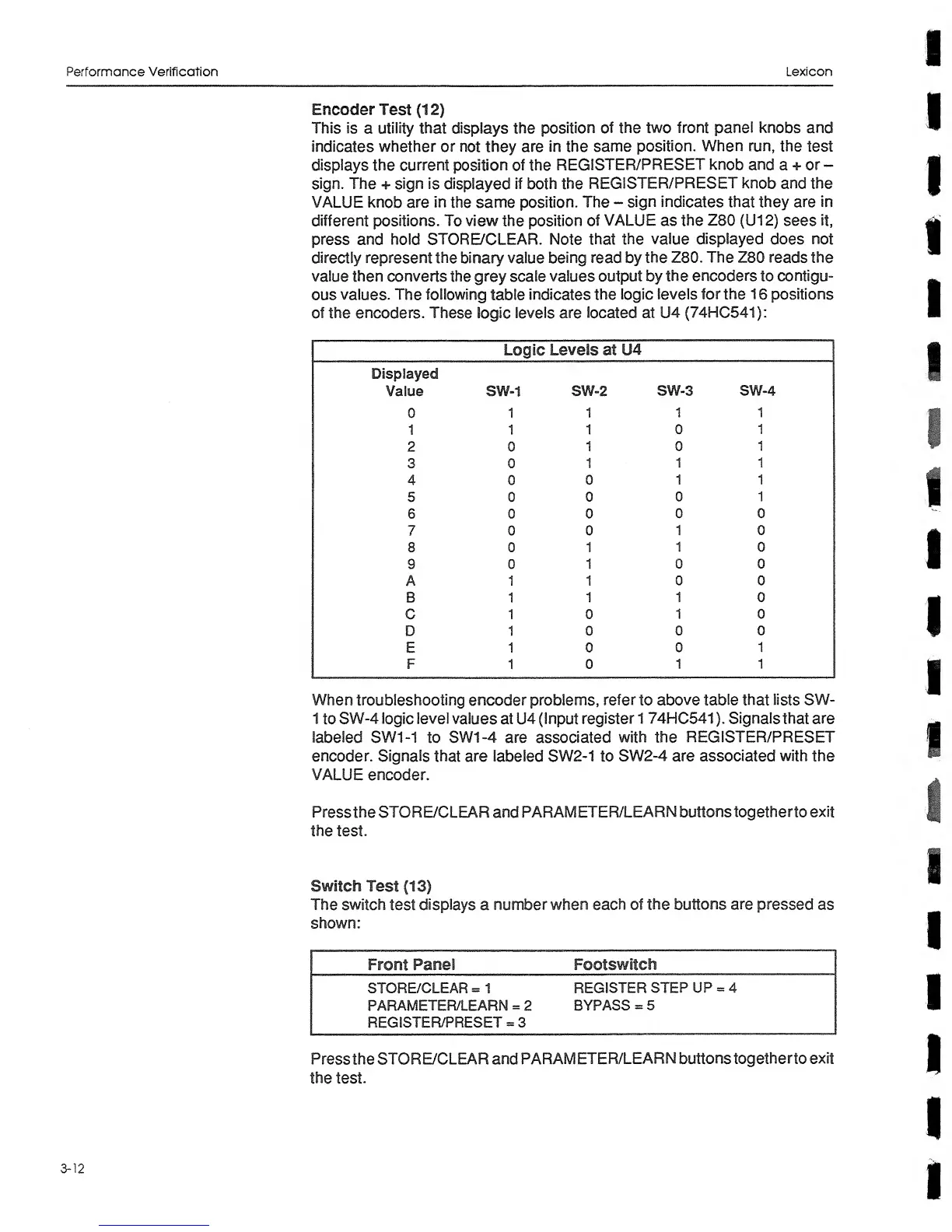
following
table
indicates the
logic levels
for
the 1
6
positions
of
the encoders.
These
logic
levels are
located at
U4
(74HC541):
Logic
Leveis
at U4
Oisplaved
Value SW-1 SW-2
SW-3
SW«4
0 1
1 1
1
1 1
1 0
1
2 0 1
0
1
3 0
1
1 1
4 0
0 1
1
5 0
0 0
1
6 0
0 0 0
7 0 0
1 0
8 0
1
1 0
9
0 1
0 0
A
1 1
0 0
B 1 1
1 0
C 1 0
1 0
D 1
0 0
0
E
1 0
0 1
F
1
0 1
1
When
troubleshooting encoder problems,
refer to above
table that lists SW-
1
to
SW-4
logic
level
values
at U4
(Input
register
1
74HC541 ). Signals that are
labeled SW1-1
to
SW1-4 are associated
with
the
REGISTER/PRESET
encoder. Signals that are labeled SW2-1
to
SW2-4
are associated
with the
VALUE
encoder.
Pressthe
STORE/CLEAR
and
PARAMETER/LEARN buttons togetherto exit
the
test.
Switch Test
(13)
The switch test displays
a
number when each of
the buttons
are
pressed
as
shown:
Front
Panei
Footswitch
STORE/CLEAR
=
1
REGISTER
STEP UP
=
4
PARAMETER/LEARN
=
2
BYPASS
=
5
REGISTER/PRESET
=
3
Pressthe
STORE/CLEAR
and
PARAMETER/LEARN buttons
togetherto exit
the test.
3-12


 To Next Page
 Loading...