EasyManua.ls Logo

Reflexion LEDW190 - Page 49

Reflexion LEDW190
Print Icon
To Next Page IconTo Next Page
To Previous Page IconTo Previous Page
Loading...
UK
49
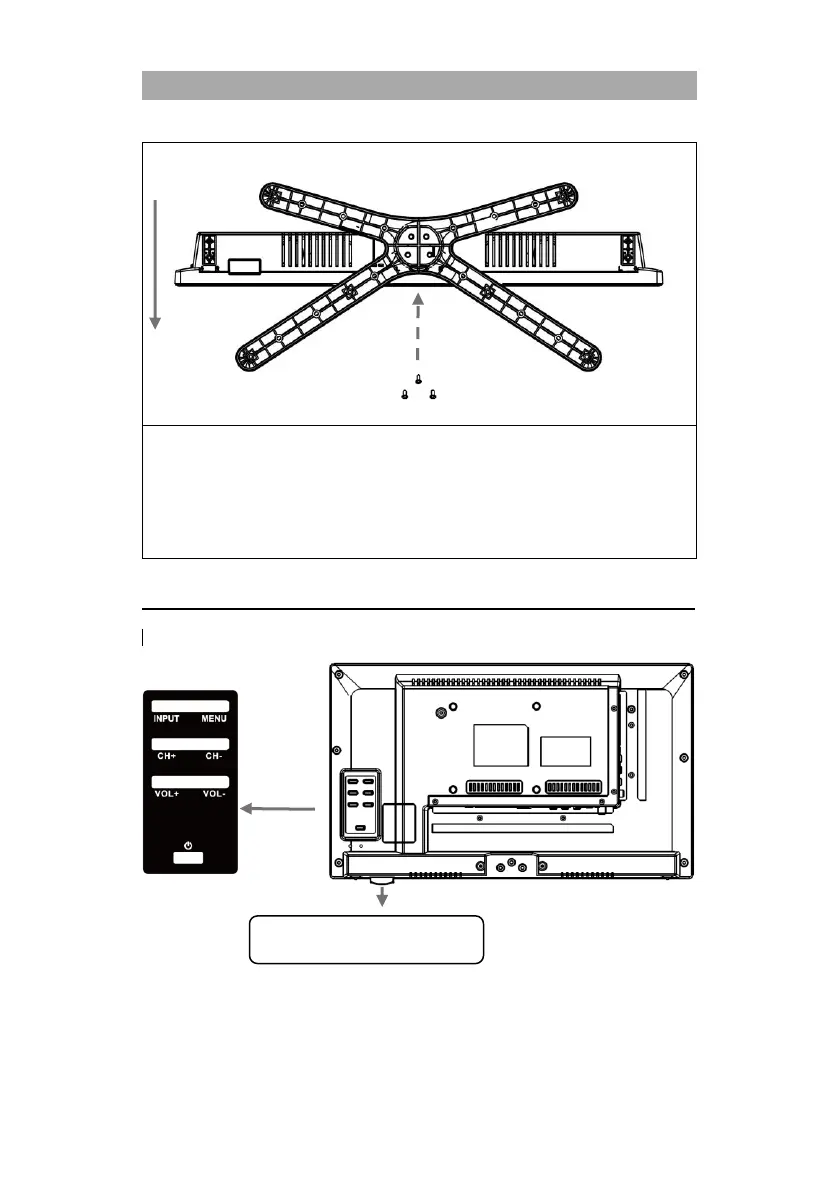
PICTURE 2
1. Place the TV set (A) on a flat and lightly padded surface with the display facing
downwards.
2. Screw the centre piece (B) to the TV set using the screws (C) supplied and a screwdriver
(not included).
3. Hold the stand foot (D) against the underside of the centre piece (C) and ensure that it
is correctly aligned (see PICTURE 2).
4. Screw the stand (D) to the TV with the screws (E).
CONTROL BUTTONS ON THE DEVICE
The buttons for the local control are on the back of the device.
Note:
Please keep the infrared receiver on the device free. Blocking the infrared receiver
can lead to connection problems with the remote control.
Front
Screws E
D TV-stand
Keep the infrared receiver clear.

Related product manuals