GB
7
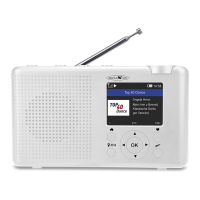
1. [ / MODE]
• Switching on: hold down for approx. 3 seconds.
• Switching off: hold down for approx. 3 seconds.
2. [PRESET SPEED DIAL KEYS (1, 2, 3)]
Quick selection buttons for the saved preset stations.
3. [VOLUME]
Turn the volume control to adjust the volume.
4. [SPEAKER]
Music output.
5. [ ]
Go to the home screen / press this button to return to the playback screen.
6. [ /EQ]
Press the button to access local channels on the Internet. Press and hold to
enter the EQ settings menu.
7. [◄►▲▼]
[►]
Navigate menu: Right.
Call up the editing menu of the favourites list.
Switch through the time and radio information.
[◄]
Navigate menu: left.
Return to the previous menu.
[▲▼]
Navigate menu: up / down.
8. [OK]
Confirm menu selection.
9. [ ]
Quick selection for the sleep timer function.
10. [ ]
Short press to open the preset list.
Hold down for about 3 seconds to save the currently selected DAB / FM
radio station as a preset.
11. [DISPLAY]
2.4 “color display.


 To Next Page