INSTALLING THE TRANSMITTER HOLDER
1. Remove the cover from the holder.
2. Attach the holder with the two screws provided.
3. Replace the cover into holder.
11
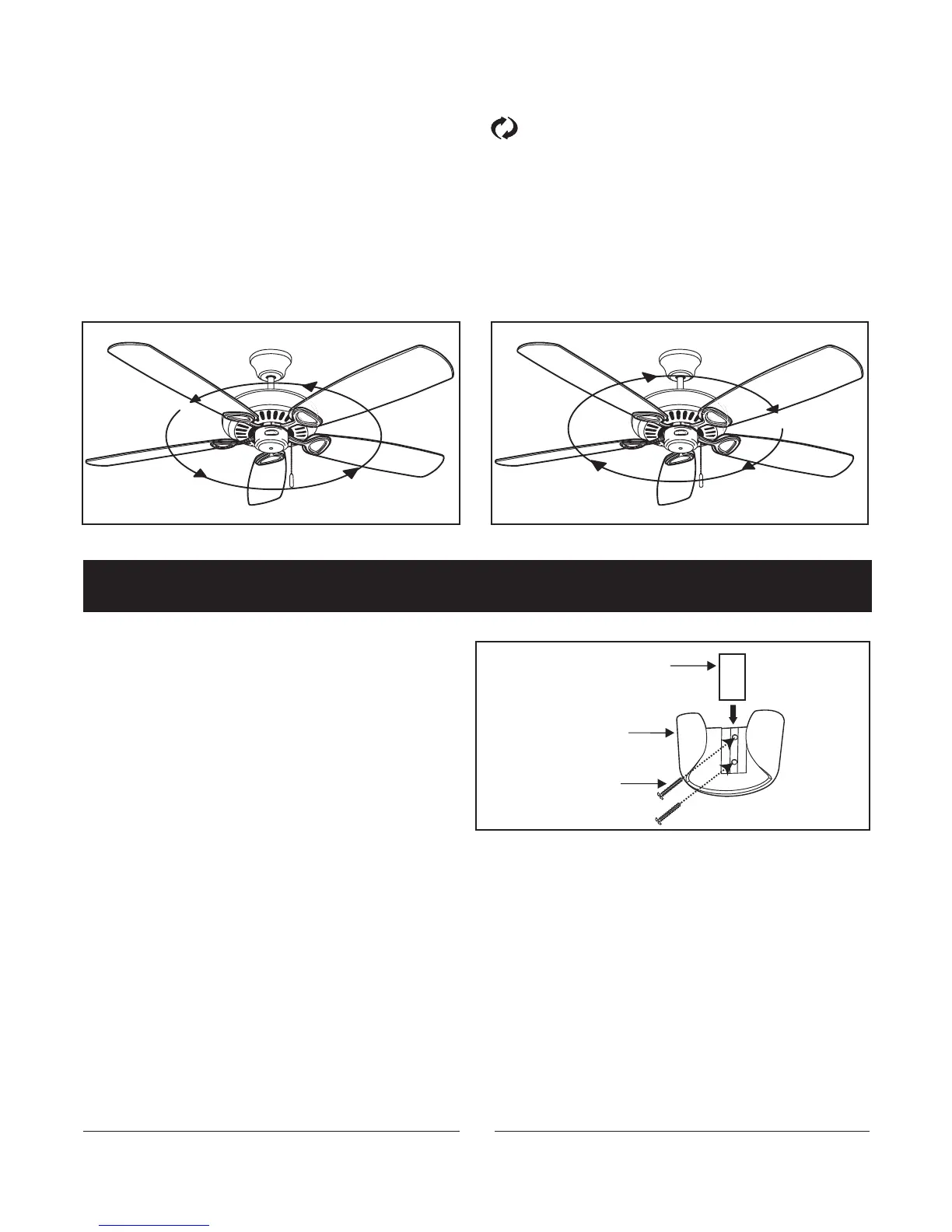
Fig. 14
Cover
Holder
Screws
Fig. 12 Fig. 13
Speed settings for warm or cold weather depend on factors such as room size, ceiling height and number of fans.
NOTE:
To operate the reverse function on this fan, press the button while the fan is running.
Warm Weather (forward):
A DOWNWARD airflow creates a cooling effect as shown in Figure 12. This allows you to set your air conditioner on
a warmer setting without affecting your comfort.
Cool Weather (Reverse):
An UPWARD airflow moves warmer air off the ceiling area as shown in Figure 13. This allows you to set your heating
unit on a cooler setting without affecting your comfort.



 To Next Page