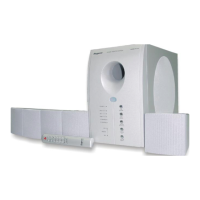
The Regent Model HT-500 is a DVD Home Theater System designed to provide a comprehensive home entertainment experience with digital video and audio. This system includes a DVD player, a powerful subwoofer, and five surround speakers, offering a complete setup for immersive movie viewing and audio playback.
Function Description:
The primary function of the Regent HT-500 is to play DVDs, delivering sharp, clear pictures and enhanced digital sound, a significant improvement over older VHS formats. It also supports playback of various other disc formats, including audio CDs, MP3 CDs, CD-R, CD-RW, and VCDs. The system is equipped with a Dolby Digital 5.1 channel decoder, which is crucial for delivering crisp theater-quality surround sound. Beyond disc playback, the system offers VCR pass-through audio jacks, allowing users to route VCR audio through the home theater system for improved sound quality. It also supports viewing JPEG files and picture CDs, expanding its utility beyond just video and audio. The system is designed for easy setup, featuring color-coded speaker connections to simplify the installation process.
Important Technical Specifications:
While specific detailed technical specifications like power output in watts, frequency response, or signal-to-noise ratio are not explicitly listed in the provided manual excerpt, several key features imply certain technical capabilities:
- Audio Decoding: Dolby Digital 5.1 Channel Decoder. This indicates support for multi-channel audio playback, providing a true surround sound experience.
- Speaker Configuration: 1 powerful subwoofer and 5 surround speakers. This confirms a 5.1 channel speaker system.
- Disc Compatibility: Plays DVDs, Audio CDs, MP3, CD-R, CD-RW formatted discs, and VCDs. It also supports JPEG files/Picture CDs.
- Video Output: The system offers standard video output (yellow RCA jack) and S-Video output. S-Video provides a sharper picture than normal video, indicating a higher quality video signal path for compatible TVs.
- Audio Input/Output: Features VCR pass-through audio jacks (RCA L/R) and AUX IN connections (RCA L/R) for connecting external audio sources like a TV or tape player. It also has AUDIO OUT (RCA L/R) for routing audio to other devices.
- Regional Codes: The DVD player is designed to play Region 1 DVD movies, which covers the USA and Canada.
- Laser Classification: Classified as a CLASS 1 LASER PRODUCT, as stated on the back of the set, indicating safe laser operation under normal use.
- Copyright Protection: Incorporates copyright protection technology protected by Macrovision Corporation, which restricts unauthorized copying and reverse engineering.
Usage Features:
The Regent HT-500 offers a wide array of features to enhance the user's viewing and listening experience:
- Multi-Speed Picture Controls: Allows for varied playback speeds, useful for detailed viewing or quickly scanning content.
- Chapter and Track Search: Enables users to navigate directly to specific chapters or tracks on a disc.
- Time Search: A precise navigation feature that allows users to jump to an exact time point within a movie (e.g., 15 minutes and 12 seconds).
- Freeze Frame and Step Play: Useful for sports or detailed analysis, allowing users to pause the video on a single frame or advance frame by frame.
- Slow Motion Play: Provides the ability to watch scenes in slow motion.
- Fast Play: Allows playback at very high speeds, both forwards and backwards, for quick scene location.
- Zoom Feature: Users can zoom into a scene while maintaining reasonable picture clarity (disc-dependent).
- Scene Repeat: Easily program the player to repeat a specific scene without damaging the media.
- Multi-Language Compatibility: Supports setup and subtitles in various languages.
- Parental Controls: Allows parents to lock out movies based on ratings, preventing children from viewing inappropriate content.
- Director's Cuts/Narration: Some discs offer special director's cuts and commentary tracks, which the system can play.
- Programmed Play: Users can create custom playback sequences.
- Adjustable Audio Modes: Includes settings for surround sound (e.g., PRO LOGIC default) and stereo output.
- Sound Equalizer Effects: Allows users to select different equalizer effects to tailor the audio output.
- Sleep Timer: A convenient feature for automatic system shutdown after a set period.
- OSD Language: On-Screen Display language can be selected.
- Speaker Setup: Detailed settings for individual speaker volume adjustment and surround sound configuration.
- Preference Setup: Options for setting audio language, subtitle language, disc menu language, parental ratings, and a password.
- Factory Default Settings: Ability to return the system to its original factory settings.
- Video CD (VCD) Playback with PBC: Supports Playback Control (PBC) for VCDs, allowing interactive features.
- Disc Information Display: Users can view information about the currently playing disc.
Maintenance Features:
The manual emphasizes several aspects related to maintenance and safety:
- General Care: Advises cleaning the unit only with a dry cloth and avoiding the use of oil, petroleum products, or solvents on any part of the set.
- Ventilation: Instructs users not to block ventilation openings and to install the unit according to the manufacturer's instructions to prevent overheating.
- Heat Sources: Warns against installing the unit near heat sources like radiators, heat registers, stoves, or amplifiers.
- Moisture Protection: Explicitly states not to expose the appliance to rain or moisture, and that it should not be exposed to dripping or splashing water. Objects filled with liquid, such as vases, should not be placed on the apparatus.
- Power Cord Protection: Users are advised to protect the power cord from being walked on or pinched, especially at plugs, convenience receptacles, and the point where it exits the apparatus.
- Servicing: Emphasizes that all servicing should be referred to qualified service personnel. Users are warned not to remove covers or attempt repairs themselves due to the risk of electric shock and hazardous radiation exposure.
- Speaker Wire Connection: Provides detailed instructions and warnings on correctly connecting speaker wires to avoid short-circuiting, ensuring proper insulation and preventing loose strands from touching other terminals.
- Troubleshooting Guide: The manual includes a troubleshooting guide to help users resolve common issues before contacting customer service.
In summary, the Regent HT-500 is a user-friendly and feature-rich DVD home theater system designed to deliver an immersive audio-visual experience with a focus on ease of setup, comprehensive disc compatibility, and robust sound capabilities, all while adhering to important safety and maintenance guidelines.

 Need help?
 General

 To Next Page