– 2 –
PREPARING THE #TX-20+
THESE INSTRUCTIONS REFER TO THE
RCS TX-20+
2.4 GHz 5 CHANNEL R/C.
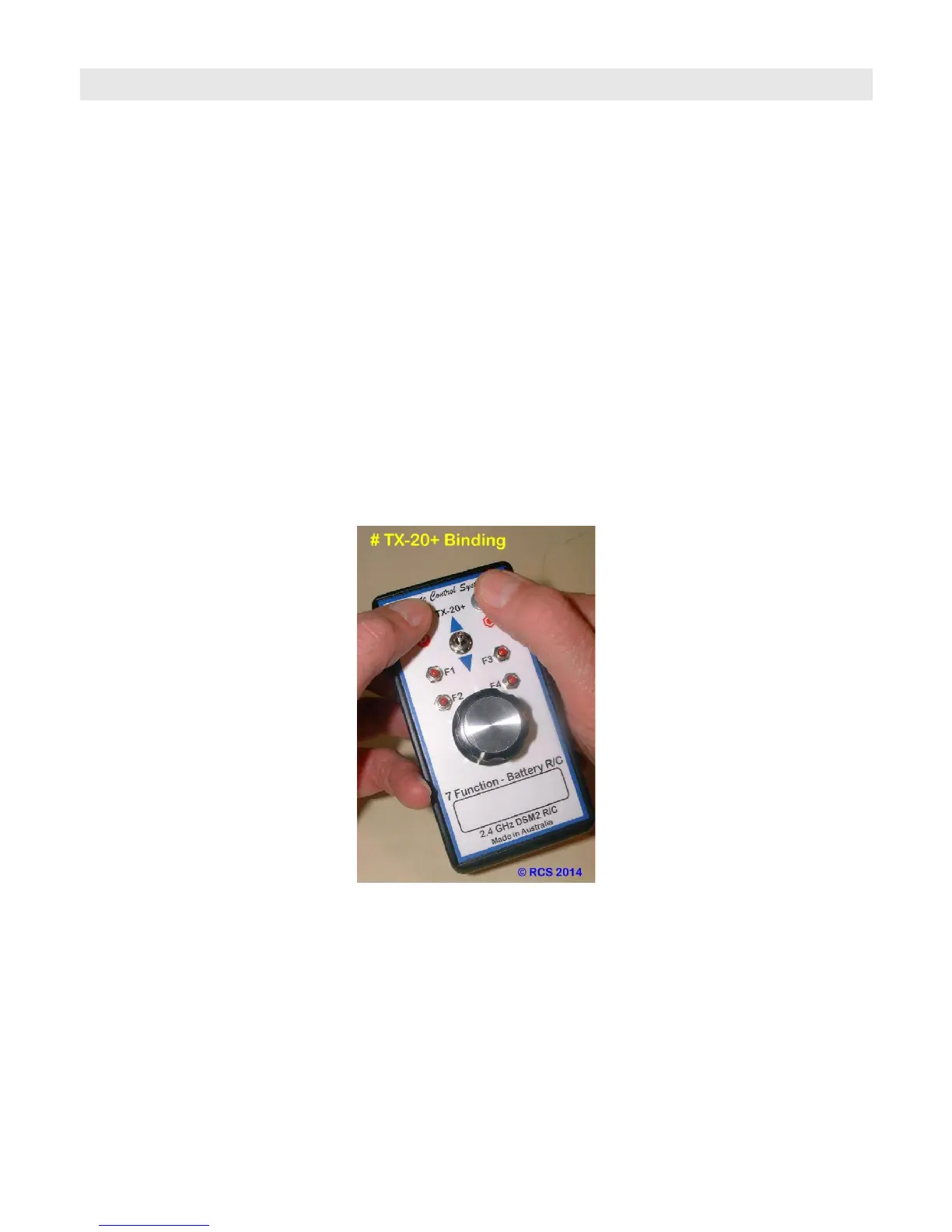
LAYOUT OF THE TX-20+ TRANSMITTER.
The Direction switch is in the upper middle of the hand piece. The speed control knob sits just below the direction switch.
Top left is the ON –OFF switch. Top right is the Bind/Ch # 5 pushbutton.
There are 4 sound system function triggers. They are marked F1, F2, F3 and F4.
These correspond to outputs 1, 2, 3 & 4 on the RCS ESC’s.
Prior to using this system there are two procedures that must be carried out by the operator, unless
the TX and RX have already been bound and the system calibrated;
1. “BINDING”.
The 1st procedure is to “BIND” the receiver (RX) to the Transmitter (TX). This applies to all brands and types of ESC’s.
“BINDING” is accomplished by following a few simple steps below.
The operating program will ignore the RX Fail Safe commands.
The operator must have the spring loaded direction switch in neutral & the throttle knob to zero. i.e. Fully CCW.
HOW TO “BIND”.
1.1 DSM2-EM(AB) RX’s. Turn on the loco power RX and wait 20 seconds for the RX to enter bind mode. RX LED will
then flash rapidly OR;
1.1 Other brands of DSM2 RX’s. Follow their instructions. You can also use the # BINDER switch assembly if you do
not wish to get inside the loco. Turn the loco power ON. The RX LED will start blinking very rapidly to indicate it is ready
to be bound.
Please note the LED’s on the ESC pcb & the front and rear lights (if fitted) will stay OFF until “BINDING” is completed.
The loco will always give a very slight jerk at switch ON. This is normal.
1.3 For the DSM2-EM(AB) Press and hold the right hand pushbutton on the handpiece marked with a hexagonal symbol.
1.4 Then press the ON – OFF button to ON. Button will illuminate. Hold both buttons until the RX starts blinking slowly.
Then let both buttons go. ON – OFF switch will blink slowly a couple of times then go solid ON.
1.5 The LED on the RX (not the ESC) will blink slowly and then;
1.6 When “BINDING” is complete the RX LED will change to solid ON. If the RCS system has been calibrated the ESC
LED & both loco lights will immediately blink three times & then go to solid ON.
N.B. The “BINDING” plug MUST be removed BEFORE the SYSTEM is turned OFF. (No binding plug with DSM2-EM(AB).
1.7 The “BINDING” plug is removed & stored safely. The RCS ESC is now ready for speed calibration. Not necessary if
already done. Not necessary with ALPHA-3 ESC.
For non Auto Binding RX’s, RCS offers an optional extra # BINDER cable and switch. When fitted this will enable any
loco to be bound to any TX without requiring access to the insides of the loco. This will enable any loco to be swapped
between any other DSM2 TX’s. You will be able to “hand off” speed matched locos for MU’ing into a consist.
Not needed with the ALPHA-3 ESC.



 To Next Page
 Loading...