11
10
EN
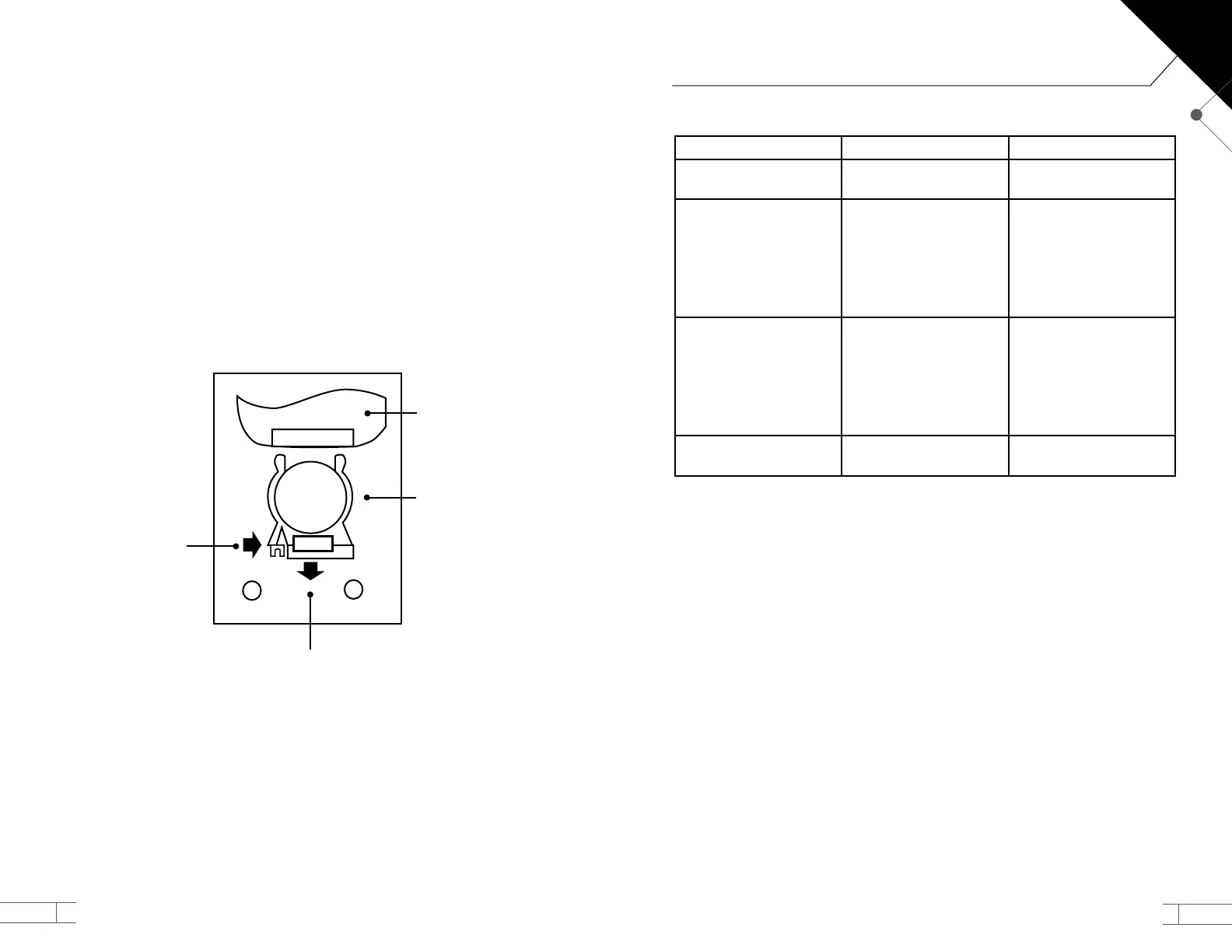
Replacing the Remote Control Battery
The remote control is powered by a long-life CR2025 3V lithium battery.
A. Place the remote control facedown in your hand.
B. Locate the battery drawer at the bottom of the remote.
C. Use your ngernail to push (compress) the latch on the left side of the drawer, while
at the same time you pull the drawer out. (See Figure 10).
D. Remove the old battery and replace it with a new CR2025 3V lithium battery
E. Insert the battery with the positive side (the surface with the printing on it) facing up
as you hold the drawer. This side will be facing up when the drawer is reinserted and
the remote is held face-up.
F. Push the drawer in gently, until the drawer latches holding the drawer shut.
Figure 10
Push
Positive pole up
Pull
1
2
PUSH OPEN
+
Remote
TROUBLESHOOTING
PROBLEM POSSIBLE CAUSE POSSIBLE SOLUTION
Unit does not power on
Power cord is not
connected
Connect the power cord
properly
Unit shakes and makes an
unusual noise
The unit is placed in an
uneven surface
Packing has not been
removed from cartridge
Fan is damaged or out of
balance
Replace it in an even
surface
Remove packing material
Contact Customer Service
The air is not being
ltered properly
Excess dust on the
cartridge
Air inlet or outlet are
blocked
The unit is placed in the
wrong place in your room
Clean it with a vacuum
Clear the areas
Replace in another
location
Control panel does not
work
May be an electronic
failure
Contact Customer Service
Replacement Parts
Use only genuine Rena Ware replacement parts.
AERO ✓
TM
QUATTRO
+
Filter Cartridge – Item #4002
Specications
Model: Rena Ware AERO ✓
TM
QUATTRO
+
Voltage: 110 V-120 V / 50/60 Hz
220 V-230 V / 50/60 Hz
Power Consumption: 55 W
Dimensions: 53.2 cm x 32.8 cm x 17.7 cm
Weight: 4.9 kg/11 lbs


 To Next Page