07
Connect TV via audio cable
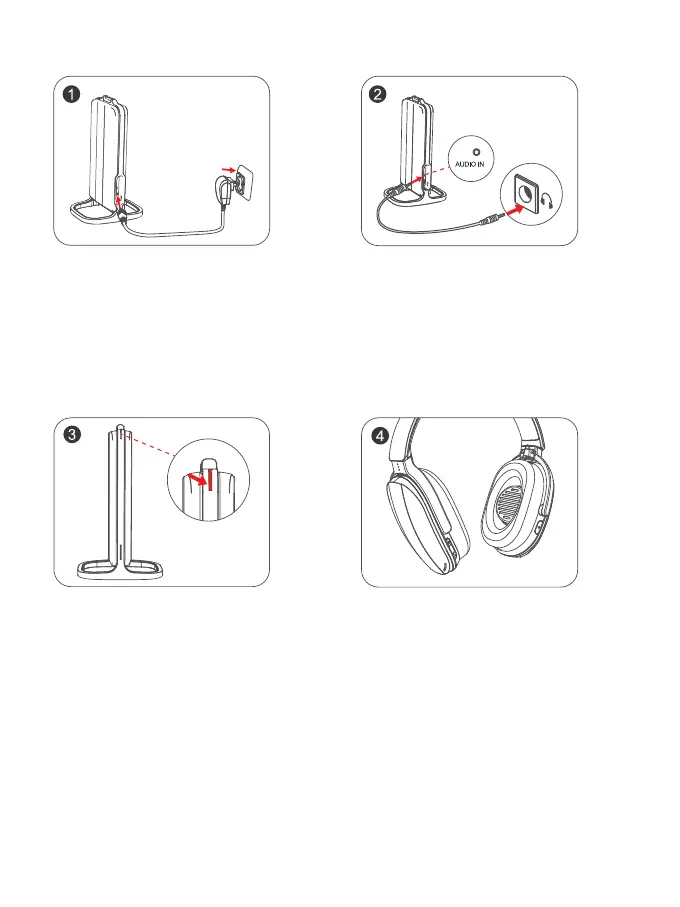
1. Connecting one end of the power
adapter of the transmitter to the AC socket,
and the other end to the Type-C interface of
the transmitter;
2. Connecting one end of the audio cable to the
AUDIO IN interface of transmitter, and the other end
to the AUDIO interface of TV; (Note: If there is no
sound, make sure your TV speakers are set to
"headphones")
3. At this time, the SIGNAL light of the
transmitter is steady red; simultaneously
press and hold the headphones
"2.4G/Bluetooth switch button" for 5
seconds to enter the state of pairing with
the transmitter; and wait for the pairing to
be successful;
4. After successful pairing and connection, you can
listen to the TV program through the headphones.


 To Next Page
 Loading...