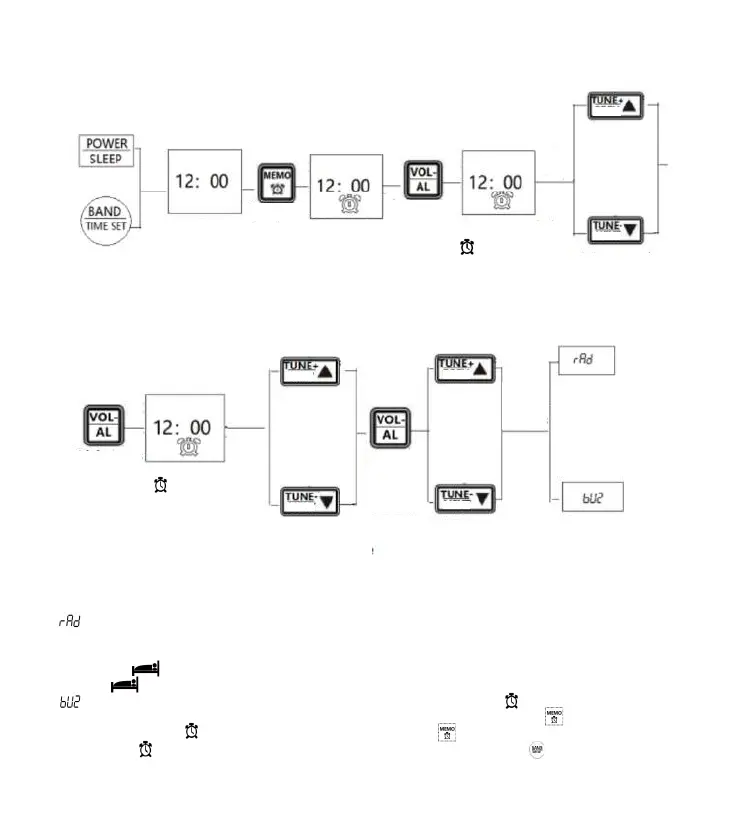
Light press
Light press to
choose the minute
Minute and symbol
“ ” flash
Choose clockLight press
to choose
Two
options
Choose automatic
power on
Lightly
press to
confirm
Light press any button
start the time display
Time display
Light press
Clock symbol
on LCD
Long press
Hour and symbol
“ ” flash
Light press to
choose the hour
Warm prompt:
“[ ]” on timer: at the time of on timer, the working mode before power off will be chosen
automatically. In the mode of Bluetooth, songs can only be played by clicking on Bluetooth
device. If the time of on timer and off timer is chosen, turn on the radio at the set on time,
the symbol“[ ] ” will appear on the screen. Turn off the radio at the set off time, the
symbol “[ ]” will disappear.
“[ ]” clock timer: at the time of clock timer, the clock symbol“[ ]”flashes, the radio
makes a“ beep...” for 3 minutes at interval of 5 minutes. Lightly press“[ ]” to turn off the
clock, the symbol“[ ] ” stops flashing. Lightly press“[ ] ” again to cancel the clock, and
the symbol“[ ] ” disappears. When the clock rings, lightly press“[ ] ” to continue to
sleep for 5 minutes.Stop the clock for a while.
11: Setting of on timer and clock timer
11.1: On timer and clock timer of this product can be set as follows:
12
NEXT
PREV
NEXT
PREV
NEXT
PREV



 To Next Page