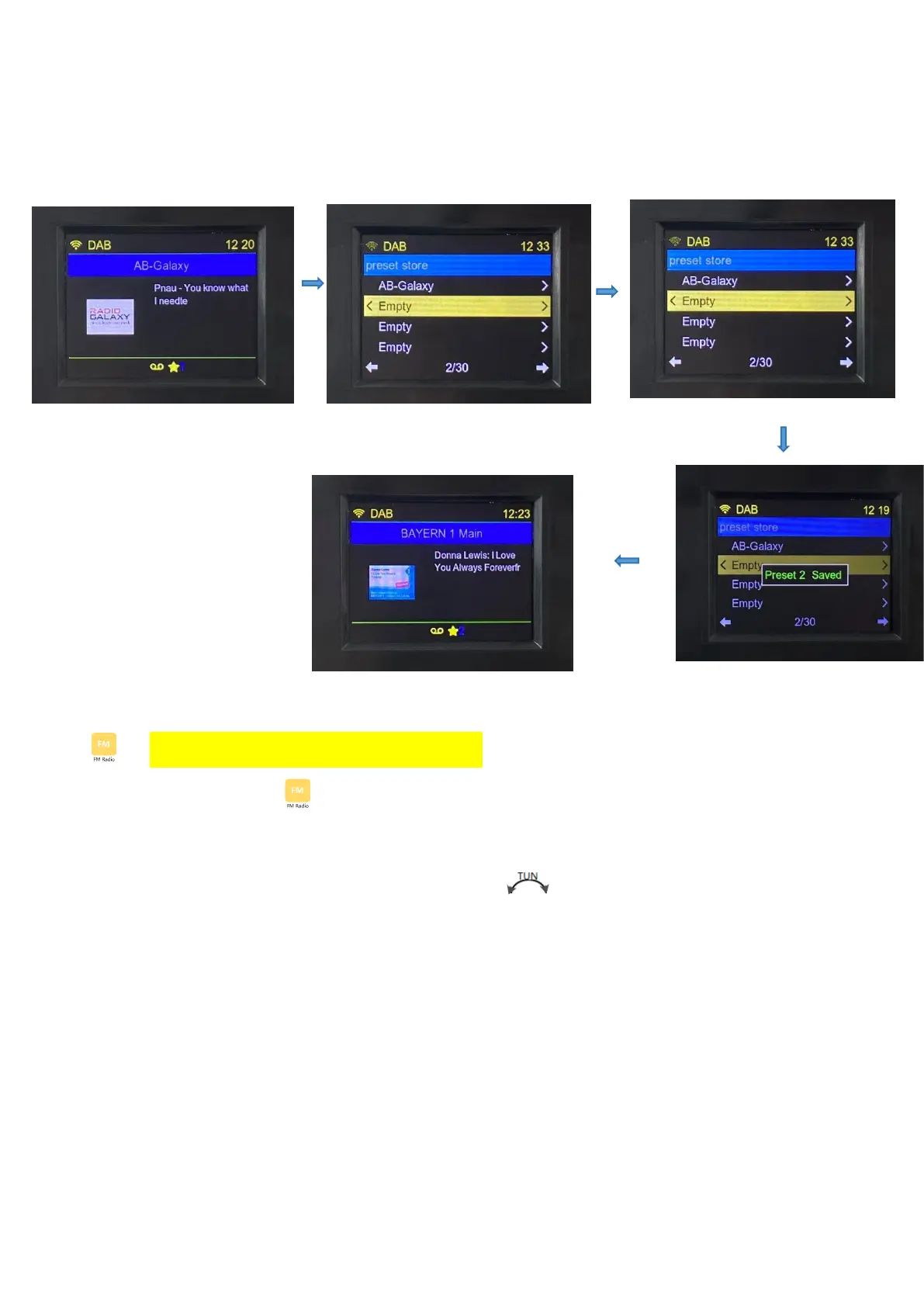
storage number, and press【ENTER】to enter, displays “PRESET **SAVED”:
4.3 FM Radio Reception (DAB version only)
Choose the icon of “ ”, press【ENTER】to enter:
FM Radio receiving frequency range: 87.50-108.00MHZ(Step value:0.05MHZ)
4.3.1 Manual tuning: in the FM mode, rotate the【 】button in the clockwise direction and
anticlockwise direction according to the minimum step value "0.05MHZ" step, increasing
and decreasing.
* In tune or play... When the LCD displays the "☆" character, it means that the frequency has
been saved to the playlist.
4.3.2:Automatic search station: In FM mode, long press【ENTER】for 2 seconds to enter
automatic scan search station, displays: scan FM station, such as: "Scanning FM station,
frequency 87.5 MHZ, found *" automatically store the stations. From the current receiving band
of the low frequency point search to the highest frequency point, stop automatically scan
search.


 To Next Page