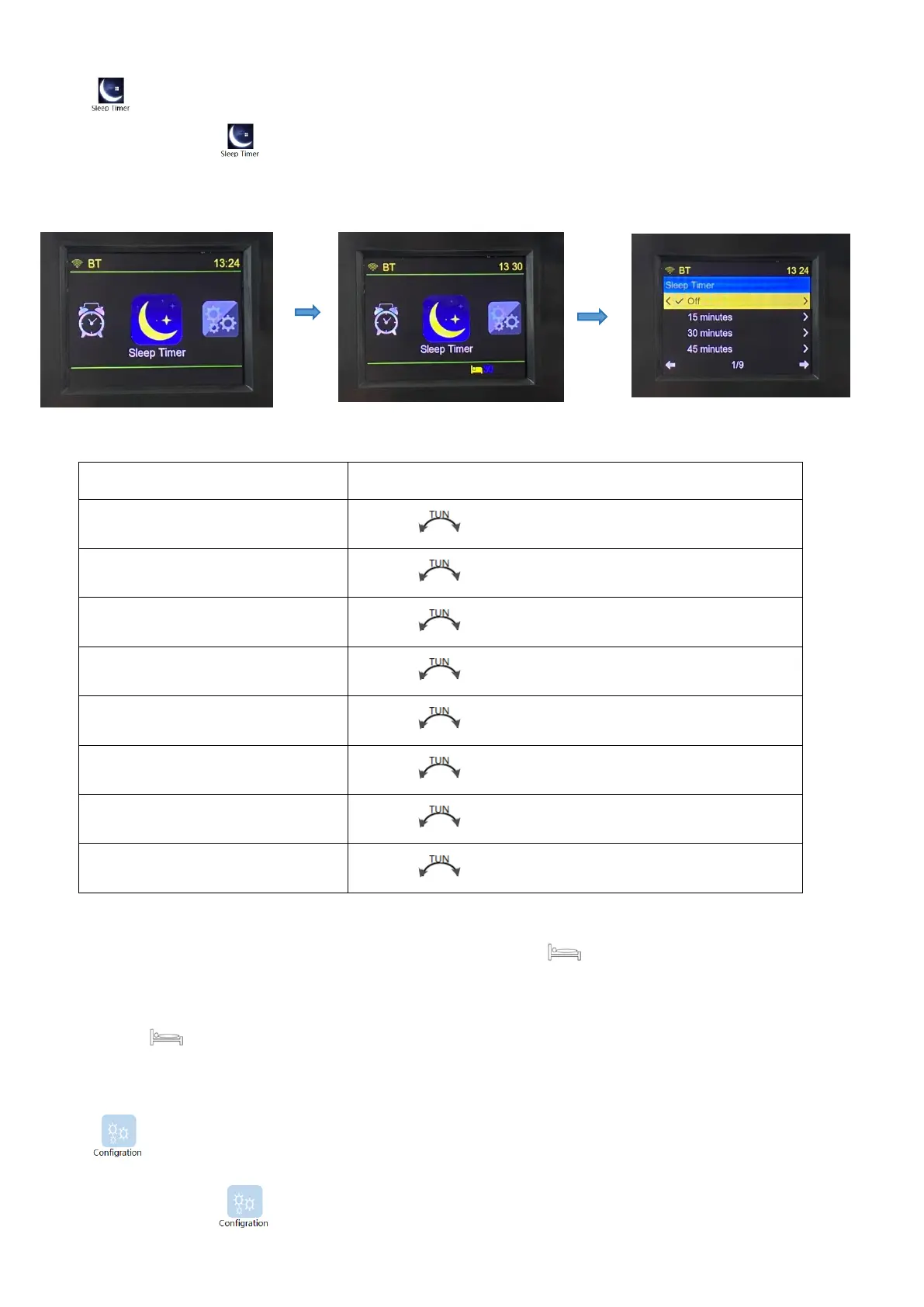
4.8 Sleep Time Settings
Choose the icon of , and press【ENTER】to enter sleep time (auto shutdown time) setting
mode.
After setting, the LCD screen displays the sleep symbol of “ ” and the countdown of shutdown.
※: Automatically shut down within the set automatic sleep shutdown time, and then LCD sleep
symbol of “ ” disappears.
4.9 Operation Introduction of Settings
Choose the icon of ,and press【ENTER】to enter system settings, as shown in the following
pictures:
Rotate【 】to choose, and press ENTER to confirm.
Rotate【 】to choose, and press ENTER to confirm.
Rotate【 】to choose, and press ENTER to confirm.
Rotate【 】to choose, and press ENTER to confirm.
Rotate【 】to choose, and press ENTER to confirm.
Rotate【 】to choose, and press ENTER to confirm.
Rotate【 】to choose, and press ENTER to confirm.
Rotate【 】to choose, and press ENTER to confirm.


 To Next Page